Are you trying to search Google for specific topics organized by DATE – such as search results for the last day, month, or year? If so, this article and video can help you. I’ll show you…
How to use the TOOLS menu to FILTER Google search so that you only see search results from the past year, past month, past day, even past hour.
How to filter Google search results for a CUSTOM Date Range.
How to SORT the Google search results BY DATE (instead of relevance). What this means is that you can sort results by oldest to newest or newest to oldest instead of just seeing the results organized by Google’s algorithm.
This particular tip applies to Google Search via the full desktop version of Chrome. Unfortunately Google Mobile doesn’t offer the “Tools” drop-down feature any longer – thanks for Brian Burke for pointing this out to the group.
Search Google by Date – Tips & Screenshots
In this section, we’ll show you screenshots for how to set up a FILTER so that you can search Google by date.
This is the step-by-step process on how to get Google’s search results to show by the most recent Year, Month, Week, Day and past hour. It also works if you want to filter Google’s search results by custom dates too.
How to FILTER Google Search Results by Date
Enter you search terms in Google as you normally do.
Click on the TOOLS menu (to the right of Settings on the Search Menu under the Google Search Bar) to begin the Search Google by Date filtering process.
Click on the ANY TIME drop down menu and instead choose to FILTER Google Search by latest year, month, week, 24 hours, or hour (OR) choose “Custom Range” and enter your own date range.
Enjoy your filtered results.
How to SORT Google’s Search Result by Date
Another useful technique that allows you to search Google by date is to use the SORT feature. This allows you to bypass Google’s search results algorithm so that you can see the MOST CURRENT NEWS about your topic.
Here’s how:
First you have to set up a search by date range – i.e. you have to use the Tools Menu and pick a TIME range as we did above (search by hour, day, week, month, year, or custom).
After you do this a new drop down filter will appear. The default setting is ‘sort by relevance’ as you can see in the first picture below.
You want to click on the ‘sort by relevance’ and choose the ‘sorted by date’ option from the drop box – as you can see in second picture below…
Notice the “Sort by Relevance” selection Notice the ‘sorted by date’ option is selected
How to Search Google by Date – The Video
Wanna see all this in video tutorial form? We got you covered there too.
Did this article teach you what you wanted to know about how to search Google by Date?
Do you have another method that works better? If so, please let me know.
Additionally if you tried this method and it did NOT help you search Google by date please let me know so we can keep this article updated and all learn together.
Thanks and Happy Searching!
Other Articles You Might Enjoy
If you enjoyed this article about how to search Google by date, you may also enjoy these other tips too…
Want to Watch NFL Redzone without Cable, Stream NFL Network, and use the NFL App to watch NFL Games online? In this article and video I’ll show you all the ways you can do this using streaming apps like Fubo TV, PlayStation Vue, Sling TV on Amazon Firestick, Roku TV, Apple TV, and your smart tv, OR by using the NFL App on your phone, tablet, or computer. Ready, set, hike!
[lwptoc]
Watch NFL Redzone Streaming
Editor’s Note: This article is part of our popular series on How to Cut the Cord and Stream TV Online. If you want to see more articles like this, get detailed reviews about streaming tv providers, and learn what to watch on Netflix, Amazon Prime Video and more – see all these articles when you visit our Cord Cutter Page. You can also visit our home page and subscribe to our blog and get a FREE Step-by-Step Guide to Cutting the Cord.
Watch NFL Redzone and NFL Network Online Without Cable SUMMARY
If you are in a hurry here are the four main ways you can watch NFL Redzone and NFL Network online without cable.
Use Fubo TV to watch NFL Redzone AND NFL Network on your Amazon Firestick, Roku, Apple TV or smart tv device.
Use PlayStation Vue to watch NFL Redzone AND NFL Network on your Amazon Firestick, Roku, Apple TV or smart tv device.
Use Sling TV to watch NFL Redzone AND NFL Network on your Amazon Firestick, Roku, Apple TV or smart tv device.
Use the NFL App to watch NFL games, the NFL Network, and NFL Redzone on your Amazon Prime Video, Roku, Apple TV, or on your phone, tablet, or computer.
Watch NFL Redzone and NFL Network Online – The VIDEO
If you want to learn how to watch the NFL Network online or the NFL Redzone stream, this video will show you how. We’ll review all the ways you can watch NFL Network Channel and NFL Redzone Channel online – including a discussion of IF you can watch NFL Network and NFL Redzone on AT&T Now (formerly DirecTV Now), FuboTV, Hulu, Philo, PlutoTV, PlayStation Vue, Sling TV, and YouTube TV.
We’ll also talk about how to watch NFL Network and NFL Redzone on Amazon Prime and Roku TV. And we’ll discuss if you can watch NFL Network and NFL Redzone yet on Apple TV+ or Disney+ TV. Finally I’ll show you how you can use the NFL app or your Smartphone, Tablet, or PC to stream NFL Network and NFL Redzone if you are a subscriber to Verizon, FIOS, Spectrum, Cox, or Xfinity.
How to Watch NFL Redzone and NFL Network Online Video
Watch this video and see how easy it is to learn how to stream NFL Redzone and NFL Network online without cable.
SKIP AHEAD in video using this table of contents guide:
00:40 Summary: You can watch NFL Redzone and NFL Network online with Fubo TV, PlayStation Vue, Sling TV, and the NFL App
03:50 Can you watch NFL Network or NFL Redzone on Hulu? No! Even though Hulu has all those adds about “Hulu has Live Sports” you can’t watch NFL Network or NFL Redzone!
04:11 Can you stream NFL Redzone on Philo? No
04:29 How to watch NFL Channel on Pluto TV? You can watch some NFL programming on Pluto TV but not NFL Redzone.
06:50 Can you watch NFL Network or NFL Redzone on YouTube TV? Not yet
07:39 How to use the NFL App to watch NFL Network and NFL Redzone streams your phone, tablet, or computer using the NFL App AND your subscription to PlayStation Vue, Fubo TV, Sling TV, or even cable providers like Verizon, FIOS, Cox, Xfinity, Spectrum and more.
Intermittent Fasting is a popular lifestyle diet and many people have discovered that intermittent fasting for weight loss really works, but did you know that IF has other benefits benefits besides just it’s effectiveness for helping you lose weight? On this page, we’ll discuss what intermittent fasting is, how it works, the various types of intermittent fasting schedules, tips on how to succeed with intermittent fasting, and much more. In addition, I’ll also share my own personal results with intermittent fasting – a lifestyle I’ve been living now for nearly 2 years.
Intermittent Fasting Frequently Asked Questions (FAQ) – That Helpful Dad
{
“@context”: “https://schema.org”,
“@type”: “FAQPage”,
“mainEntity”: [
{
“@type”: “Question”,
“name”: “What is intermittent fasting?”,
“acceptedAnswer”: {
“@type”: “Answer”,
“text”:”Intermittent fasting is a catch-all term for lifestyle diets in which someone doesn’t eat for a preset period of time (the fasting state) and does eat during a preset period of time (the fed state). At its most basic level it amounts to not eating after dinner and possibly delaying breakfast.”}
}]
}
Editor’s Note: This article is part of a series on Intermittent Fasting and this is the MAIN PAGE of that series. This article has been updated numerous times to reflect what I’ve learned about IF along the way. You’ll find links to the other articles in the IF series below.
Mike, That Helpful Dad
Hi, I’m Mike, That Helpful Dad. It’s been nearly 2 years since I began this journey and I’m excited to share what I’ve learned along the way so that, if YOU try intermittent fasting, you’ll be set up for success!
Meanwhile I should point out that this article is NOT a ‘scientific’ review of Intermittent Fasting; instead it’s a personal experience story from one man’s POV. I don’t pretend to know everything about Intermittent Fasting. I’m writing to hopefully inspire you with ideas for a technique that perhaps can help you make your life better in the same way Intermittent Fasting helped me. Good luck.
So what have I learned after nearly two years of Intermittent Fasting?
Overall I learned that Intermittent Fasting is surprisingly easy and it gives me lots of energy. It’s also a very forgiving diet that helps you overcome the inevitable times when you ‘fall off the wagon.’
Intermittent Fasting has become my new ‘lifestyle’ and I can’t see myself going back anytime soon. HOWEVER Intermittent Fasting is NOT a magic cure-all and there are a few important tips to keep in mind if you want to try it – I’ll detail them for you here.
Intermittent Fasting Table of Contents
[lwptoc]
I. What is Intermittent Fasting?
Intermittent fasting is a catch-all term for lifestyle diets in which someone doesn’t eat for a preset period of time (the fasting state) and does eat during a preset period of time (the fed state).
At it’s most basic level it amounts to not eating after dinner and possibly delaying breakfast. And if you are a beginner looking to try IF this is where you may want to start.
Personally I use the 16/8 Intermittent Fasting schedule (see more below) where I don’t eat for 16 hours and eat all my food within an 8 hour window. It looks like this: stop eating around 6pm and start eating again around 10am the next day.
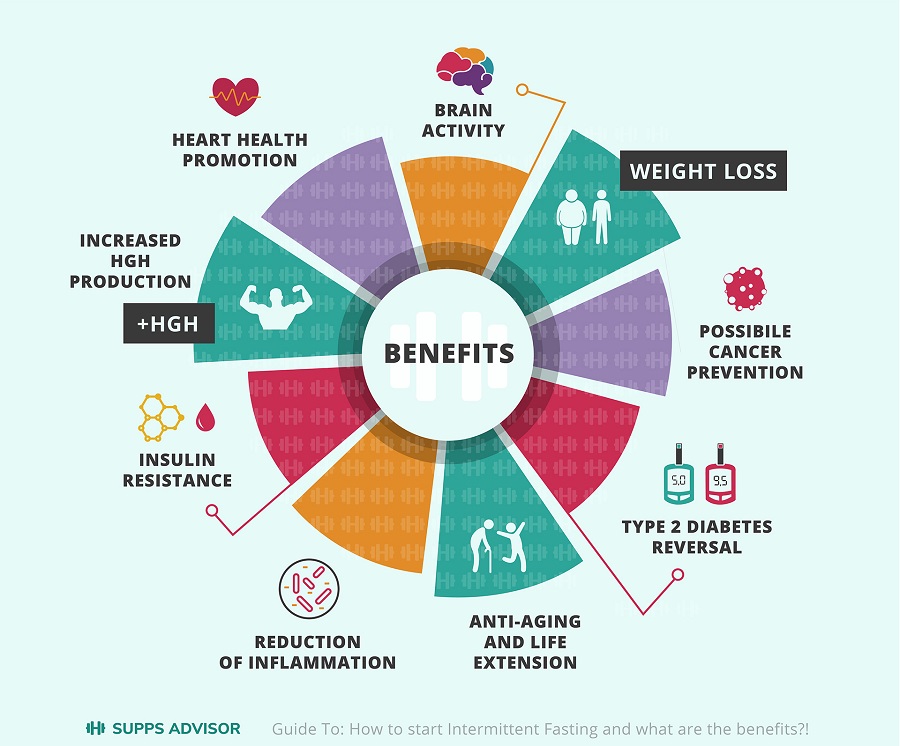
Why would someone want to try intermittent fasting?
Benefits of Intermittent Fasting from our friends at Supps Advisor
There are many types of intermittent fasting diet plans and eating schedules and I’ll detail them below but first let’s talk about what most people use IF for…
II. Intermittent Fasting for Weight Loss
By far the number one reason why I hear most people try intermittent fasting is because they are attracted to the possibility of using intermittent fasting for weight loss.
But does intermittent fasting for weight loss really work?
For our purposes, the reason why Intermittent Fasting seems to work for weight loss is basically common sense…
If you are restricting or eliminating calories consistently over time, then you’ll tend to lose weight. It’s not rocket science.
Remember, with intermittent fasting you are not eating for a predefined period of time (for example with 16/8 Intermittent Fasting you don’t eat for 16 hours). Now when you put yourself into this ‘fasting’ state and because you are not eating, you’re by definition restricting calories (at this during this time period) — and if you do that consistently over time you’ll lose weight.
So that’s it? Intermittent Fasting is just caloric restriction?
Not quite.
There’s a lot of more to the story about intermittent fasting for weight loss, so I wrote a separate article about it. You can read it here…(click the pick)
Article: Intermittent Fasting for Weight Loss
If you are interested in using intermittent fasting for weigh loss my article also include a plan for success as well as links to books on the topic.
III. Intermittent Fasting Schedules
What are the most popular types of intermittent fasting eating schedules?
There are many different versions of intermittent fasting. Here are the most popular types are…
Time Restricted Feeding (16/8, 14/10, 12/12) – where you don’t eat for 16 hours and eat all your food within the remaining 8 hours. I personally live the 16/8 Intermittent Fasting lifestyle and love it!
Eat, Stop, Eat (OMAD, 24-hour fasting, Whole Day Fasting) – as the name implies, you’re basically fasting for 23 hours and then eating One Meal a Day (OMAD) or going for a full 24 hours before eating.
5:2 Intermittent Fasting – With 5/2 Fasting you’ll be trying to limit your total daily calorie intake to only 500 calories for TWO DAYS during the week. The other 5 days you’ll be eating your typical (hopefully healthy) diet.
Warrior Diet – a type of Time Restricted feeding in which you do a version o 20/4 Intermittent Fasting where you eat little to no food for 20 hours and then eat one large meal at night during a 4-hour window.
Extended Day Fasting – 36 Hour Fasting, 48 Hour Fasting, and even 3-7 Day Fasting. I.E. the king of fasting. Yikes!
Because this is another in-depth topic, I wrote a separate article further detailing the types of intermittent fasting, you can read that by clicking this pic…
Article: Intermittent Fasting Eating Schedules
IV. Intermittent Fasting Results
As I mentioned, I’ve been a practitioner of the Intermittent Fasting lifestyle for about 2 years now and I can honestly say that this ‘diet’ has changed my life in many positive ways. I’ve written about the benefits of Intermittent Fasting on this blog numerous times in the past and today I’d like to share more of my Intermittent Fasting Results with you – providing transparency of results for 1 month, 3 months, 6 months, 1 year, and even now out to 2 years.
You can read my full story here – it includes why I started intermittent fasting as a beginner, what my initial fears were about intermittent fasting, what my results were from 1 month through to 2 years, and what I learned along the way.
Read my intermittent fasting results article here…
What about Butter or Coconut Oil? There is also a LOT of debate (see references below for a sample) about whether you can also add in ‘good fats’ like grass-fed butter and/or coconut oil to your morning tea or coffee and that this won’t break the fast because apparently these good fats…
Keep you in the ketosis (fat-burning state).
They don’t spike an insulin response like eating carbs would.
They provide your brain-food (the fat is used by your brain for energy).
So long as you keep it under 50 calories from these good-fats you are supposedly still fasting.
Look, I’m not scientist here and I can’t tell you with medical research certainty if any of this is this is true or not, all I can tell you in that my experiments have shown and for me, using 1/2 TBSP of grass-fed butter in my coffee works (and has generated the results you’ll read in my personal story about intermittent fasting).
As a side note, I love the coffee + cinnamon + butter combo so much I developed a recipe for it. Check it out here…
My coffee + butter recipe
For further reading about what you can eat DURING a fast see the references below.
VI. Intermittent Fasting Tips – The Video
Here’s a video I made at the 6 month mark of Intermittent Fasting.
These are the tips I collected after practicing Intermittent Fasting for a full year. If you’re planning to try Intermittent Fasting for beginners I’d recommend you consider using some or all of the following:
Skipped Days = Lethargy: you can skip a day or two if you like but I discovered that when I skipped an Intermittent Fasting day, I felt poor physically – specifically, I felt lethargic, unmotivated, and bloated. As a result I rarely skip a day of fasting and usually get in at least 14 hours.
Fasting Cardio vs HITT: the combo of Intermittent Fasting and Fasted Cardio (AKA Cardio before Breakfast) did increase my energy level but I still think longer HITT later in the day is more effective because you can burn more calories overall. I think an alternating combo of the two is best.
Workouts Burn Even More Fat: CrossFit and other constant movement workouts worked particularly well from an energy standpoint. There is also the theory that working out larger muscle groups (legs, chest, back, etc) and building up those muscles will continue the post-workout fat-burning process longer (see topic #6 of this post and many others).
Fluids are a Must: Drinking 1 glass of water immediately upon waking and then my Cinnabun Coffee Cup was more than enough to take me through to 10-11am for the 16-hour fast cycle to work its magic. I also like adding in some turmeric to my coffee as well. Additionally a nice cup of green or moringa tea is also good if you want something more to drink too
Eating Schedule is Flexible: When I am ready to break my fast (at 10-11am) I load up on protein – yogurt, milk, eggs, bacon, etc. I then eat lunch around 1.5-3 hours later, then have some fruit/snack around 330-4, and then dinner at 6ish. Many people say to avoid fruits because they are high in sugar and that impedes the fat loss – that may be true but I like fruits and believe their overall health benefits outweigh the negatives for long-term health.
Strict DIET is NOT a must : At no time did I focus on any particular diet. I tried not to eat a bunch of junk but I wasn’t strict. So long as I was in the ‘eating window’ I ate what I wanted — for me that’s mostly protein and good fats but I still a fair amount of carbs too. I pretty much ate my normal pre fasting diet. That meant I didn’t eat a set menu of restricted foods – perhaps if I did do those things then Intermittent Fasting would be even more effective but as I said I’m just an Average Joe and I like keeping things simple.
Eat Dinner Early: The key with Intermittent Fasting (at least for me) is to eat dinner early and avoid those late night snacks. DO that and you can cruise thru to 16 hours around 10 am with ease.
Alcohol is a bit of a Problem: Alcohol appears to play a key role in the process. I love beer but unfortunately, so many of the beers I like (IPAs) are ‘heavy’ from a calorie standpoint and when I have a beer I usually want to have a snack too. All those calories add up – fast. My results were negatively impacted when I had more beers per month then when I didn’t. It’s not rocket science. I’m not willing to give up my beer and chicken wings completely so I realize that’s going to decrease some of the effectiveness of my Intermittent Fasting, but at the same time I look at it from a different POV: Intermittent Fasting helps me limit the negative impact of the beer so I can still enjoy it with less guilt. (The Power of Perspective is pretty cool, huh?)
Caloric Restriction takes you to the next Level: I don’t like to count calories, but after 9 months of intermittent fasting I felt like I was hitting a plateau. At that point I decided to pay marginal attention to my calories and tried to make a conscious effort to stay in a net caloric deficit (basically consuming less calories than my body required which for me was approx 2,000 calories a day). I didn’t go crazy with this and I relied on basically just reading food labels and doing some simple math in my head to add up approximately what I was consuming throughout the day calorie-wise. When I added this into the mix it took my results to the next level – during the final 3 months I went from 154 lbs to 149 lbs and dropped 2 more inches from my waist. I realize this tip is not rocket science but it’s important to point out. I didn’t count calories religiously and I didn’t necessarily limit what I ate (I just ate less of it) and it worked for me. I suppose if you want to be more hard core on this, you’ll get even better results than I did, but as I’ve said all along, I want to use a method that is easy and is something I can live with over the long run. Here’s a link to calculate the calories YOU need to lose weight
SMART Goals are ideal – Looking back now I can see that my 3-month goal to lose 4 inches off my belly was a bit unrealistic – especially when I didn’t stick to the original plan or change my diet much. Set yourself up for success by setting a reasonable goal. Looking ahead (since I still don’t plan to change my diet completely and I still want to drink beer, I’m giving myself more time to reach my 32/32 belly/waist goal — I’ll keep you posted on my progress and you can subscribe to my blog for updates).
I’m just one guy and as I wrote already I don’t know everything there is to know about intermittent fasting. There are a lot of great references and books about Intermittent Fasting. Here are some of the resources I’ve found helpful, along with an assortment of top-rated books that you might find helpful if you practice intermittent fasting for beginners….
If you’ve tried Intermittent Fasting, Fasting Cardio, have some killer Morning Ritual, or any related wisdom to share, please do so. I’m eager to learn your tips so we can help each other improve.
If this post helped you feel free to share it with a friend.
When you do these things we all win.
Enjoyed This Article?
Share it with a friend using this social media friendly images – perfect to pin, post, and pass along…
If you’re looking for instructions on how to take a full or partial screenshot on your Windows 10 PC, your Chromebook, or your Mac computer, this brief article can help you. The instructions here are not unique and you can find them on plenty of sites, but I’m tired of looking them up elsewhere so I’m putting them on my site too. 🙂
Table of Contents
How to Take a Screenshot on a Windows 10 PC
How to Take a Screenshot on a Chromebook
How to Take a Screenshot on a Mac
I. How to Take a Screenshot on a Windows 10 PC
A. How to take a FULL Screenshot on a Windows 10 PC
Press the Windows Logo button+PrtScn buttons on your keyboard to save the screenshot to a file. This will save the full screenshot into a folder called Screenshots that is a sub-folder of your Pictures Folder under your This PC Menu.
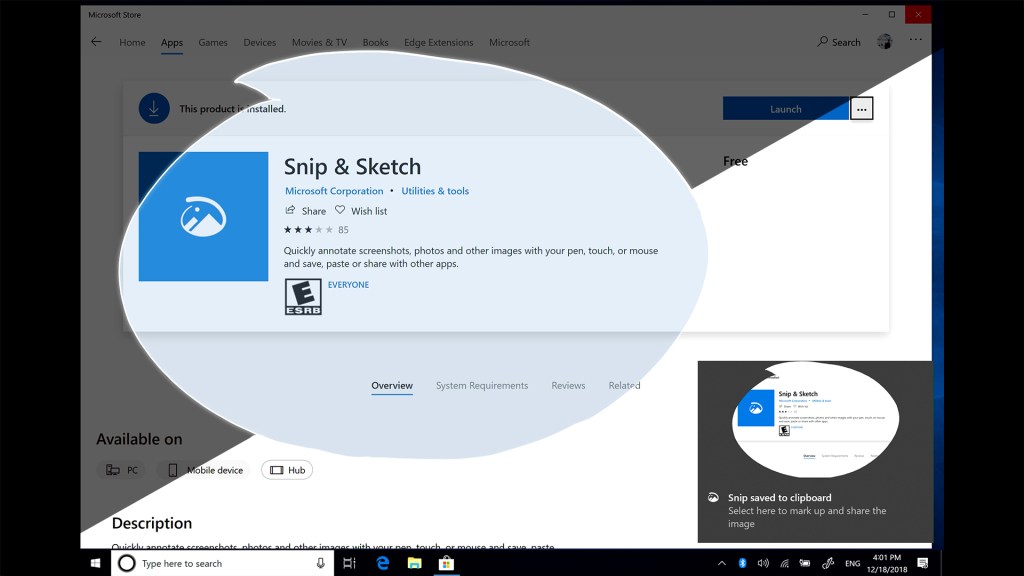
This is a really easy option, assuming you have it already installed on your PC (if not visit the Microsoft App store to download the new Snip & Sketch app). Then go to your apps and open (‘launch’) it. It’ll look like this…
Snip & Sketch
Once Snip & Sketch is open, you’ll be able to use this powerful little app to take full or partial screenshots, markup the pics, and much more. Just click the “NEW” button in the top LEFT of the tool’s menu to get started – here’s what it looks like…
A 3rd option for a full screenshot is to Press the Windows Logo button + G to open the new Game Bar option in Windows 10. These screenshots will be in the Captures Folder which is a sub-folder of the VIDEOS Folder on your This PC Menu
Screenshots on a Chromebook are pretty simple. All the screenshots are stored in your FILES Folder.
A. How to take a FULL Screenshot on a Chromebook
Press the Control + Shift Window Key. It looks like this…
Chromebook Full Screenshot Keys
B. How to take a PARTIAL Screenshot on a Chromebook
Press the Control key + the Shift key + the Shift Window Key. It looks like this…
Chromebook Partial Screenshot keys
III. How to Take a Screenshot on a Mac
A. How to take a FULL Screenshot on a Mac
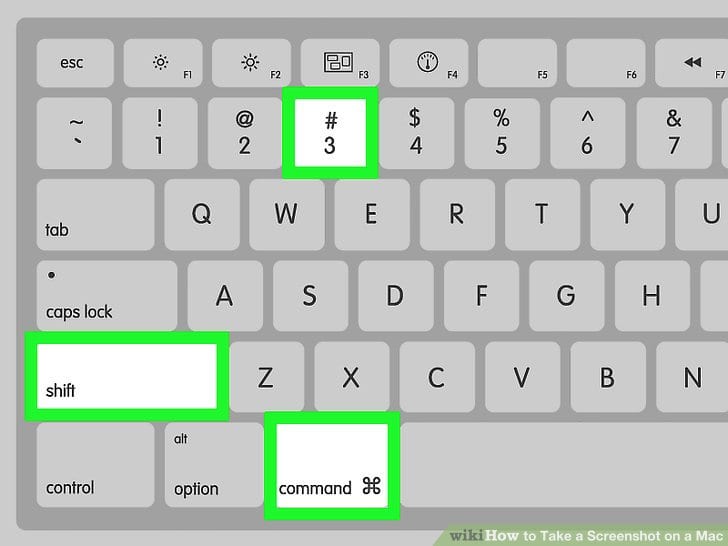
Instructions from Apple: “Press Shift key + Command key + 3 key. Find the screenshot on your desktop.”
Mac Full Screenshot – from WikiHow
B. How to take a PARTIAL Screenshot on a Mac
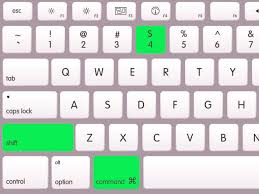
Instructions from Apple: “Press Shift key + Command key + 4 key. Drag to select the area of the screen to capture. To move the entire selection, press and hold Space bar while dragging. After you release your mouse or trackpad button, find the screenshot on your desktop.”
Mac Partial Screenshot
There are obviously other ways to take screenshots on your computer, but these are the ones I use because they seem to be the easiest. If you have one you recommend, let me know in the comments below.
If you’re looking for a diet program that can provide real results to help you lose weight, then you might want to consider Intermittent Fasting. In this article, we’ll discuss the benefits of intermittent fasting specifically from a weight loss perspective so you can decide if this lifestyle is right for you.
Hi, I’m Mike, That Helpful Dad. I’ve been living the Intermittent Fasting lifestyle for about 2 years now and it’s changed my life for the better. I hope it can help you too.
What is Intermittent Fasting?
Since this article is focused specifically on Intermittent Fasting for Weight Loss, we won’t spend a lot of time on definitions. We have other articles that dive deeper into the science behind Intermittent Fasting and all the various Intermittent Fasting schedules you can use to tailor an IF lifestyle that works best for you.
But, to ensure we’re on the same page, let’s give a simple definition for Intermittent Fasting as follows…
A popular schedule for Intermittent Fasting is 16/8 for men or 14/10 for women. What that means is fasting for 16 hours and eating within an 8 hour window (or) fasting for 14 hours and eating within a 10 hour window. But other intermittent fasting schedules are options too – there is basically something for everybody with intermittent fasting.
Intermittent Fasting for Weight Loss
Will intermittent fasting help you lose weight? If so, how does intermittent fasting for weight loss work? Great questions, I’m glad you asked!
Since most of my readers are Average Joe’s like me this is not a high science blog, I won’t bore you with the pathophysiology behind how Intermittent Fasting works at the metabolic level, (however there are some great articles on this I’ll link to in the references section below).
For our purposes, the reason why Intermittent Fasting seems to work for weight loss is basically common sense…
If you are restricting or eliminating calories consistently over time, then you’ll tend to lose weight. It’s not rocket science.
Remember, with intermittent fasting you are not eating for a predefined period of time (for example 16 hours) – during this window you’ll be consuming little to no calories. Now when you put yourself into this ‘fasting’ state, a lot of potentially positive effects are occurring within your body that may benefit you beyond just the weight loss effect of IF, but given our focus on weight loss, the key here is that because you are not eating, you’re by definition restricting calories (at this during this time period) — and if you do that consistently over time you’ll lose weight.
So that’s it? Intermittent Fasting is just caloric restriction?
Not quite.
Myself and other proponents of IF would argue that Intermittent Fasting is much more than just restricting calories – after all history has shown us that diets solely focused on calorie counting, calorie restriction, and other ‘starvation’ diets tend to not be effective over a long period because people can’t (and frankly don’t want to) maintain that type of diet for every long – and when they come off of that type of diet there is a high rebound rate where people tend to put back the weight the lost (and possibly even gain more).
So what’s different with IF?
Intermittent Fasting vs Calorie Restriction Diets.
Will you likely restrict calories when you practice intermittent fasting?
Probably.
Does intermittent fasting REQUIRE you to restrict calories?
No.
Remember, intermittent fasting is basically a preset period not eating (the fasting state ) followed by a preset period of eating (the fed state; not to be confused with the feasting state). There’s nothing in the definition of IF or even in most of the various schedules associated with IF that specifically talk about calorie restriction.
It’s important to understand the difference between IF and basic calorie restriction diets because if you don’t then you may not have success with Intermittent Fasting.
Why?
Because if you gorge yourself on junk food during the time of you eat with IF and you consume more calories then you need each day, then you will GAIN WEIGHT with intermittent fasting.
Intermittent Fasting is NOT a Guaranteed Slam Dunk
Oops!
When I talk to people who are new to Intermittent Fasting I basically tell them that I stop eating around 6pm, skip breakfast and just have black coffee (or coffee with butter), and then start eating again at 10am. (I follow the 16/8 Intermittent Fasting version). Then, between 10am and 6pm I basically eat whatever I want.
While that’s true, there is an important caveat – when I say I eat whatever I want, I don’t eat lots of junk food. Don’t get me wrong, I love chicken wings, beer, nuts, and I can crush a whole bag of Doritos if you give it to me. I DO still eat all those things. HOWEVER I don’t do that every day because, first off I don’t want to, and secondly, I know that Intermittent Fasting isn’t going to overcome poor eating habits.
So I’ll say again, if you eat more calories than you need each day, then Intermittent Fasting isn’t going to be a weight loss solution for you and, more likely than not, you’ll probably gain weight with IF.
That would be disappointing. I don’t want to see that happen to you.
Intermittent Fasting for Weight Loss – a Plan for Success
If you really want to succeed with using intermittent fasting for weight loss, then you do yourself a favor and find out how many calories you need per day to maintain your weight. To do this, use a caloric calculator (Healthline has one that’s free and easy to use here).
As Healthline notes “an average woman needs to eat about 2000 calories per day to maintain, and 1500 calories to lose one pound of weight per week. An average man needs 2500 calories to maintain, and 2000 to lose one pound of weight per week.”
So if you are looking to lose a pound a week, shoot for the daily calorie target associated with your personal situation. For me, the goal is APPROXIMATELY 2000 calories a day.
I say ‘approximately’ because I don’t actually count calories, I just estimate them roughly throughout the day. In that sense, Intermittent Fasting is a fairly forgiving diet plan (so long as your estimates are not way off!).
OK, I know my daily calorie goal, so now what?
Once you know your daily calorie goal, then use Intermittent Fasting to help you achieve it.
This is the real beauty of Intermittent Fasting – it makes is a LOT easier to achieve a daily calorie goal because you’re limiting the time period in which you are eating and from there it’s simple math.
The less time you spend eating, the greater your chances of consuming less calories. This is the real key behind using Intermittent Fasting for Weight Loss.
STOP RIGHT THERE – so basically you’re saying you still want me to starve myself? , Mike, this sounds even worse than a starvation diet because now I have to starve myself for longer periods of time. That sucks. No way!
Intermittent Fasting = Starvation?
WRONG!
While it’s true that you won’t be eating for extended periods of time, you’re definitely NOT starving yourself. So long as you’re not eating a bunch of junk food, and you follow your normal healthy diet, you can eat whatever you want.
Look, here’s the bottom line with IF – if you simply skip the after dinner snacks and skip breakfast, you’ll probably have a pretty easy time with Intermittent Fasting for weight loss.
Seriously, is it really that hard to stop eating around 6pm and then not eat the next day till 8am (14 hour fast) or 10am (16 hour fast)? It’s not hard. I can do it and so can you.
Eat what you want (within reason), but just eat that food during the intermittent fasting schedule that works for you. Do it consistently over time and watch the pounds (and your waist line) melt away.
Intermittent Fasting for Weight Loss Resources
One of the goals of our site is to curate quality content from other sites and share it with you. The following articles on intermittent fasting for weight loss may be helpful to you:
If you’re looking for tips or help on how to improve your Netflix experience we can help you. In this article, we’ll discuss how to find and login to your Netflix account so you can see how much the various Netflix Plans cost, how to change your Netflix Plan, how to sign up for the Netflix Streaming or DVD Plans, how to change your Netflix Profile, how to set up new Netflix Profiles, how to change your Netflix Profile Pic, how to set up Kids Profiles on Netflix with automatic parental controls, how to set up a PIN on your Netflix Account, how to change the Parental Control levels, how to find 4k and UHD content on Netflix (and what Netflix plan you need to be able to watch 4k content), how to find new releases on Netflix, a list of the Top Netflix Original Series, the Best Netflix Original Movies you can watch now, and more. Wow – that’s a lot so let’s get started!
Editor’s Note: The content on this page is setup as VIDEO GUIDES – that means you’ll be able to visually see a STEP-BY-STEP process on how to do all of these tips on Netflix. Easy-peesie-pasta-weesie!
Table of Contents
How to Create New Profiles on Netflix
How to Change your Profile Pic, Name, Language
Netflix Plans and Pricing
How to Change your Netflix Plan
How to Set up Parental Controls on Netflix with PINs
How to Set up Kids’ Profiles on Netflix
How to find 4k and UHD Content on Netflix
How to find New Release TV Shows and Movies on Netflix
Best Netflix Original Series
Best Netflix Original Movies
I. How to Create New Profiles on Netflix
In this video we’ll show you how to find your Netflix Account so you can manage your Netflix Profile, edit your existing profile, and create a new Netflix Profile – when you create a Netflix Profile you can change your Netflix profile picture, name, language, and even manage the parental controls at the individual profile level.
II. How to Change your Netflix Profile Pic, Name, Language, and more
In this video we’ll show you how to find your Netflix Account so you can manage your Netflix Profile – you can change your Netflix profile picture, name, language, and even manage the parental controls at the individual profile level.
III. Netflix Plans and Pricing
In this video, we’ll review the pricing plan comparisons for the 3 Streaming Plans and the 2 DVD By Mail Plans that Netflix Offers. We’ll also review which streaming plans allow you to watch SD, HD, or 4k content and how many streams you can watch at one time per plan.
IV. How to Change your Netflix Plan
Do you know how to change your Netflix Streaming Plan? There are 3 Netflix Streaming Plans: Basic, Standard, and Premium – each level provides different benefits. In this video we’ll show you the differences between the various Netflix Streaming Plans in terms of price per month, video quality (SD, HD, or Ultra HD), and # of streams you can watch at one time.
V. How to Set Up Parental Controls on Netflix with PINs
Do you want to know how to Set Up Parental Controls on Netflix using Passwords, Pins, Profile Restrictions, Kid Mode, & More? I’ll show you how to use the parental control features of Netflix to set up parent control passwords, PIN restrictions to restrict viewing for ALL profiles on your Netflix account, profile-level restrictions to restrict viewing only for specific profiles, Kid Mode viewing to provide automatic parental control viewing, and more.
VI. How to Setup Kids’s Profiles on Netflix
In this video I’ll show you how to easily create profiles for each of your kids on Netflix. We’ll talk about why you should want to create Kids’ Profiles on Netflix and how to set up automatic Parental Controls with Kids’ Profiles. It’s easy set up Kid’s profiles on Netflix with these tips.
VII. How to Find 4k & UHD Content on Netflix
In this video I’ll show you how to easily navigate Netflix to find 4K and Ultra HD movies and tv shows on Netflix. We’ll also talk about what Netflix Plan you need (Netflix Premium) in order to watch UHD content.
VIII. How to Find New Release TV Shows and Movies on Netflix
In this video I’ll show you how to easily navigate Netflix to find new release movies and tv shows on Netflix.
IX. The Best Netflix Original TV Shows & Series
If you’re looking for ideas on what to watch next on Netflix then this video can help you. I’ll tell you my Top 10 recommendations for the Top 10 Best Netflix ORIGINAL TV Shows you can to watch on Netflix right now (actually I’ll give you 24 shows to add to your list but who’s counting?).
X. Best Netflix Original Movies
If you’re looking for ideas on what to watch next on Netflix then this video can help you. I’ll tell you my Top 10 recommendations for the Top 10 Best Netflix ORIGINAL Movies you can to watch on Netflix right now.
You can get what you want in life if you understand the Power of Persistence. Using the Power of Persistence is not hard — it starts with this simple formula:
ASK for what you want and don’t stop asking until you get it!
In this article we’ll discuss tips and strategies you can use to get what you want using examples from Sales, The Bible, and even the world of Dogs! We’ll also talk about the Right way to Ask and the importance of Persistence over time as the key to overcoming seemingly impossible obstacles. Ready? Let’s go!
Editor’s Note: Today’s lesson was inspired by our dog Bella, for reasons that will soon become abundantly clear. Here’s a picture of her.
Note how cute she is, BUT be careful, like many small dogs, Bella has no qualms about using her cuteness as a weapon to control you…
I. How to Get What You Want… in the Dog World
Bella is a Yorkshire Terrier who only weighs about six pounds, yet she rules our household – we call her ‘The Commander” because Bella basically gets whatever she wants.
Now, this is not to say that we just give in to Bella’s commands automatically – quite often we’ll tell her “No.” The problem (for us) is that Bella doesn’t really take “No” for an answer.
Bella understands the Power of Persistence.
In fact Bella is so good at being persistent and continuing to ask for what she wants that I have had no choice but to learn a Life Lesson by watching her over time.
For more than a decade I’ve observed Bella ask, ask, and ask again until she gets whatever it is that she wanted.
I’ve been so inspired by her that I’ve begun to employ Bella’s tactics in my own life (both at work and at home) – and guess, what, it works!
Now I want to share what I’ve learned about the Power of Persistence from Bella so that you can benefit too.
II. Learning How to Be Persistent – From Bella
As I said before Bella asks for what she wants. Therefore the first step towards getting what you want is opening your mouth and asking for it – after all, if people don’t know what you want because you haven’t told them, then how are they supposed to help you?
KEY POINT: If you have a need, ask for whatever it is you require to aid that need. If you don’t ask, the burden remains with you.
But what if they say ‘no?’
Ah, the dreaded team of ‘If’ and ‘They’ and their terrible weapon ‘No.’ I hate those guys!
Through most of my early life, I ran into the “If” and “They” brothers and out of fear that they might hurt me with their terrible ‘No” weapon I often found myself too afraid to ask.
As a result, I didn’t get a lot of things I may have wanted early on in life. You know what I’m talking about here…
A date with that hot girl in college with the killer eyes.
Closing the deal with a giant client who had multiple locations.
A better deal on a car loan.
Blah, blah, blah.
Yes indeed, If and They and the Fear of No made me miss out on all those things – and it sucked!
But eventually, I got tired of missing out and started to ‘ask’ – and lo and behold, it worked!
Not every time mind you (after all I was just a Junior-League Asker back then), but sometimes it did – and hey, even some of the time is better than none of the time, right?
“You will NEVER get what you want if you do NOT ask.”
You’ve got to Ask. Plain and simple.
But what IF THEY say NO?
I’m glad you asked that question…again.
The fact is that during the course of our lives we are all going to be told “NO” many times over. It’s a guarantee as assured as Death and Taxes. You WILL be told ‘no’.’
But so what?
That doesn’t mean you have to accept the ‘No.”
That doesn’t mean you can’t ask again.
When we hear the word “No” we can either choose to accept it (which is what most people do) or we can reject it and keep asking for what we want.
Bella chooses to keep asking.
Bella is persistent.
As a result, Bella pretty much eventually always gets whatever she wants. (How can you resist those puppy dog eyes?)
I believe you should consider being more like Bella.
III. Getting to “Yes” In Sales
If you’re in sales there’s a great line from the movie Boiler Room that drives home this lesson about the power of persistence…
“There is no such thing as a ‘no sale’ call. A sale is made on every call… Either you sell the client [the product] or he sells you a reason he can’t. Either way, a sale is made, the only question is who is gonna close? You or him?”
Are you gonna let the If and They brothers convince you to ‘buy’ their “No” or are you gonna be persistent and keep asking until you get the “Yes” you want?
You can’t have it both ways…
Either you accept the no and NOT get what you want;
Or you “Do a Bella” and ask, ask, and keep asking until you have your prize.
Which will it be?
IV. Ask – Because Jesus Said So!
I don’t know if you read The Bibleor not and I’m not here to preach to you, but there is a lot of wisdom to be found inside this great book; one such example is from The Gospel of Matthew, Chapter 7, in which Jesus instructs his disciples to…
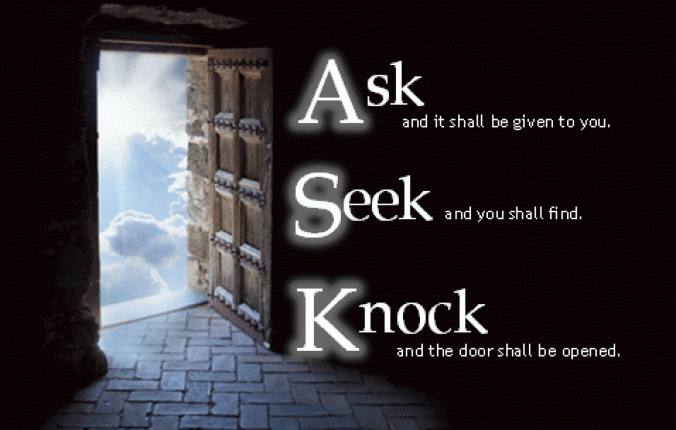
“Ask and it will be given to you; seek and you will find; knock and the door will be opened to you. For everyone who asks receives; he who seeks finds; and to him who knocks, the door will be opened.”
If you really want something, you have to ASK for it and if you get told “No” you have to KEEP ASKING.
Now I’m not going to sit here and tell you that you will always get what you want – the fact is that you probably don’t really NEED everything you are asking for and it’s probably a good thing that you do not get everything you ask for because then you’ll just end up spoiled (and yes Bella is spoiled and that’s not necessarily a good thing either but that’s beside the point!).
But, if there is something that you really want and if this certain something honestly would make your life better, then I recommend that you keep asking for it until you get it.
Don’t give up.
If it’s that’s important to you, persist until you get what you want – sooner or later you will.
If you’re into The Bible and you’d like to read more examples that illustrate this, check out the following examples of the Power of Persistence:
They were all told “no” and/or ridiculed for asking;
Rather than give up, they displayed the power of persistence and kept asking;
ALL of them got what they wanted as a result of their persistence.
V. The Right Way to Ask
Whether you want to apply these tactics in the world of sales or just your everyday life, there’s a right way to go about asking and a wrong way.
How to Get What You Want – The WRONG Way
Ask, ask, ask until you get what you want. Tell the person who you want to help you why they have to give in to YOUR demands. Don’t worry about them or their needs, just keep talking about how YOUR life will be better as a result of getting this thing. Don’t stop until you get what you want regardless of whether it benefits the other person or not. You win.
How to Get What You Want – The RIGHT Way
Identify the person who can help you, but before you ask what you want of them, find out what you can do to help them.
Build a relationship with them (even if it’s just a one-time interaction like a retail sale in a tourist area, you can still build a friendly rapport together and this works wonders on sales success).
When it’s time for you to ask what you want (in this case the sale), be sure to clearly explain what action you want them to do (buy something) AND also (and here’s the key part) be sure to help your new friend understands what’s in it for them too (for example, in the retail example, if the customer buys the new outfit they will look awesome at their beach party later).
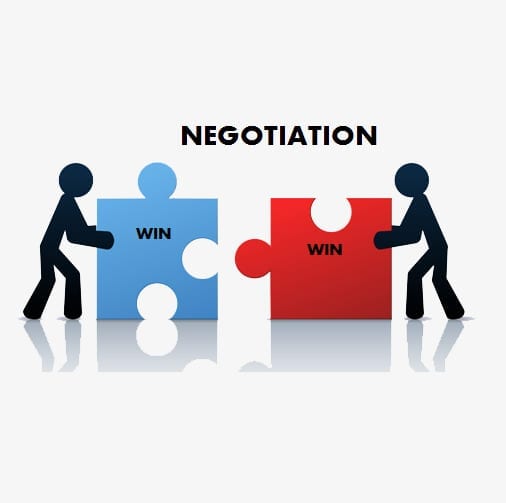
When you practice Win-Win Asking like this, you both benefit because you both WANT to see the ask completed because everybody wins.
VI. Persistence Over Time
But what if you don’t get what you want right away?
You must be persistent over time.
Always remember this “God’s Delays Are Not God’s Denials” and that applies to what you ask of other people too.
Just because you get told ‘No’ today doesn’t mean you’ll get told “No” tomorrow, or next week, or next year. Life is fluid – it changes over time.
The same goes for people — don’t assume someone will keep saying “No,” just because they said it before.
This is especially critical for those of you in sales like me. Customers mind’s change — as time goes by your customer may be willing to say ‘Yes’ — BUT you’ll never know unless you keep asking.
How to Stream Live TV – Are you considering cutting the cord and looking for tips on how to watch tv online without cable? Do you want to learn how to live stream local news and sports? Are you trying to figure out how to watch movies online without cable? If you answered “Yes” to any of these questions then this article is for you – I’ll give you reviews for all the best tv streaming providers AND also give you step-by-step instructions on how to cut the cord and ditch cable tv forever. You’ll probably save a ton of money and you’ll be much happier when you discover how easy it is to stream tv online without cable. Ready, let’s go!
[lwptoc]
Mike, That Helpful Dad
Editor’s Note: Hi, I’m Mike, known online as “That Helpful Dad” and I’m happy to share my tips with you. If you enjoy this article, be sure to visit my home page and subscribe to my blog (it’s free) so you’ll get all my tips. Please let me know if you enjoyed this article or have any questions. I’m here to help.
There are many articles online that talk about how to cut the cord and ditch cable tv by switching to a tv streaming service provider like Sling, Hulu, Roku, Amazon, etc.
This article is different for a few reasons:
My goal is to help you find streaming tv providers that are true “cable alternatives” such that they will allow you to enjoy an internet tv viewing experience that is similar to cable, but without the high cost of cable.
I want to show you how to stream to WITHOUT having to use an antennae, without having to use any complicated equipment, without having to use a computer, and without having to download a bunch of different apps to your tv.
This article is particularly well suited for older adults like myself because I am providing a step-by-step guide than anyone of any age can use to learn how to stream tv online. Even my 70+ year old mother in law Rose is now streaming live tv! 🙂
What do I mean when I say we want a streaming tv provider that is a “true cable alternative?”
Simply that the streaming tv provider (for example Sling, Hulu, YouTube TV, etc) offers a viewing experience that is similar to cable tv (with similar networks, access to live local news and sports, a DVR, channel guide, etc), so that if you “cut the cord: on cable and choose to watch tv online, you won’t miss cable tv because you’ll have everything you had with cable – except the high cost!
Guide to Streaming TV Online – Summary
If you follow the steps in this Essential Guide to Cord Cutting, you’ll learn how to choose a streaming tv service provider easily and quickly and most importantly you’ll set yourself up success streaming live tv online.
Consider the following questions…
Are you interested in HONEST REVIEWS of streaming tv service providers like Sling TV, AT&T Now, Fubo TV, Philo TV, Hulu Plus Live TV, Pluto TV, or YouTube TV, etc?
If you answered ‘yes’ to any of these questions then this article is for you and you’ll want to bookmark this post so you can refer back to it as you make your cord cutting decisions.
Inside this Essential Guide to Streaming Live TV you’ll find links to helpful articles about how to cut the cord, in-depth videos on specific cord cutting topics, and more. Not only will we discuss all the major streaming service provider options for watching tv online, but we’ll also talk about some important considerations you need to think about like finding local channels, whether or not you need a cloud DVR, and how easy/hard it is to find content on the various platforms.
I invite YOU to join the discussion so we can help each other finally cut the cord and ditch cable tv forever!
Why Listen to Me? Becuase I am a Real Life Cord Cutter
I’m a real consumer just like you, not a paid endorser. I provide honest reviews people can trust and I’ve been doing it for years on this blog and my YouTube Channel. After years of frustration dealing with cable companies, I recently took the leap and cut the cord. I now stream all my tv online and my family couldn’t be happier!
Sharing how to stream live tv is something I’m passionate about, but I realize that many people my age are still intimidated by the prospect of trying to watch internet tv and get rid of cable so on this page you’ll find lots of resources to help you make process of switching to streaming tv easier.
In this article I detail what I learned along the way in the hopes that it will be useful to you as you make YOUR decision about the best streaming tv provider for your family. There’s a lot to consider and it’s easy to overlook some of the ‘hidden’ details that can be the difference between a positive experience or a frustrating one. That’s where I can help.
Streaming TV 101 – Target Audience for these Tips
While I am hopeful that there is something for everybody who is interested in this topic, I recognize that not everybody will find it useful. Like most of the other articles on this site, this info will probably be most helpful to people of my generation (the 35-55+ crowd). Tell me if this sounds like you:
You’ve watched cable tv all your life, but you’re frustrated with the increasing cost of cable, the long-term contracts, the poor customer service, all the hidden fees and fake ‘taxes’ on the cable bill, and having to pay ridiculous charges for all those cable boxes.
You are looking for cord cutting options that will allow stream tv online BUT you want an overall experience that is as similar to cable tv as possible.
You don’t want to have to buy an antennae to get local channels – you want all your tv one place.
You hate commercials and want to be able to fast forward through them OR at least know IF you can (and that depends on which tv streaming service you pick).
You like reading honest reviews from real consumers and are tired of fake ‘promotional’ reviews that don’t give you the real pro’s and con’s you need to know.
If this sounds like you, then this article is for YOU. BTW if you like my tips, be sure to sign up for my weekly email tips so you can read them at your leisure. Visit my home page to sign up.
If you’re a millennial or someone who is already super tech-savvy then the info here is probably gonna be too basic for you. No worries. I understand. But hey, if you have some tips to share about this topic, by all means, help us older folks out and add your comments to the mix.
FREE Step-by-Step Guide to Cut the Cord
E-Book Version
You should see a pop-up window that offers this free gift but if you didn’t get one just click my pic to visit my home page and subscribe to my site – it’s a free subscription and you’ll get 4 free e-gifts – one of which is my 35-page Guide to Streaming TV Online.
Video Version
This is a 30+ minute comprehensive video that will walk you thru the the process I personally followed to cut the cord and now exclusively watch streaming tv online. Watch this vid and it will set you up for success.
10 Things to Know BEFORE You Try to Stream Live TV
STOP – before you spin your wheels trying to stream live tv and not really knowing what you’re doing or where to start, let me save you some time. There are some important considerations you need to know about BEFORE you cut the cord. These include:
How to stream LIVE LOCAL Sports and News.
What Channel Lineups and Channel Packages are offered by the different streaming tv service providers? Can you customize the channel packages with Sling, DirecTV Now, and others?
Does every streaming tv service provider offer a DVR? Are they all the same?
What On-Demand TV Shows and Movies are offered? Can you skip through commercials while watching on-demand content?
Is there a limit on the number of tv’s you can stream on at one time?
How will you access the streaming tv service providers app? Do you have enough internet speeds? Do you need a wifi mesh router to reduce buffering?
Can you add premium channels like HBO, Showtime, NFL Redzone? What if a particular channel you want to watch isn’t available?
What promotions are available from Sling, DirecTV Now, and others?
What about a Channel Guide? Is the service easy to use to find what you want to watch?
How much can you really save by cutting the cord? Is it really worth your time and efforts?
These topics are so important that I’ve discussed them in detail in a separate article. Check it out here…
Streaming TV Service Providers – Main Options
Here are the online tv streaming service providers we’ll be discussing in this article:
I recognize there are other options that will allow you to stream tv online such as Pluto TV and standalone services like Netflix, Amazon Prime Video, Kodi, and lots more, however this particular article is focused on the streaming tv service providers that will allow you to have an overall experience that is as close as possible to cable tv – that means being able to watch LIVE TV, view LOCAL channels, watch major ‘cable’ tv networks (ESPN, TBS, HGTV, etc), watch Regional Sports Networks, use a DVR, have a channel guide, and more.
Cord Cutting Streaming TV Provider Reviews – The VIDEO
I’ll give you HONEST reviews and Helpful Tips for all of the following: ATT TV Now, FuboTV, Hulu with Live TV, Philo, PlutoTV, Sling TV, Vidgo, & YouTube TV. PLUS we’ll talk about HD Antennas, LOCAST, Amazon Prime Video, Netflix and the Roku Channel.
Streaming TV Service Providers – The Reviews
Sling TV Review – Summary
Sling TV was the first major online tv service provider and it’s still one of the most popular.
Pro’s: 3 channel packages and numerous customization options. Stream anywhere. Low overall costs ($20-40). 50-hour DVR. Good user interface. Easy to use overall.
Con’s: Terrible Local Channel and Regional Sports availability in many areas (need to use a separate antennae). DVR is $5 extra, doesn’t work on all channels, and you can’t always skip commercials. Orange plan only offer 1 stream at a time. To get all their channels you have to subscribe to Orange + Blue plan.
AT&T Now (formerly DirecTV Now) is a major player in the online tv service provider world and it’s rapidly growing in popularity.
DirecTV Now used to be the streaming tv service provider my family used but we have since moved away from them.
Pro’s: Numerous customization options, and up to 120 channels! Excellent local channel and regional sports channel availability. Stream anywhere. Good user interface – similar to watching cable tv. HBO is included in some plans. Overall DTVN is very easy to use.
Con’s: Higher costs starting in 2019. Only 2 streams at once unless you pay more. Free DVR is only 20 hours (you can pay $10 to get 100 hours), you can’t always skip commercials (especially for on-demand content) and the commercials are often annoying).
PlayStation Vue is actually pretty awesome and you do NOT need to own a PlayStation to use this service. This was the streaming tv service my family used and it had everything you could want in a streaming tv app.
MAJOR UPDATE: Sony chose to discontinue PlayStation Vue as of January 2020. It is no longer an available option.
Hulu with Live TV (AKA “Hulu Plus”) may be a good option for some people seeking to cut the cord, but it’s still a relatively new service and there are some kinks to keep in mind.
Pro’s: 60 channels for about $4r. Good local tv and regional sports coverage. 3 simultaneous streams and paid option for ‘unlimited’ streams. 50-hour Free DVR.
Con’s: only 1 channel lineup no customization options. Can’t skip commercials with DVR unless you pay $15/month for “Enhanced DVR” (also provides 200 hours storage). Hulu recently update their interface to include a passable channel guide.
YouTube TV is another relatively new ‘major’ player in the world of online tv service providers. Given that Google owns YouTube (and just about everything else in the world) I would expect that YouTube TV will continue to improve over time. Right now (in my opinion) it’s still too raw for most people looking to cut the cord.
Pro’s: up to 80 channels for about $40. Awesome Free DVR with UNLIMITED storage and you can usually fast forward through commercials. Decent user interface. Sometimes great promotions (like up to 2 months free). They’ve recently added more local channels.
Con’s: still not available in many areas. Lack of local live tv and regional sports networks in some areas. May not work on Amazon Fire TV devices. Only ONE channel lineup and minimal customization options. You can’t skip commercials for on-demand content and if there is an on-demand version of show you recorded on the DVR it will bypass your DVR recording and make you watch commercials! No HBO option.
Fubo TV used to be a streaming tv provider focused mainly on sports, however in 2019 they switched their content to become a major player in the overall streaming tv business. Fubo TV is now one of the top ways to watch tv online and offers numerous channel packages for you to stream live tv.
Philo TV Review
Philo TV is a low-cost leader which can provide a great experience for you and a boatload of quality channels you will watch for a low cost – provided you don’t care about local channels.
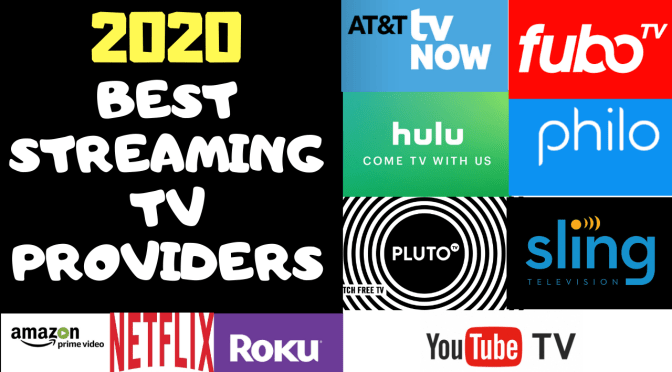
2020 – Best Streaming TV Apps
Ranking the Streaming TV Service Providers
Based on the info provided in our detailed reviews for each service and using a ranking scale that is focused on choosing a streaming tv service that is most like a traditional cable tv viewing experience, here are my personal rankings.
For additional insights on Amazon Prime Video checkout these links too…
Streaming TV with Netflix
I’d be remiss if I didn’t at least mention Netflix as an option for streaming tv online. Although Netflix is not an option if you want to watch live tv or have an experience similar to cable, it’s still a great option for watching tv and movies online. Here are some articles about Netflix Streaming Tips…
Best Netflix SeriesA Guide to NetflixBest Netflix Movies
Streaming TV Tips – What’s YOUR Take?
That concludes our Essential Guide on How to Stream Live TV. Was this helpful? If so, please share this article with your friends.
Have YOU already learned how to watch tv online? What streaming tv service provider are YOU using? What tips have you learned that can help others – let us know so we can all learn together. Thanks!
What to Read Next?
There’s more to life than streaming tv, check out these other helpful tips too…
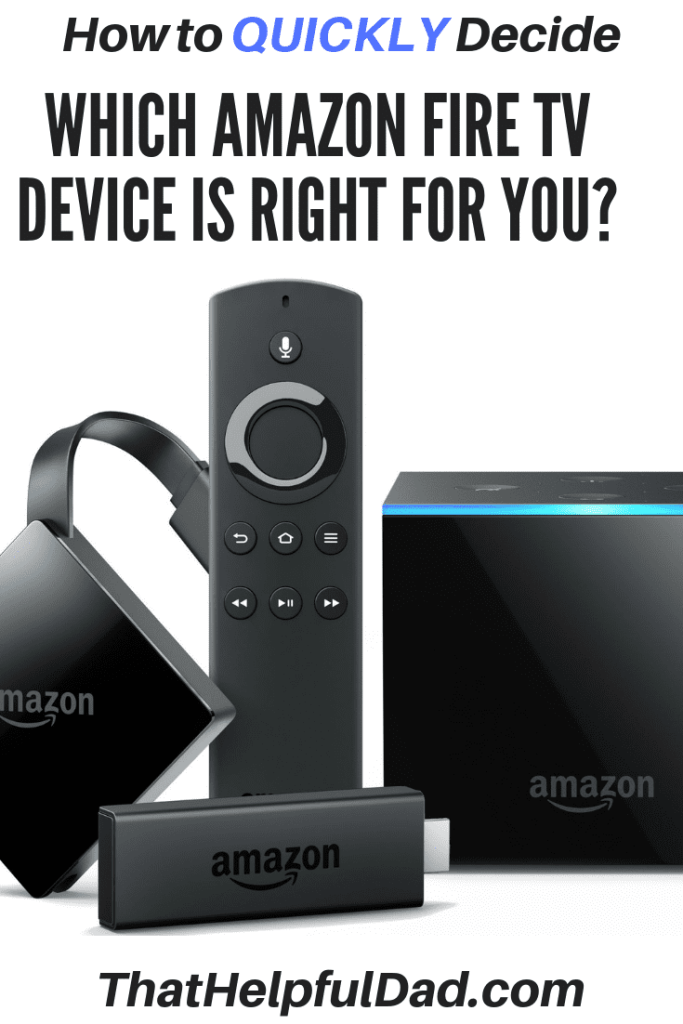
So you know you want to buy an Amazon Fire TV Device but you’re not sure which one? I can help you. In this article, we’ll review the key differences between the Fire TV Stick, the Firestick 4k, the Fire TV Cube, and the Fire TV Recast so you can complete your decision and buy the right Fire TV device that’s best for your family.
This article assumes you’ve already made the decision that an Amazon Fire TV device is right for you and that you just need help on choosing which model is best.
Amazon Fire TV Table of Contents
Video Review
How to Decide which Fire TV Device to buy
Know the options available.
Know what YOU want the device to do.
Buy the Fire TV device(s) that’s best for you.
Fire TV Accessories
More Tips
Buy a Fire TV Device with Confidence
The Amazon Fire TV Devices (as a group) are our #1 recommended option for people who are trying to cut the cord and ditch their cable tv. If you want to EASILY stream tv online, the Amazon Fire TV devices are your best bet.
Compared to Roku, Apple TV, Smart TV, and other digital media players, the Amazon Fire TV Devices are the easiest to set up, the easiest to use, and the easiest to find content on.
This is especially true for older adults (over 40) who are new to the world of streaming tv online.
Fire TV Options – The VIDEO
How to Decide which Fire TV Device is Right for You?
It’s really a simple 3-step process.
Know what Fire TV Devices are available.
Decide what you want the Fire TV Device to do
Make the purchase
Step 1: Know the Fire TV Device Variations
To get started we first have to know the various Fire TV devices that are available. They are…
This is the key section of this article. I’m going to keep it short and sweet because again I’m assuming you already know the basics about the Fire TV and just want to make the final decision. Here’s how to pick:
You want the absolute easiest option in terms of setup and use.
You don’t care about 4k content.
You don’t care controlling other devices with your Firestick remote.
You are on a limited budget and/or you have multiple tv’s you want to put a fire stick on.
You are new to the world of cord cutting.
The basic Amazon Firestick is not only the lowest cost option but it’s also the best option for older adults new to online streaming tv. Buy one or more of these and you won’t be sorry. I personally own 5+ of these devices for all my non-4k tv’s and have them on most of our tv’s and travel with 1 of them pretty much all the time.
The Amazon Fire TV Stick forms the foundation of our cord cutting tv system for my family.
You want all the features of the Fire TV Stick 4k AND you also want to be able to control other Alexa-enabled devices with a single system. So, for example, with the Fire TV Cube you can…
Use either the Fire TV remote or just your voice to turn on the TV, dim the lights, and play what you want to watch.
You can control your soundbar, A/V system, cable box, DVR, etc.
You want the combination of a Fire TV Stick 4k and an Amazon Echo all in one device.
The Fire TV Cube is like a powerful universal remote in a single system.
You already have a Fire Stick, Firestick 4k, or Fire TV Cube AND an HD Antenna AND you want to be able to record shows and watch them on your fire-tv compatible devices.
Do not buy a Fire TV Recast as your first Fire TV device!
The Fire TV Recast is basically a DVR to record over the air content. It is not a streaming stand-alone device.
Keep in mind that you can’t record streaming app content on this device. That means you can NOT record Sling, Hulu, DirecTV Now, etc content with a Fire TV Recast – you’ll need to use the DVR that comes with those apps.
To be clear, in order to use the Fire TV Recast you need ALL of the following:
Fire Stick, Fire Stick 4k, or Fire TV Cube or Echo Show.
TV or mobile device that can access the Fire TV App.
If you have these things AND you want to be able to record over-the-air content onto a DVR (i.e. the Fire TV Recast) then this is a great option.
Step 3: Make the Purchase
Now that you know which Fire TV devices are best for your specific needs, go ahead and pull the trigger.
If you are going to cut the cord, ditch cable tv, and move to online streaming tv like I did, then the Amazon Fire TV Devices can help you make that happen.
Although it sounds like a lot of upfront costs if you buy a Firestick for every tv, if you do the match it’s really a no-brainer because the purchase of the Amazon Fire TV devices is a ONE-TIME COST while the cost of all those cable boxes (on average $8-20) is an ON-GOING MONTHLY COST. Do yourself a favor and get rid of all those costly cable boxes!
Here’s my setup:
For all my non-4k tv’s I have the basic Amazon Fire Sticks – that includes my kids’ rooms, guest rooms, and outdoor tvs. my 4 year old watches tv with his Fire Stick. My 75 year old mother-in-law also watches on her Fire Stick.
I do not currently have the Fire TV Cube (it wasn’t available when I made my original purchases) and I don’t need the Fire TV Recast (because I get my local channels from my streaming tv app and therefore don’t use an HD Antennae. Instead I use the DVR inside my streaming tv app from DirecTV Now). That said, if you would benefit from the Fire TV Cube or Fire TV Recast, by all means, go for it.
If you’re ready to buy, check the latest prices here. We are proud to be an official Amazon Affiliate. Good luck!
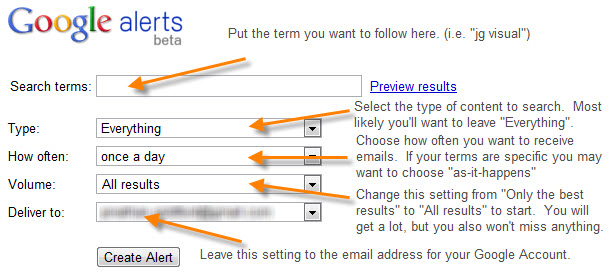
Google Alerts allow you to automatically monitor the web for specific topics that interest you. Rather than you manually searching for your topics, if you set up a Google Alert, then Google will automatically email you whenever the topic is mentioned on the web. It’s easy, it’s convenient, and it works.
Watch the video above or check out the screen shots below and see how easy it is to set up a Google Alert. In the video I will also show you what your options are for customizing the emails you get sent.
In order to set up an alert the first step is to know the web address…
If you want to use it to track your favorite celebrities go for it, but if you wanna go a bit beyond the obvious, here are some other ideas for using Google Alerts:
Track your favorite stocks (if there is an important news item you can make a trade faster)
Track news about yourself (to protect your reputation or just stroke your vanity – haha)
Get news about your home town
Use Google Alerts like a de facto Twitter Feed (get news on a trending story using the ‘as it happens’ option – see screenshot below).
Get new promo or coupon codes as they are released (in the search box add the words ‘and’ plus ‘promo code’ or ‘coupon’ to the alert)
Track job openings for a particular company
And so much more.
If you have an special alert you’ve set up, please share it with the group so we can all learn.
Google Alerts – ScreenShots
How to set up a Google Alert for Amazon
Google Alert Set Up Options
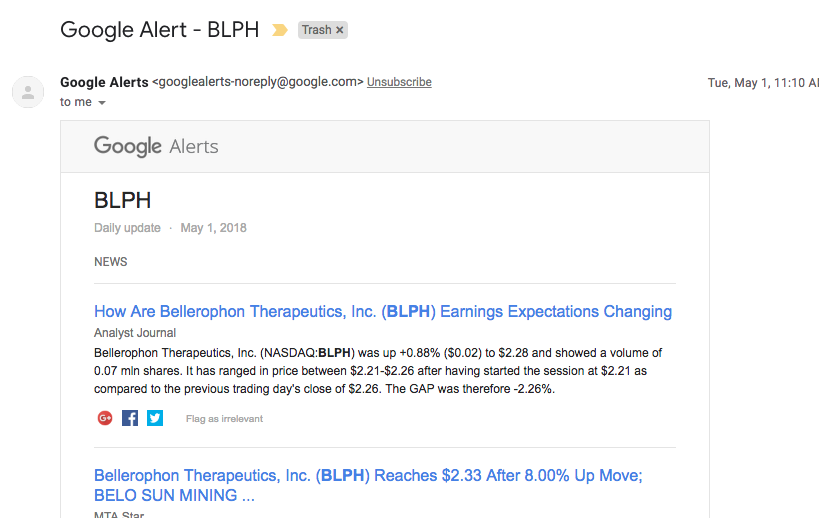
Example of Google Alert Email
How to unsubscribe from Google Alert
That’s for for today. Was this helpful? If so, let me know. Let’s talk again soon.















































 That Helpful Dad