Google Alerts allow you to automatically monitor the web for specific topics that interest you. Rather than you manually searching for your topics, if you set up a Google Alert, then Google will automatically email you whenever the topic is mentioned on the web. It’s easy, it’s convenient, and it works.
Watch the video above or check out the screen shots below and see how easy it is to set up a Google Alert. In the video I will also show you what your options are for customizing the emails you get sent.
In order to set up an alert the first step is to know the web address…
If you want to use it to track your favorite celebrities go for it, but if you wanna go a bit beyond the obvious, here are some other ideas for using Google Alerts:
Track your favorite stocks (if there is an important news item you can make a trade faster)
Track news about yourself (to protect your reputation or just stroke your vanity – haha)
Get news about your home town
Use Google Alerts like a de facto Twitter Feed (get news on a trending story using the ‘as it happens’ option – see screenshot below).
Get new promo or coupon codes as they are released (in the search box add the words ‘and’ plus ‘promo code’ or ‘coupon’ to the alert)
Track job openings for a particular company
And so much more.
If you have an special alert you’ve set up, please share it with the group so we can all learn.
Google Alerts – ScreenShots
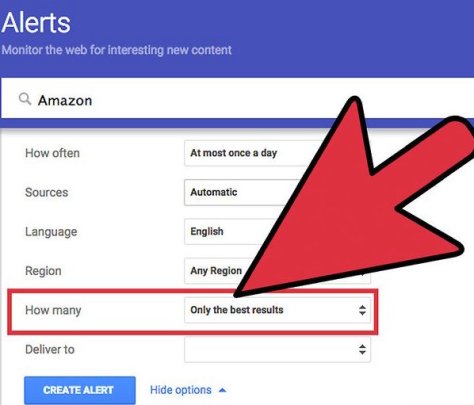
How to set up a Google Alert for Amazon
Google Alert Set Up OptionsExample of Google Alert EmailHow to unsubscribe from Google Alert
That’s for for today. Was this helpful? If so, let me know. Let’s talk again soon.
If not, this video will introduce you to Amazon Treasure Truck, find out if the Treasure Truck is in your city yet, tell you how to sign up for it, what types of things you can buy on the Treasure Truck, and give you other fun tips.
Amazon describes the Treasure Truck as follows:
“At Treasure Truck, we hand-pick our favorite new, trending, local, or delicious items, load them on the Truck, then cruise around town spreading joy for everyone with a smartphone and an appetite for fun. Every time you swing by the Truck, you’ll find something new to enjoy, like games, giveaways, tasty treats, and other surprises.”
Here’s the link to check if YOU can sign up for the Treasure Truck…
Google Flights is a travel booking service like Expedia, Kayak, etc but Google Flights has some cool features that make it convenient to use. In this video I will show you how to use Google Flights and discuss the bonus features Google Flights offers that make booking your travel more convenient with Google Flights.
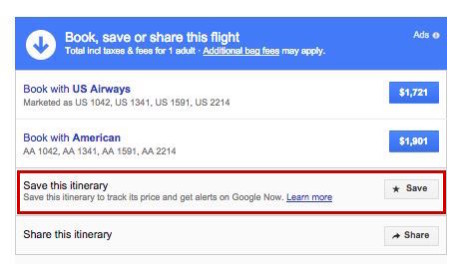
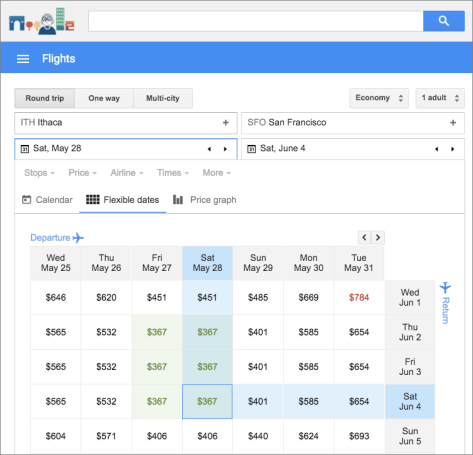
Google Flights – Screenshot Samples
You can save your search for laterCool Feature – see alternate prices on different datesFlexible Dates vs Price View
Google Flights – What’s the bottom line?
Google Flights is my new go-to travel booking site. It has lots of great features, is easy to use, and offers me numerous ways to find the best price for my travel options – especially if my dates are flexible. Give Google Flights a try and let me know what you think.
In this article, I’ll review what a balance bike is, compare balance bikes with training wheels and tricycles, and tell you my recommendation for which balance bikes to check out.
Bonus: I’ll also share some vids of my son JeeHo using his balance bike over time so you can see the progress he’s made. Be sure to check him out doing his ‘look, ma, no feet’ trick.
What is a Balance Bike
A Balance Bike is basically a two-wheeled toddler bike that does not have any training wheels to help the child balance.
Here’s a pic.
The purpose of a balance bike is to teach the child to learn how to balance on two wheels without ever using training wheels.
Your goal in using a balance bike is to bypass the training wheel stage and the tricycle stage and speed up the process of moving on to a standard bicycle with pedals. A Balance bike forces a child to balance in order to ride – kind of like survival of the fittest, eh?
I can tell you a balance bike works – even better than I expected!
Check out these videos…
Balance Bike in Action
My son JeeHo on his balance bike last year.
JeeHo on his balance bike this year.
What is the best age for a balance bike
We started our son JeeHo at 2 years old but you could start them as early as they can walk if you wanted to. The earlier you start them the better.
How do you teach a child to ride a balance bike?
Step 1 Put them on the bike.
Step 2 Adjust the seat so their feet can touch.
Step 3 Tell them to Go, Go, Go.
Step 4 Watch them have a blast.
Balance Bikes Vs Training Wheels
Again one of the main purposes of the balance bike is to skip the training wheels stage. Why is this so important?
Because using a balance bike teaches them to balance (thanks, Captain Obvious) while using training wheels actually down-regulates the child’s ability to learn how to balance on a bike (not what you want).
Training wheels provide a false sense of security on a bike. Balance bikes teach them how to be confident on a bike.
(Important) Here’s a little-known benefit – balance bikes teach your kids how to manage TURNS more efficiently while using training wheels decreases this ability because the training wheels just don’t allow your kids to turn that easily. With a balance bike your kids will learn how to do sharp, real-life turns, but with training wheels, they are forced to make wide, unrealistic turns. This was a real problem for our first son Jax (who used training wheels and not a balance bike), but it wasn’t a problem for our second son JeeHo (as you saw in the vid above).
Balance BIke vs Tricycle
As we talked about above, you can start a child on a balance bike very young – pretty much at the time you’d normally consider buying a tricycle, you can put them on a balance bike. Quite frankly there is no reason to buy a tricycle (other than perhaps nostalgia) when you can buy a balance bike instead.
A tricycle is slow and steady. A balance bike is fast and cool.
As with training wheels, tricycles delay your child learning balance. A balance bike forces them to learn balance.
Even worse than training wheels, a tricycle forces those wide turns. A balance bike helps your child learn how to balance ‘through’ the turn.
Balance Bike vs Scooters
This is really like comparing apples and oranges. In the case of a scooter AND a balance bike, both teach balance, but in different ways. There are such a wide variety of scooters it’s hard to make a worthwhile comparison of these two so we’ll forego that for now. We own a wide variety of scooters, bikes, etc. Although it’s totally off subject and definitely does not teach balance, one of our favorite ‘razor’ scooters of all time is (3 wheel scooter).
Our Experience with a Balance Bike
To say we’ve been happy with our decision to try a balance bike is an understatement. Seeing JeeHo race around the neighborhood is so cool. It’s really surprising to see how fast he can go on his balance bike – he regularly keeps up with the bigger kids on their bikes and that makes him feel so cool.
Also, JeeHo has developed so much confidence on his balance bike and that was an unexpected benefit.
Should you buy a Balance Bike?
Do you really have to ask? This is a no-brainer. YES, you should buy a balance bike. They are so cool.
Recommendations for Balance Bikes
Here is my top pick for balance bikes – as with ALL products I recommend, we actually own/use this item.
The Kazam balance bike was super easy to put together, has held up well over the years, and has proven to be a great value. You can’t go wrong with this bike.
If you want to compare it vs other bikes, here’s a link to few more to consider on Amazon – of particular note are the ones by Strider and Cruzee.
In this article, I’ll detail why I chose the Kamado Joe, specifically why I chose the Kamado Joe vs Big Green Egg, what my personal experience has been with the Kamado Joe, and provide some helpful Kamado Joe tips for new cooks.
The Kamado Joe is the brand name of a line of ‘kamado-style’ ceramic grills. After dabbling in black, Kamado Joe’s are known by their now famous RED color and more importantly by the company’s trend-setting innovations for kamado cooking.
Here’s what a Kamado Joe Classic II looks like. Note that trademark red color – it’s a thing of beauty, ain’t it?
II. What is a Kamado?
For those who are new to kamado cooking, let’s take a step back and talk about what a kamado is. (For those that already know, skip ahead).
What is a Kamado?
There an excellent series of “Kamado 101” articles by a fellow named “Kamado Jim” and I’ll link to them in the references at the bottom of this page, but for now let’s refer to the simple definition on the Kamado Joe website…
And “relatively unchanged for centuries, air flows through the kamado grill’s ceramic body and out its vented dome, chunk charcoal comes to life as smoke and heat.”
I’m always on the lookout for ways to improve my cooking. My friends in the neighborhood joke about this because they claim that I rely more on technology than cooking ‘heart’ – ouch! Whether that’s true or not I can’t say, but I will admit that if there is a cooking gadget that I think can up my game, I’ll give it a try.
For years I’d heard about the Big Green Egg but was averse to try because of the perceived learning curve and the expense of the product. But I did my research and finally took the plunge a couple years ago and I’m kicking myself that it took me so long!
There is a difference in the flavor of the food when you cook over lump charcoal/wood. Can’t deny it, no disputing it, when you cook on a kamado you’ll taste it and it’s awesome.
That said, there IS a learning curve to kamado cooking (and I’m still learning!) and it IS expensive to buy a kamado grill ($600-1000 will get you started depending on what brand you buy and how big you go). Also keep in mind you’re gonna want some accessories pretty early on as well – so do yourself a favor and remember this little piece of wisdom…
I’m not gonna lie – when I was first shopping for a kamado it was a pretty tough decision to choose the Kamado Joe vs the Big Green Egg.
I did a lot of research (read: spreadsheets, shopping, forums, etc). I talked to a lot of people. I watched a lot of videos.
Honestly, I don’t think you can go wrong with either the Big Green Egg or the Kamado Joe and since the time this article was first written I have since purchased a Big Green Egg as well (because you can never have too many grills, right?).
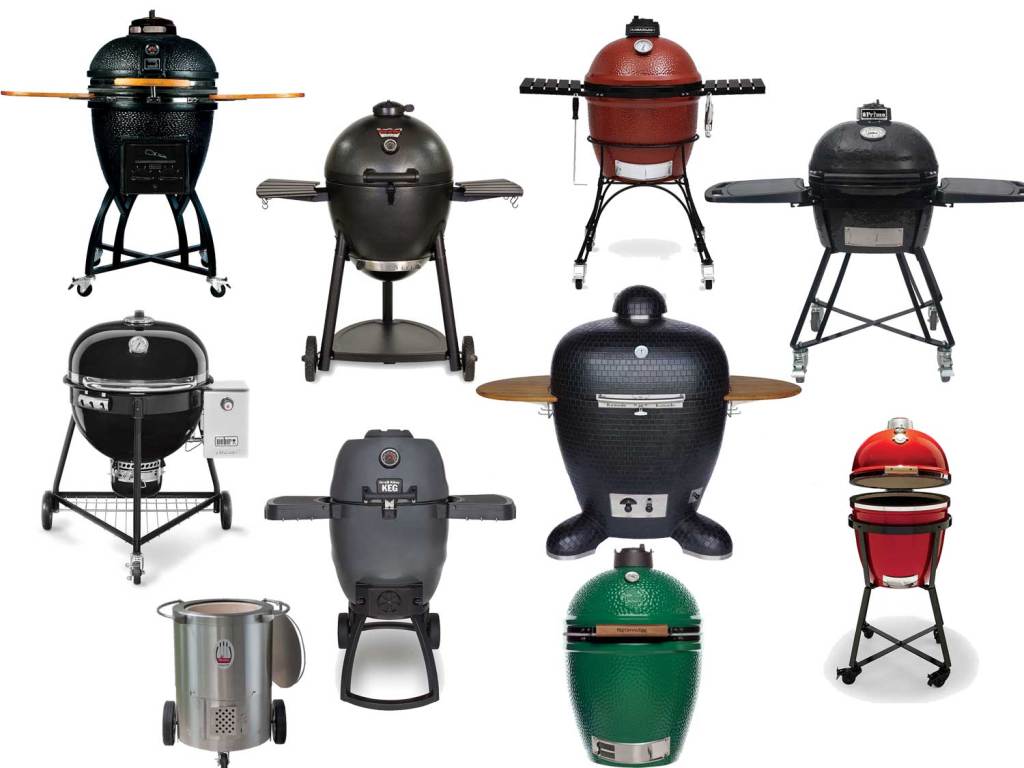
As I mentioned above, in addition to the Kamado Joe and Big Green Egg there are certainly other options in the kamado world too – there are a lot of lower-end options and some higher one too but for me I narrowed it down to the Big Green Egg and the Kamado Joe pretty quickly based on my individual needs.
To be honest, most of my friends have Big Green Eggs and they love them. As I said I too own a BGE and therefore I am not here to knock the Big Green Egg because it has a long history of success and tons of rabid fans who tout its awesomeness. Let’s face it, The Big Green Egg is the ‘It Girl’ of kamado’s, and it probably outsells all other kamados combined. Buy the Big Green Egg and you will probably be very happy.
But for me, the Kamado Joe is still the best between the two and here’s why…
Regarding the research, I’ll link to some threads in the reference area in the interest of time let me just summarize by saying that I chose the Kamado Joe over the Big Green Egg or other options because of the following THREE Reasons:
Kamado Joe reputation – everything I read had it on par with the Big Green Egg in terms of capabilities and quality.
During my shopping experiences the Kamado Joe just ‘felt right‘ when I got my hands on it.
Additionally my Kamado Joe is more functional than the Big Green Egg“out of the box” and it’s hard to dispute that. This is because the Kamado Joe can do more ‘out of the box’ because of its design – the Kamado Joe comes with an internal cooking rack system called “The Divide and Conquer” system.
Kamado Joe’s Divide and Conquer system allows you to cook BOTH direct and indirect at the same time, on varying levels. Here’s what that looks like…
As you can see from the pic, with the Kamado Joe you can have different cooking zones elevations AND you can also use BOTH indirect and direct cooking at the same time.
With the Big Green Egg (unless you modify the place-setter system by purchasing the Eggspander) your option is either direct OR indirect but not both – that’s HUGE!
The additional flexibility of the Kamado Joe appealed to me and I can tell you that the Divide and Conquer system is not just a gimmick – it works and I DO use it quite frequently. Furthermore, there are tons of forum articles from Big Green Egg users who end up wanting to modify their eggs to retrofit them with the Kamado Joe Divide and Conquer system (see references below). Why retrofit when you can just by a kamado made for this? That kamado is the Kamado Joe.
Additionally, when I purchased my grill (2017) Kamado Joe was coming out with an updated line that featured an ‘easy-close’ lid – one of the things that’s important to know about kamados is they are heavy – I read numerous reports about the lid ‘slamming down’ on some kamado’s and causing cracks. Kamado Joe’s ‘air-lift’ hinge was designed to prevent that and this was another selling point for me.
STOP THE PRESSES – THE DEBATE IS OVER!
Kamado Joe has now introduced the Kamado Joe Classic III, the Big Joe III, and the Pro Joe and all of them feature another new innovation called the SlōRoller – an insert that works by distributing smoke and heat in rolling, recirculating waves.
The SlōRoller helps to surround food in clouds of ‘delicious smoke’ while at the same time evenly distributing heat. Kamado Joe says this results in enhanced flavor and significantly reduced hot spots.
Fewer Hot Spot? Enhanced Flavor? Sign me up!
You can read our full review of the new Kamado Joe III here…
With the release of the Kamado Joe III I personally believe the long-standing debate between the Big Green Egg vs Kamado Joe is finally over. In fact I wrote a new article about it and you can read it here…
V. Kamado Joe Size Options & Kamado Joe III Walkaround Video
Check out this video from Kamado Joe’s John Setlzer with a great intro to the Kamado Joe III…
Check latest prices for Kamado Joe III
Kamado Joe Classic III
Kamado Joe Big Joe III
Kamado Joe Joe Junior
IMPORTANT TIP: Although the Big Joe gives you the most cooking space and it is truly awesome, just understand that not only is it the most upfront cost, but the accessories also cost more too. For most people, the standard size “Classic II” or the new Classic III will be the way to go – you’ll get the most accessory options to choose from as well.
That being said, if you often cook for groups over 10 people, then you will want the Big Joe or even the new Pro Joe. Enjoy!
VI. How is the Food on the Kamado Joe?
Pizza – awesome. Chicken Wings – best ever. Beer Can Chicken – yummy. Fish – moist and tender. Steaks – out of this world flavor!
Cooking on kamados (and the Kamado Joe specifically) offers a variety (from cold smokes to 800-degree heat) that just can’t be beaten with any other cooking appliance I know. In addition, you can do really long cooks on them (think low and slow) to include even overnight cooking because the kamado holds a temperature so well and for so long.
Sadly I also have an expensive, built-in Cal-Flame gas grill (when I put in a patio bar a few years ago) — unfortunately, because of the addition of the Kamado Joe I rarely use my beautiful grill for anything but making bacon (yes I turned a $4k grill into a giant griddle, and no that ROI on that wasn’t so great!) or for ‘must-be-quick’ cooks because kamados take a while to heat up. I also got rid of my Masterbuilt Smoker since the Kamado Joe replaced that too.
I’ve got some great recipes books that have really helped me and I’ll link to them in the “Tips” section below.
VII. Kamado Joe Quick Tips
A. Buy a Kamado “Manual.”
You can’t run before you walk. There IS a learning curve to kamado cooking and you would be wise to buy one of the following two books because either of these will speed up your progress and have you mastering the KJ in no time. You just spent a grand on the KJ, chip in another $20-30 and get these books – you’ll learn a bunch AND pick up some great recipes too!
I’ve quickly learned that not every brand of lump charcoal is created equal. Don’t cook on JUNK charcoal when you can cook on quality LUMP charcoal – your food will thank you for it. Some of them are made with woods like hickory or mesquite that are so strong they don’t go with a wide variety of foods. I’ve tried a few brands I’ve found that you get what you pay for – quality brands of lump charcoal offer pieces that are are bigger, burn a long time, and have a flavor on the mild side because of the combo of woods used.
TIP: Personally I don’t mess around with charcoal chimneys or parafin fire starters. Instead I like electric fire starters. I’d recommend you one too and be done with it. Kamado Joe makes a good electric fire starter for a reasonable price.
C. Give Yourself Time…literally!
One downside of the Kamado Joe, like all kamado’s, is that it takes time to get it ready to cook – figure an hour to get heated, etc. and I’ve learned to give myself an extra 15 minutes if I’m trying to ‘time up’ with other foods just to be safe.
D. Cleaning is Easy.
Kamado Joe (like most kamado’s) is pretty much self-cleaning (oh yeah!).
If you’re installing the KJ in an island, be sure to check out my full accessory list for tips on custom tables or island covers, but if you’re keeping the Kamado Joe in it’s nest, then here’s an excellent cover (this is for the Classic II size). It’s “Kamado Joe Official” so you can ride in style…
This is by no means all you’ll want or need in the way of Kamado Joe Accessories, so be sure to read my articles Best Accessories for the Kamado Joe, but to get you started for now, add these to your cart – you’ll thank me.
Again, if you want to see ALL my recommendations on Kamado Joe Accessories, be sure to visit my “Best Accessories for the Kamado Joe” article – you’ll get over 200 tips and ideas to consider.
VIII. Do you have The Kamado Joe?
What’s been your experience so far?
What tips or accessories recommendations do you have to share?
I’d love to hear your thoughts – meanwhile it’s time for some more wings and beer with my Kamado Joe!
Did you know we write about more than just Kamado Cooking on this site? It’s hard to belive, I know, but it’s true! Visit our home page to read more tips…
OK, OK, I know what you’re thinking – “Bed of Nails?” Is that some sort of yogi fetish? Do visions of somebody laying on a board of spikes go through your head?
I’m not quite talking about that. Instead, The Bed of Nails I’m referring to is a product that’s basically an acupressure mat. Here’s what mine looks like…
As you can see, there’s a bunch of little ‘golf spike’ looking things that provide the ‘nails’ for you to lay on.
Now before you dismiss this as a cockamamie idea, let me just tell you that this acupressure mat is freakin’ awesome – I use my ‘Bed of Nails’ almost every day and it really works!
Bed of Nails – Why should YOU want one?
Lay on this thing (skin to mat) and you’ll experience a gamut of sensations.
Is there pain? Yes. It hurts — especially if you lay on the mat without a shirt and with a hard floor underneath – but seriously if you are gonna do it you gotta go ‘all in’ if you wanna get the highest ROI, right?
However, if you can get through the first 5 minutes then you’ll be over the hump – on your way to a state of pure bliss.
After 20-30 minutes, you’ll reach a state of ‘gelatinous euphoria’ where the cares of the world melt away.
I love my mat so much I have a small travel size I take with me.
Bed of Nails – HD’s Pro Tip
Combo your Bed of Nails with your favorite meditation and it’s an out of body experience.
Trust me, if you give this product a chance you will be thanking me – it’s that incredible.
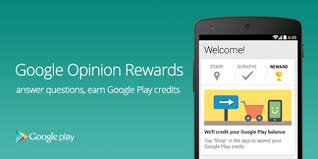
Google Rewards is a free app you can download from the Google Play store. You may also hear Google Rewards called Google Opinion Rewards or Google Surveys.
Regardless of what you call, it the fact is that the Google Rewards app is an easy way to earn some free money!
After you download the app and answer some basic demographic questions about yourself, Google will begin sending you notifications on your phone when a new survey is available. Open the survey and answer the questions.
Each survey has 1-7 questions and takes about 10-seconds to a minute to answer. Questions range from, “Which logo is best?” and “Which promotion is most compelling?” to “When do you plan on traveling next?”
Once you complete the survey you get your rewards instantly. You can then spend them immediately. Here are some screenshots…
HD’s Pro Tip: Regarding frequency of surveys and earning more money – Google says they send surveys about once a week, but I’ve found that if you visit a lot of places that are tied to Google Maps (hotels, restaurants, etc) the frequency tends to increase. More Surveys = More Money. Also these surveys are usually tied to Google Reviews – if you tend to leave a review anyway, why not get paid for it? Here’s an example…
How Much Money Can You Earn from Google Opinion Rewards?
For each survey, you will receive between 10cents and $1.00 in Play credit.
Most surveys I’ve done pay out about $16-25-cents.
That may not sound like much, but it does add up over time. In the past 6 months I’ve made over $35 – just from taking a few seconds 1-2 times a week to answer a few questions. It’s easy money. I’ve used that money to buy premium apps, e-books, and music.
You can then spend the money you earn from Google Opinion Rewards on whatever you like in the Google Play universe – that means music, books, tv shows, apps, and more.
Google Rewards – What’s YOUR Take?
Have you tried Google Rewards? What’s been your experience?
Do you know any other tips to make the most of Google Rewards? If so, please share them.
Did this article help you? Drop me a comment and let me know. Feel free to share this with a friend.
Summary: Use these 5 tips to make sure you are getting the most value from your Amazon Prime Membership. The 5 tips focus on:
How to save money with The Amazon Warehouse.
How to use an Echo Dot to stream music to your in-ceiling speakers.
Using Prime Photos as a Screensaver for your Fire Stick.
5% cash back on all Amazon.com and Whole Foods purchases.
Using Prime Video to cut cable re NFL Network.
Watch this tip as a VIDEO
My Experience with Amazon Prime
I’ve been a prime member since the very beginning (2005) and an Amazon customer since 2002. If you’ve followed my blog, you know I’ve talked about Amazon Prime many times so I won’t rehash it all again but there are a few things I continually see people overlooking and I wanted to make sure that you know about them so you can get the full value for your Amazon Prime membership.
When most people think of Amazon Prime they just think of the free 2-day shipping and while that’s certainly a great benefit (if you order a lot of items), Amazon Prime gives you a lot more than just free shipping. You also get lots of free music, videos (tv/movies), books, and more. For the full list, visit this Amazon Prime Benefit Page. Again, we’ve talked about this already so I’m going to assume you know it and skip to the tips for today.
Get more out of Amazon Prime
1-Amazon Prime Visa Rewards
5% Cash-Back on the Amazon Prime Rewards Signature Visa Card – that’s 5% cash back on ALL Amazon.com purchases and also a Whole Foods too! You can’t beat that. Also, there is no annual fee. We order everything on Amazon using this card. It’s really a no-brainer. Click the pic of the card below to learn more…
Pro Tip: Get an even bigger discount when you combo your purchases on Amazon with the Prime Rewards Visa card this AND the Amazon Subscribe & Save program. The Subscribe and Save program saves you another 5-15% off of your regularly ordered items (think toilet paper, detergent, protein, etc) and now you are talking some serious savings! To learn more about the Subscribe and Save Program click on this pic…
2. The Amazon Warehouse
Shopping with Amazon Prime is simple and efficient and (for me) faster than going to the store, but do you know about theAmazon Warehouse? If you don’t click this pic now and learn more…
Do yourself a favor and always check the Amazon Warehouse when you are shopping on Amazon! You can find a lot of ‘like new’ items (that still carry an Amazon warranty) for 25% off or more. This isn’t junk off-brands, it’s name-brand high-quality stuff. We’ve saved over a $1,000 by using Amazon Warehouse the last couple of years and rarely have we been dissatisfied with the quality (and if you then just send it back for a full refund without questions via UPS — which Amazon will send to you for free pickup at your door).
Here’s a video I made to help you…
Things I purchased on the warehouse include my entire home theater system (Yamaha receivers, speakers, etc) and all my zone-2 speakers (bedrooms, lanai, etc), kid’s bikes, home appliances, tools, and lots more. I almost hate telling you about this tip because I’m afraid you might steal my deals! Haha
3. Prime Music
Why pay for a subscription on Pandora or use other music apps when they are free on Prime Music? Click the following Amazon Link to learn more:
Again it’s just simpler. Plus it can be an interface to also play all the music on your phone too so it’s a one-stop shop for all your music. And just to be clear, while you can pay $7.99 month for the full version of Prime Music, you can use the standard version of Prime Music for free indefinitely (it’s already included in your Prime membership). Prime Music standard has all the artists I’ve ever been looking for, all their popular songs, and you can even download them to your phone. Seriously, it’s crazy good.
Pro Tip: Connect an Amazon Echo Dot with your stereo receiver’s Zone 2 and then use the Alexa app to stream music throughout your house, patio, and more.
This is so simple. I don’t know why more people don’t do this? Why would you buy an expensive system like Sonos, etc when (assuming you already have a receiver and you already have speakers throughout your house) you can just connect a $40 Echo Dot and stream music that way? It’s another no-brainer. Here’s a link to find the Echo Dot on Amazon now…
4. Prime Video
With lots of binge-worthy tv and a variety of free movies (with options to rent/buy new ones and have them stored on your Amazon account) and you’ve got entertainment largely covered.To learn more about Prime Video, click this link…
Pro Tip #1: Did you know you can order your favorite ‘channels’ (HBO, Showtime, etc) from inside the Amazon Prime network? That means you don’t have to go hunting for your channels back/forth on TV. They’re all in one place AND this makes the process of searching to find your favorite shows even easier too. To learn more about Amazon Channels, here’s a helpful link:
Pro Tip #2: with Amazon Video now streaming Thursday Night Football you can cut/reduce the cable bill because you don’t the NFL network. Here’s a link for that too… Stream NFL on Amazon Video
5. Prime Photos
Prime Photos is still a bit raw but I’ve found Prime Photos to be an inexpensive way to order some prints and get them pretty quickly. Plus you can use it as another auto-backup for your pics and have another location to store them in.
Pro Tip: if you use the Amazon FireStick as your streaming resource you can set up a ScreenSaver that shows your Prime Photos via an automatic slideshow too – it’s pretty cool.
There are a lot of pics and links on this page – I have included them here to try to save you time but if you do not like this format, please let me know so I can modify going forward.
We are a participant in the Amazon Services LLC Associates Program, an affiliate advertising program designed to provide a means for us to earn fees by linking to Amazon.com and affiliated sites. It’s worth noting that I only use affiliate links for products that I actually pay for and use myself and that honestly believe will be helpful to you too. To learn more, please visit our Transparency Page.
Did you enjoy this article?
If so, take a quick sec and…
Share this page with a friend so they can benefit too
Share your wisdom – did you have a similar experience or great photo to share? Drop me a line below and tell us about it.
Follow my blogand let’s stay connected – we can help each other reach new heights.
This article is a review of my personal experience with the product.
Why you might want a mesh wifi system
Do you have wifi dead spots in some areas of your house? Do you suffer from the dreaded ‘buffering’ when streaming video? If you have these and other wifi frustrations then you should look into getting a wifi mesh – especially if you have a large house.
We has Fios high speed internet and our house is 3200sf inside and we have about 3000 more SF outside that we want to have covered by wifi in order to stream outdoor tvs, watch movies outside, listen to streaming music, etc. The problem is that even with wifi extenders, there’s always been a bit of a problem in the far reaches of the house and outside. As you know Verizon/Frontier is of little help for this or ANY issue so if you want better wifi coverage in the house you’re on your own to figure it out.
What are your Wifi Mesh Options?
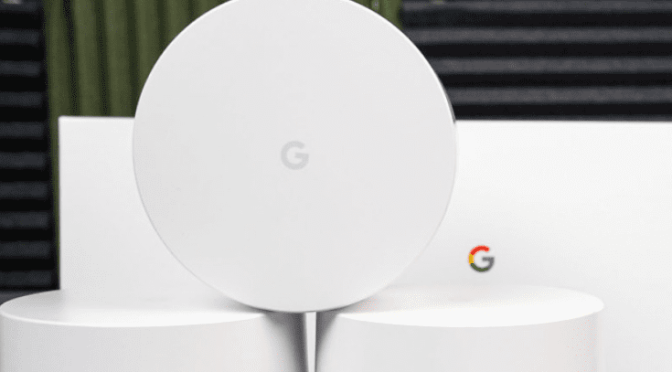
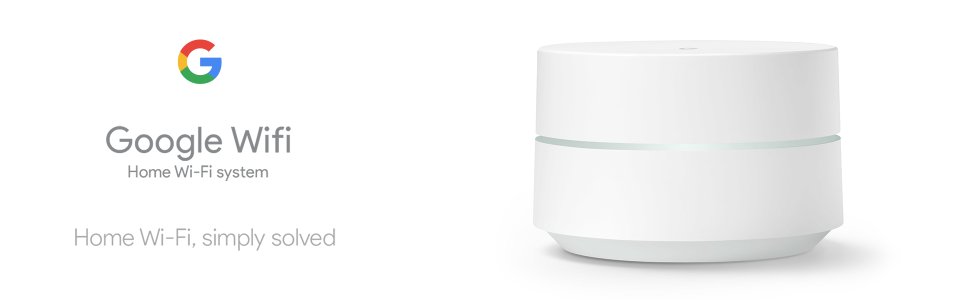
Lots of companies make wifi mesh products: Google, Orbi, Linksys, TP-Link, AmpliFi, and more. After lots of analysis paralysis, comparing lots of options, and making spreadsheets, I narrowed it down to Google Wifi and Orbi. You can usually buy a wifi mesh with just one unit or in packs of three. For the size of our home (3k+ Sf and 2 floors) we needed a 3 pack.
Since I have a long history of using Google products and we’ve always been satisfied with them, and since the price for a 3-pack from Google was lower as well (Google $280 vs Orbi $300), we went the Google route. Yes, $300 is a bit of an outlay, but I’m telling you that this product is worth it. Also remember, if you don’t have a large home you might be able to get by with just a single unit (which run closer to $125/unit). Yes, it’s a shame we can’t get the service we are paying for from our internet service provider, but that’s life and the Google Wifi Mesh IS a solution that works.
The setup could not have been easier — it was essentially plug-and-play.
The results were instant – great coverage everywhere!
We’re paying for 100/100 speeds from Frontier but prior to using the mesh, it was hard to get them at any distance away from the router. Now with the Google Wifi Mesh we’re consistently around 95/95 up/down speeds anywhere in the house. Streaming is now fast and instant – no more buffering!
The additional features of the system via the Google Wifi App for your phone are really EASY to use and offer great options. You can…
Prioritizing a device.
Use family mode to control kid’s devices.
Have a separate code for guests.
Running a network check to see if/where you may have problems.
You can even control other devices on the Google Home network if you add those as well (for example the Nest Therm, etc).
How to Buy Google Wifi
You can buy Google Wifi from lots of places: The Google Store, Best Buy, and more.
Here are a helpful link to find Google Wifi on Amazon:
Editor’s Note: We are a participant in the Amazon Services LLC Associates Program, an affiliate advertising program designed to provide a means for us to earn fees by linking to Amazon.com and affiliated sites. It’s worth noting that I only use affiliate links for products that I actually pay for and use myself and that honestly believe will be helpful to you too. To learn more, please visit our Transparency Page.
What’s the Bottom Line?
The Google Wifi Mesh is a great price for getting wireless coverage for your entire house.
Did you enjoy this article?
If so, take a quick sec and…
Share this page with a friend so they can benefit too
Share your wisdom – did you have a similar experience or great photo to share? Drop me a line below and tell us about it.
Follow my blog and let’s stay connected – we can help each other reach new heights.
Summary: Save time (and money) with Google Keep’s Voice Transcription Capabilities and File Sharing
As always, my goal is to share practical wisdom you can use to make life easier. Here are a couple more tips…
Use Google Keep as your voice recorder and save time because the file can be instantly exported to a Doc/Word file with no file conversion time (ah, that’s huge).
Additionally, you can capture all these voice memos to your heart’s content and they’ll be instantly available for follow-up on all your devices.
My Dilemma: I Found Myself in Need of a Voice Recorder.
Like you, I am always on the lookout for ways to increase my productivity. I have a lot of drive time at work (often four hours per day or more) and to make the most of it I listen to lots of podcasts.
We probably listen to many of the same ones (Ferris, Robbins, Goins, etc) and that’s all well and fine, but what I found is that just passively listening to these recordings was doing myself a great disservice — there’s a lot of wisdom being shared by these thought leaders, yet I wasn’t retaining enough of it so I couldn’t take action on it later and actually benefit from the knowledge.
Taking handwritten notes while driving obviously wasn’t an option, so I looked into buying a voice recorder that would allow me to capture tidbits and ideas I could follow-up on later. Unfortunately, I didn’t like what I found…
The Problem with Voice Recorders
Minor: They are expensive: $50–100 or more depending on the features you want.
Minor: You can’t see what you recorded during the process.
Big: You take extra time to download/convert the voice file to a word/doc file.
BIG: Voice recording is all they do.
Enter Google Keep
Just in case you are not familiar with Google Keep…
It’s marketed as a note taking app.
It’s not new (it was launched 2013), but not a lot of people I know use it. Sadly, Google Keep is often overlooked in favor of other more ‘robust’ apps like Wunderlist, Evernote, and others. While those other task tools may be more powerful than Google Keep, I found that I didn’t need all their extra features, didn’t want to pay for them, and didn’t want to invest the time necessary to learn them. I just wanted something that works and “G-Keep” hit the mark for me.
What’s great about Google Keep for new users is that it has an easy to understand, minimalist interface, and that means pretty much a zero learning curve.
Although it’s considered a minimalist app, G-Keep is a little beast that offers a set of powerful tools that make it a super effective for reminding you to get things done. You can use Keep to create lists, store pics/files/more, collaborate with others on action items, and much more.
Here’s what I was already doing with Google Keep
For years I’ve been using Keep to create a series of ‘to do’ lists (shocking, I know). It’s very effective for this purpose and what’s great is that my lists are automatically shared between all my mobile and home devices. As we speak I currently have 7 widgets on my phone and 10 active lists. These include work reminders, home projects, shopping lists, voice recording notes, my 3 to Thrive lists from my SMART Morning Routine, reminders on wisdom tips I want to share with my sons, blogging ideas, and more.
I use the G-Keep Android widget to SHOW my to do lists on various home pages of my phone so that I have them ‘always up’ and thus always on my mind. This lets me SEE the tasks so I can be reminded to DO them.
I use the checkbox feature on G-Keep to turn my to-do lists into action items so they are easy to remove from view once complete. You can also use G-Keep in paragraph form for standard notes — for example when you are doing the voice recording.
As shown in the pic, you can use G-Keep similar to Evernote or Dropbox and store files and share them with others. I work in the medical field and there’s a lot of complex terms, etc to remember…
But what about the Voice Recording?
This is something I only recently discovered with G-Keep as a capability. Now obviously it’s not rocket science and maybe you already knew this, but honestly it was new to me (wait, maybe I shouldn’t I admit that).
Specifically, when I found myself in need of a voice recorder, rather than buy yet another device, I tried using G-Keep as my de facto voice recorder in lieu of getting a dedicated one — it exceeded my expectations for this purpose!
G-Keep is an effective speech-to-text voice recorder.
Suddenly all that podcast wisdom had a place where I could capture it…and easily follow-up on it later. My 4+ hours of drive time was no longer a chore — dare I say I began looking forward to it? (Well, let’s not go that far).
G-Keep is easy to use as a voice recorder. If you know how to type a text, then you already know how to take a note in G-Keep. Additionally, if you know how to push the microphone button on your text keyboard, then you already know how to take a voice-to-text note in G-Keep. Like I said, there’s no learning curve!
Also G-Keep is free — you don’t have to spend money buying a dedicated voice recorder. (Send your donations to The Human Fund please — you’re welcome, George).
Key Features of Google Keep for Speech-to-Text Usage
You can use G-Keep in hands-free mode while driving. (Thanks to its integration with the “OK, Google” Assistant). Just say “OK, Google…Open Google Keep.” Then speak your note.
Using G-Keep as your voice recorder means you don’t need to carry around yet another device.
G-Keep will save you tons of time because it automatically transfers all your speech-to-text notes to your other devices. As soon as the note goes in G-Keep it’s available on all your connected devices (phones, tablets, Chromebooks, Mac, etc).
G-Keep can save you even more time because all your notes can be instantly converted to Google Docs/Word files. You don’t have to do any extra steps (for example if you used a traditional voice recorder, you’d have to possibly convert the file format, download it yourself, etc). With Keep it’s already done. Print your voice notes out, send them to someone else, etc. It’s so easy.
Was this quick tip helpful?
Hey, I realize we’re not splitting the atom here, but I’m hoping that my tips do make a difference for you — even if it saves you 15–20 minutes, that’s more time to spend with your family, right?
If this tip helped you I’d invite you to take action by doing one or more of the following:
Share this page with a friend so they can benefit too
Share your wisdom – drop me a line below so I can learn from you.
Follow my blogand let’s stay connected – we can help each other reach new heights.
Let’s talk again soon!
Practical Wisdom YOU can use today to make a difference in YOUR Life












 HD Pro Tip: Try a













 As always, my goal is to share practical wisdom you can use to make life easier. Here are a couple more tips…
 Just in case you are not familiar with Google Keep…

 That Helpful Dad