Category Archives: Money, Career, and Finances

How to Cut the Cord and Ditch Cable for Good. Tips on online tv streaming providers like Direct TV Now, Fubo TV, Hulu Plus, PlayStation Vue, Philo, Sling TV, YouTube TV, and more

13 Tips to Get People to Open Your Emails AND Respond

Email is great IF people actually OPEN your emails…

Email is a great way to communicate with customers and Email Marketing as a strategy continues to be one of the most effective ways to attract, retain, and build relationships with long-term customers, but unfortunately, email response rates often leave a lot to be desired because many customers don’t respond to the emails you send them and all too often you don’t even know if the customers are even opening your emails to begin with.

Open Your Emails

Email Overload = Low Email Open Rates and Even Lower Email Response Rates

Why don’t customers open your emails? Why don’t customers respond to your emails?

The answer to both these questions is fairly simple – just like you, your customers are super busy, just like you, your customers get tons of email (way more than they could ever read), and just like you, your customers are now using email tools that pre-filter ‘promotional’ emails (especially those sent from email marketing companies like Mailchimp, GetResponse, Drip, AWeber, and the like).

As a result, there’s a very real possibility that your email response rates are low because…

  1. That ‘perfect’ email you took so long to craft may never even be seen by your customer because it got filtered into a promotional tab.
  2. If your customer does happen to see the email, they may not recognize its value and instead just ignore it.
  3. Even if they do read your email they may not bother to reply.

All of these are bad options if you’re trying to build a business relationship with your customer.

So is there anything you can do to increase the odds your customers will open AND reply to your emails?

Thankfully, yes.

Increase Email Response Rates

The 13 tips in this article can dramatically improve your email response rates. Not only will more customers open your emails, but if you use these tips consistently more customers will actually respond to your emails too.

How do I know these email tips work?

Because like everything else i recommend on the Helpful Dad site, I’ve personally tested each one of these tips and I can assure you they work. I use them in my own businesses every day and they’ve helped me achieve consistent success with customer emails. They can help YOU too.

Where did these tips come from?

Just to be clear I didn’t invent these tips nor and I taking credit for them – there are a variety of sources for these ideas and I’ve listed them in the references at the end of this article).  As with much of the knowledge on this site, I’ve curated this wisdom and packaged it in easy form for you to use. I’ve collected a LOT of email tips over the years and what you’re reading here is a whittled down list of the email best practices that have consistently worked for me to get people to open my emails and respond to them. Put these email tips to the test yourself and let me know your results.

13 Tips to Get Your Emails Opened

Get People to Open Your Emails Tip #1 – Avoid the ‘promotion’ filter of your customer’s inbox.

To do this, try sending ‘plain text’ emails.

Take a look at these emails – one is ‘html’ and the other is ‘plain text.’

Yes html emails look nice and pretty and the plain text are less fancy (minimal formatting, no pics, etc) but the fact is that plain text emails don’t get filtered as much as HTML emails.

Filtered emails = not seen emails.

Emails not seen = game over before you even started.

Get Your Email Opened Tip #2 – Where possible, avoid mass emails and send each email directly to ONE customer at a time.

If you must send email to multiple people, try keeping the group small (say 2-4 people). Generally, I only send emails to single customers (because of my #1 most effective tip below which, for some strange reason is actually #4 on my list?), but if I do combo emails I make sure it’s to customers of the same company.

The more you increase the group, the greater the chance that your email won’t get opened because…

When people see other names on the distribution list they will often ‘defer action’ to someone else in an effort to save time themselves.

Another way of saying this is – they don’t open your email because they figure someone else on the list will. Thus they save time for themselves.

Get People to Open Your Emails Tip #3 – How to Avoid Corporate Intranet Filters.

As much as possible (and especially for introductory emails to new customers) try to avoid sending attachments.

All too often corporate IT servers seem to filter out emails with attachments as a way to prevent an email virus from infecting their networks.

Don’t take the risk your email gets quarantined to the Land of the Unknown Email.

If you have to send an attachment, establish the connection with the customer first, get their buy-in that they actually want the attachment, and then ask for the best way to send it to them.

Find out from your customer is attachments allowed by their corporate email filter, if so how can you avoid the filter, and if something like  Dropbox or Google Drive share a better alternative, etc?.

Get Customers to Open Your Emails Tip #4 – Use the Power of the SUBJECT LINE

This is actually my #1, most important, if-you-do-nothing-else-do-this tip. (I don’t know why it’s not listed first – perhaps because I like the number “4” best?)

In any case, this single tip has increased my own email response rate by at least 10x!

And it’s so simple…

Instead of writing generic, easy to overlook subject lines, write a compelling, action-oriented subject that (and this is the super-important part) starts with the customer’s name.

That sounds so obvious on paper, but yet 99% of people writing emails don’t do this put their customers name in the subject line. That’s a shame, because if you put the customer’s name in the subject line, that alone will get more people to open your emails.

Let me give you some examples…

Blah Subject Line: “Contract Options for Your Review”

Better Subject Line: “Attention: New Widget Contract Choices (Action Required)”

Best Subject Line: “Jim: New Widget Contract Options (Feedback Requested by Friday)”

Which one of these emails do you think Jim is going to open? Which would YOU open if you were Jim and your job was dealing with Widget contracts for your company?

I’ve used all of these email subject lines in my career and I can tell you that email #3 is the one that gets opened way more than the other two options combined.

Let’s analyze email #3’s subject line again…

Jim: New Widget Contract Options (Feedback Requested by Friday)

What makes this a good email subject line?

  1. The email subject line is specific to “Jim” so Jim knows it’s for him – that alone will increase the odds the email gets opened. (BTW I like to use first names whenever possible to establish long-term rapport and because (as Dale Carnegie says) ‘the sound of someone’s name is the most beautiful music to that person’, but if you can’t do that for some reason then full/formal names also work).
  2. This email subject line uses the word “New” which is a hook that generates interest and leads to people wanting to open the email to see what’s ‘new.’
  3. The email subject line clearly identifies a product (in this case “Widgets”) and assuming that Jim is interested in Widgets, he’s likely to open the email.
  4. The email subject line briefly details the main content (in this case ‘contract options’) and again assuming Jim is interested in new pricing options for his Widgets, he’s likely to open the email.
  5. And finally, the email subject line lets Jim know that not only is his ‘feedback’ requested (making him feel important) but his feedback is needed by a specific day (Friday).

What’s all this add up to? When Jim scans through his mass of emails for the day, you’ve just made it very easy for him to hone in on an email that is specific to him, has clearly identifiable content that (presumably) interests him, and requires his action by a certain day (pro tip – try to make the action day within the same week to create a sense of urgency).

The result – more of your emails get opened.

How do you know if someone opens your email?

This is a bit of a side tip – ever since Outlook made it harder for us to get an “Email Read Receipt,” it’s become more difficult to know when someone actually opens your email. Thankfully there are tools that can help you.

I use one called “Mailtrack”  – it’s a free service that has been a worthy replacement for the Outlook Read Receipt function. The only caveat is that Mailtrack is exclusive to Gmail – if you can live with that parameter you’ll love it.

So now that you are getting people to open your emails, how do you get them to reply?

Tip #5 – Be Brief, Be Brilliant, and Be Gone = Get More Email Replies

Emails are not a place to write your next book (something I’ve often been guilty of since I love to write), but there’s a concept called “TLDR” which stands for ‘too long, didn’t read.’ THta’s a killer when it comes to emails.

Email View or Not View

TLDR – Email Not Read = Email Not Responded to.

Remember, your customers are busy.

Think of your email recipient like a little squirrel – you’ve got a nut, you’ve convinced the squirrel to take a step towards you, he’s interested, when he gets near, don’t drown him with a bucket full of nuts, just give him the little one he wanted.

The same holds for your email – you got the customer to open it, don’t overwhelm them with a 10 paragraph, single-spaced manifesto. Just give them the bite-sized version.

Your email should be easy to digest, short, and easy to see what action is needed by them so that it is easy for them to respond to.

Tip #6 – BLUF leads to more people responding to emails.

BLUF stands for ‘bottom line up front.’

Remembering that your customer is busy, help them save time (and increase your reply rate) by putting the action you want them to take in the very first line of your email.

Although you may not want to hear this, realize that…

Even IF your customer opens your email, they may only read the first line before deleting it or ‘saving’ it for another time.

Knowing this, make sure they read the single most important thing you need them to do/know by putting it that first line of your email.

Hopefully, that first line will compel more people to read your email beyond just the first line, but just in case they don’t you’ll at least have gotten them to see what your email ‘ask’ is and then you’ve put the ball in their court.

Tip #7 – Use Bullets to Get People to Respond to Emails

Don’t expect your customer to read your entire email.

  • Recognize they are likely to just scan it (much like you are probably doing to this article – are you even reading THIS line? If so put a comment below).
  • Put your important points in bullet format to draw attention to them.
  • This is especially important for the email body (the part that your customer is least likely to read – kind of like this section of my article).

Get People to Open Your Emails and Get Them to Respond Tip #8 – Establish Credibility

Establish Credibility with your Email Customers.

This one is really important for customers you don’t know well, initial introductions in emails, or when you’re trying to set a meeting at a conference you’ll both be attending.

Let the new customer how you know them (for example, “I was referred by Mr. MaGoo” and then put “Mr. Magoo” in the “CC” line of the email.  Naturally you will have already confirmed with Mr. Magoo that you can reference him).

By putting the mutual reference in the email by name, when the new customer you are trying to connect with sees the name of someone they know (Mr. Magoo) AND sees that Mr. Magoo is in the CC line this makes your credibility skyrocket.

This technique dramatically increases your email reply rate because the customer also feels a sense of ‘obligation reply’ to the mutual reference.

It’s a powerful tool so don’t abuse it.

Bonus Tip –  if you’re both gonna be at a conference, reference that event to validate yourself and use that as a SMART goal opportunity for a live meeting – another winner.

Tip #9 – Remember The “Smartphone Preview” to Get People to Open Your Emails

Most people read email (first) on their mobile devices. Emails on mobile look a lot different than on desktops/laptops.

Space is smaller so long emails become super looooooooong. Long email thus get nixed, which means long emails have less chance for a reply.

If you really want to make it easy for people to open your emails and to respond to them, try to keep your email bodies “mobile-view friendly.”

Tip #10 – Setting Simple, Clear Expectations for a Reply = More People WILL Reply to Your Email.

If you already have a good relationship with a customer and your email requires a response, give them a courtesy ‘heads-up’ that you’re sending them an email AND expecting a reply.

Again people are busy – that doesn’t mean they don’t want to help you, just that…

They may not realize you want a reply.

Make it easy for them to reply to your emails.

Send your customer a quick text, give a call to their admin, or find another way (LinkedIn, hallway chat, etc) to ensure they understand you’re expecting a reply to your email.

Don’t yet have a good relationship? Connect with them on LinkedIn (with a personal message as part of the connection) and once they accept your connection invite, then send them a brief note via LinkedIn messaging about why you connected and that you’re sending them a win-win email that would benefit them to reply to.

These first 10 tips will make more people open your email AND make it easy for people to reply to your emails. That’s great, but how do you take your Email Game to the next level?

Increasing Email Response Rates – The Next Level

Tip #11 – Make it easy to meet. 

You want to set up a time to talk? Whether you want to chat by phone, do a webex, or meet live, the worst thing you can do is close with a blase offer like ‘if you’re interested let me know when you can talk’ or something similar.

Instead, (and I’m gonna beat this drum again) remember your customers are busy, so…

Make it easy for them by offering them date/time suggestions upfront.

Here’s an example…

“What’s a good time to [chat/meet/etc]? Would Monday, May 1 at 4, or 5 pm EST work? How about Wed May 3 at 10 or 11 am EST? If not suggest a day/time that works for you.”

Using this tactic speeds the process up because it removes the guesswork and rather than make the customer do the work of finding the time to meet, all they need to do is check their calendar to see if one of your suggested times will work.

Tip #12 – The Best DAY and TIME to send Emails

Timing is everything in the world of email overload. If you’re trying to break free of the email clutter…

Send your emails at times when your customers are most available to read them.

Good times to consider are…

  • When are they on Social Media and in ‘work mode?’ In my business, it’s Sunday Evening as they get ready for the work week so a brief, action-oriented email sent at this time gets great response rates.
  • Other times during the week that work well are mid-morning (after they’ve had a chance to settle into the day) or mid-afternoon (after lunch but are not yet in ‘go-home’ mode) – both are great times when people check emails.
  • I also try to avoid Mondays (people are usually too busy) and Fridays (people just want to clear their desks and focus on the weekend).

Email Tip #13 – Update Subject Lines During Replies To Avoid Email Conversation Views.

A great way to get your emails lost in the shuffle of email filter tools is NOT to update subject lines – don’t let that happen to you. Instead…

  • Remove those “RE” and “FW” identifiers – they only create clutter and are sure-fire bundle targets.
  • Be sure to modify the subject line in some way to make it stand out and not get bundled in ‘conversation view’ emails because bundled emails = lost emails and lost emails = emails not replied to = lost business.
  • Change subject lines as the needs of the conversation changes – put new actions first, note important dates, or better yet make a whole new email (using these great email tips of course!).

Get People to Open Your Emails AND Get them to Reply  – The Bottom Line

Use these 13 tips and you’re pretty much guaranteed to get more people to open your emails and more importantly get them to reply to you.

These email tips worked for me and they can work for you too. And when they do help you get more people to open and reply to your emails  be sure to let me know.

Now go forth and start hitting ‘send’ with more confidence that someone is actually listening!

References – Increase Email Response Rates

References:

  1. https://optinmonster.com/is-email-marketing-dead-heres-what-the-statistics-show/
  2. https://www.prontomarketing.com/2018/01/13-tips-for-effective-email-marketing/
  3. https://www.martechadvisor.com/articles/marketing-automation-2/rethinking-email-marketing-effectiveness/
  4. https://digitalagencynetwork.com/email-marketing-still-effective-strategy-2018/
  5. DreamIt Email Tips Video

Want More Tips Like This?

My blog is focused on providing ‘practical solutions’ to real life problems. If you want to make sure you never miss a tip AND get some cool freebies in the process, be sure to subscribe to follow me.

Let’s talk again soon.

~Michael


10 Things to Consider BEFORE You Cut the Cord – Cord Cutting Tips

Are you considering cutting the cord and looking for tips on how to stream live tv online with a streaming service like Sling, DirecTV Now, Hulu Plus, etc.? If so, this article can help you because we’ll discuss 10 important considerations you need to think about BEFORE you cut the cord, such as…

  • How to watch LOCAL news and sports?
  • Is having a channel guide important?
  • Do you want a DVR?
  • And much more.

Pin Me to Save for Later

Editor’s Note: This article is one of a series of articles in our Guide to Cord Cutting Series – if you’re serious about cutting the cord, be sure to subscribe to our blog and pick up your free copy of our Step-by-Step Guide to Cord Cutting – visit the home page to learn more.


Cord Cutting Tips – 10 Important Considerations

If you want a tv streaming experience that is as close as possible to watching cable tv then you’ll want to be able to watch LIVE LOCAL tv, right?

If that’s important to you then you should know…

Not every online tv service provider offers live LOCAL tv and even if they do, they may not offer live local tv in YOUR area or they may not offer ALL your local channels.

You need to know this going in.

What local channels (NBC, CBS, ABC, Fox, etc) are most important to you?

Which ones are offered on the various streaming services?

I suggest you make a chart as you go through your options.

Remember, if you care about your LOCAL NEWS and LOCAL SPORTS teams, you’ll need to be able to watch your local channels. And unless you plan to try to do this over the air with a separate antennae (easier said than done and quite frankly a bit of a pain), then you’ll need to know what the cord cutting companies offer.

This is one is the most important questions in my opinion yet it’s also the one most often overlooked AND some streaming companies make it hard to figure out.

Be sure to get a copy of my Step-by-Step Guide to Cord Cutting so you can learn even more about which Streaming TV Providers offer the best local channels in your area.  In this regard, there is a BIG difference in what’s available from each company.

You may also want to check out the following VIDEO TIPS on the topics of How to Stream Live LOCAL Sports and How to Watch Live LOCAL News.

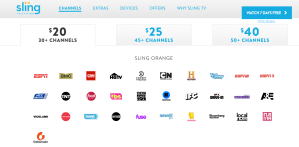
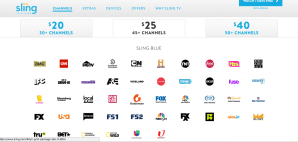
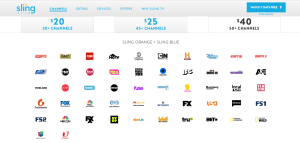
I think this is a bit obvious, but just in case let’s talk about the fact that each of the different streaming tv service provides (Sling, DirecTV Now, etc) all have different channels available in their various channel packages.

Some, like Hulu, Philo, and YouTube TV offer just 1 option and that includes basically all the channels they offer. Others like Sling, DirecTV Now, PlayStation Vue, and FuboTV have multiple channel package options with varying degrees of customization.

It’s also important to note that not channels are in every package.

Let me give you some examples.

  1. If ESPN or NFL network is a big deal, you’ll have to ensure the package offers it – but not every provider offers these networks.
  2. Same goes for kids’ networks – my son ‘has to’ have Nick Jr. Unfortunately Nick Jr is not on most of the packages so that really limits me.

One of the benefits of reading my Step-by-Step Guide to Cord Cutting is I save you time by giving you the links you need to see what each online tv streaming service offers.

Here are a couple video tips to help you: How to stream the NFL Network and NFL Redzone and How to watch Kid’s Networks online like Boomerang, Cartoon Network, Disney Channel shows, and the Nickelodeon networks.

Is having the ability to record content on a DVR important to you? If so, then you should check to see what streaming services offer this AND if there is an extra fee to have it.

Additionally you’ll want to know…

  1. If you can fast forward/rewind while watching your recorded shows (not all of them let you do this, particularly when it comes to commercials on certain shows).
  2. How many hours of storage you have. Some only give you 20 hours, some give you UNLIMITED storage.
  3. How long you can keep a show for ? Some streaming tv service provides limit your DVR saved content to < 30 days, others give you unlimited storage time.

BTW, I review all these in my Step-by-Step Guide too.

What’s the library of on-demand tv shows and movie content like? Do they even HAVE an on-demand library?

Can you fast forward or rewind on-demand content?

Are you locked into watching commercials? (That sucks!)

Just how many commercials does the average on-demand show have?

Think having to watch commercials during an on-demand show isn’t a big deal?

Think again — when my wife and I watched an Anthony Bourdain show on Direct TV Now’s On-Demand service from CNN…

There were 7 required-to-watch, non skippable, commercial breaks with 6-8 15-30-second each commercials for all 7 breaks for a show that was less than 1 hour.

Worse yet it was the same commercials every single time!

It was so ridiculous we couldn’t watch another on-demand episode.

I’d call that a problem, wouldn’t you?

How many simultaneous streams (i.e. how many tvs?) can you watch the streaming tv programs on at the same time?

Some allow you just 1 stream, some up to 5. Sometimes you can get more streams if you pay an ‘add-on’ fee. Sometimes is also depends on which plan you have for a specific streaming tv service provider.

For example Sling Orange (most basic plan) gives you just 1 stream, but Sling Orange + Blue (highest plan) gives you 4 steams. DirecTV gives you 2 streams to start but you can pay $5/month and get a 3rd stream. PlayStation Vue gives you 5 Streams.

If you don’t want to do the research on your own, I review them all in my Step-by-Step Guide to Cord Cutting to make it easy for you. You can download this guide from my home page or you can watch it in VIDEO form here…

6. How will you access the streaming tv app? Do you have sufficient internet coverage for streaming?

With cable tv you use cable boxes, but with streaming tv service providers you’ll use their app. In order to access the streaming tv app, you’ll need to download it either to your Smart TV’s Smart Hub or more likely to a Digital Media Player (DMP).

● Popular DMPs include Amazon Fire Stick, Apple TV, Roku, etc.
● I’d be cautious on relying on just your Smart TV interface as not every streaming tv service provider’s app is compatible with all smart TVs.
● You’d be much better off just getting a DMP for each tv if you can since the streaming tv apps are usually created/updated specifically for DMPs.

Here are a few of the more popular Digital Media Players – my favorite is BY FAR the Amazon Fire devices (I have multiple Fire Sticks and the Fire TV), but the Roku and Apple TV options are also very popular.

The Amazon Fire TV Stick is a low-cost, awesome way to cut the cord and access the tv streaming service provider apps. It is my go-to choice.

The Amazon Fire TV with 4k Ultra HD is the same as the Fire Stick but with the addition of 4k viewing (for shows/networks that offer 4k).

The Amazon Fire TV Cube give you the ability to combine the Fire TV with an Amazon Echo and an IR blaster for your remote so you may be able to control your TV, receiver, etc from one device.


Apple TV 4K – 64GB

Don’t forget about ensuring you have adequate Internet Speeds AND Coverage Throughout
Your House.

Remember you still need the internet in order to stream tv online. You’ll also need an adequate internet speed.
● Your speeds could be as low as 50/50 Mbps if you only have a couple tvs, but if you have a large family, have lots of tv/tablets, etc, then you’ll probably want 100-200 Mbps to be safe.
● CHECK YOUR CURRENT SPEED: http://www.speedtest.net/

Will you also need a Wifi Mesh to help maximize your internet coverage?

Let me make this very simple for you – if your house is > 1500 sf and/or you have lots of tvs/tablets you want to stream on then do yourself a favor and get a wifi mesh.

Personally I use the Google Wifi Mesh – it’s awesome, setup was super easy, and since we installed it we’ve haven’t had a single ‘buffering’ problem even while streaming on 5 devices at once in a 3k sf home.

Here’s a review I wrote about Google Wifi if you want to learn more…

https://thathelpfuldad.com/product/google-wifi/

7. Can you add Premium Channels like HBO, Showtime, etc? What if a specific channel is missing from the streaming tv provider?

Additional original programming is also on other premium channels like HBO (Game of Thrones, Westworld, Curb Your Enthusiasm, Ballers, Veep, and more), Showtime (Homeland, Shameless, Billions, Ray Donovan, and more), and other premiums, but unlike Netflix, Hulu, and Amazon Prime, you should be able to add these premium channels directly WITHIN your streaming tv provider app (or if you have Amazon Prime you can add it as a ‘channel’ there too).

As a result, premiums are considered simply additional channels within your streaming service app overall.

BUT, not every streaming provider offers all the same premiums. Also, the cost for these premiums varies by providers too so it pays to shop around.

In addition to premiums, you also need to consider what  happens if a particular channel is not available in any of the packages you’re looking at?

Don’t let this stop you from cutting the cord, if a specific channel is missing, you can look into the potential to add a specific channel (for a small fee) to your online streaming tv interface (for example you may be able to add add CBS, Boomerang, Akorn TV, etc as single add-on channels to your Roku, Amazon Fire, or Apple TV accounts).

One benefit of using the Amazon Fire devices is that you can add premium channels like HBO and Showtime as ‘standalone’ channels within your Amazon TV interface so you can access them individually whether you have a major streaming tv service provide or not. It’s super easy to add (or delete) a channel from your Amazon Video account.

That Helpful Dad’s Tip: why pay for HBO all year if you just want to binge-watch Game of Thrones? Instead add the HBO channel on Amazon Channels, binge-watch the series for a month or so until you finish, and then cancel the channel until the series comes on again: Cha-ching – money saved!

Here are 4 examples of how Amazon Channels can help you find specific cord cutting options..

Pretty much every cord cutting company offers a free trial, but some offer longer periods, unadvertised promotions (for a month or more) that you either have to ask for or that you can get as part of promotions when you buy something (for example YouTube TV offered a 2-month free trial when you bough a Pixel 2 XL on Verizon). Best Buy and Groupon often have promo code incentives like this.

There are also other sign-up bonuses like free Apple TVs, Roku’s, Amazon Fire Sticks, etc.

These deals frequently change so pay attention to what’s available. You can find all the basic promos directly on the streaming tv service providers websites with the links provided in my Step-By-Step Guide to Cord Cutting.

If you’ve watched cable tv all your life then this is an important one. Questions to ask are…

  • Is there an easy to use channel guide?
  • How easy is it to find your favorite channels?
  • How do you navigate through the user interface to find content?

This may or may not be a big deal to you. If you tend to know exactly what you want to watch before you watch, then most of the cord cutting user interfaces will work for you, HOWEVER if you like to channel surf or look at a traditional ‘cable-tv’ style guide, then this could be a huge problem.

Case in point, I love the streaming content that Hulu with Live TV provides but the lack of a traditional guide made it so hard to browse content that we had to cut the cord on Hulu because it was just too difficult to use.

10. Know how much you can save with cord cutting before you take the plunge to ensure it’s worth it for you.

Before you go through the process of cord cutting, I recommend you first determine how much you might potentially save and see if that amount is worth your while to pursue.

In my Step-by-Step Guide to Cord Cutting I’ll walk you through this in detail and provide examples, but if you want to do a quick test just…

Look at your current cable bill and find out how much you are paying for internet only. If your under a bundled plan multiply the price by 1.25 (because you’ll lose the bundled discount.

Determine the cost of your new streaming tv service package.

Add parts 1&2 together.

Subtract the answer to #3 from your TOTAL current cable bill.

The difference is your potential savings.

After cutting the cord, I’m personally saving around $80/month, but I have LOTS of friends saving $100-125/month as well.

The big question for YOU is ‘how much is enough of a savings for you to cut the cord and ditch cable?’ $80? 50? 25?

Once you know your break point, you’ll be more inclined to take action and cut the cord.

Good luck!

~Michael

Helpful Links

What to Read Next?


Pin Me * Share Me * Save Me


https://thathelpfuldad.com/cord-cutting-how-stream-live-tv/

10 Reasons to Switch to Google Fi as your Wireless Carrier – Google Project Fi Review

Google Fi – Save Money, Be Happier

I’ve been using Google’s Project Fi (AKA  just Google Fi) now for over 2 years. My average monthly bill is around $30 (incl taxes). In this article I’m going to give you 10 reasons why YOU should consider switching to Google’s Project Fi as your cell phone carrier. Trust me, once you give Fi a try, I doubt you will go back.


Editor’s Note: I am a real consumer of Project Fi not a paid supporter. I honestly do believe in the service. That said, when I share a link to Project Fi’s homepage it is a Referral Link which I hope you will find to be a win-win, because if you sign up for the service, after 30 days of being active we BOTH get a $20 credit. Pretty cool, huh?

Here’s a direct link to the offer if you want to learn more. 

10 Reasons to Switch to Google Project Fi

1.SAVE MONEY.

Since most people nowadays rarely bother to read an entire blog post, I’m starting with the most important reason first.

Switch to Google Project Fi and I’d wager you’ll save a nice little chunk of change.

The average bill for my phone with Verizon Wireless was over $60 a month – that was on a family plan that was supposed to be saving me money and even included a 22% employer discount. It was a fairly basic plan with unlimited talk/text and I averaged 1GB data or less per month. Can you say “screw-job?” Yeah, that’s what I thought too, so I decided to try Google Fi.

So what’s my average bill with Google Project Fi for similar coverage (unlimited talk/text and 1GB data)?

$29 – inclusive of all fees.

I don’t think it takes a math whiz to realize which one is the better deal.

2. GET REFUNDS ON UNUSED DATA

What’s better than rollover data?

How about getting an actual refund on the data you don’t use?

It’s pretty much a flat fee of $10 per GB, but the catch is that with Google Fi you only pay for the data you actually use and get a refund on what you didn’t use.

How’s that for consumer friendly?

3. BETTER COVERAGE INSIDE BUILDINGS

My job takes me inside a lot of big buildings (hospitals, hotels, etc) for extended periods of time. With Verizon I was always frustrated to be without service on many an occasion. My colleagues with AT&T, T-Mobile, etc also seemed to have similar issues.Since I switched to Google Project Fi this hasn’t been an issue.

Why? Because as long as you can connect to wifi inside, you’ll have coverage. And with so many places having wifi now, this make connecting easy.

4. A COMBO OF WIFI AND CELL TOWERS

What makes Google’s Project Fi unique is that the coverage for your service is provided by a combo of WiFi and cell towers owned by a variety of carriers.

The benefit of this is that your Google Fi phone will automatically switch back and forth between WiFi or cell towers to provide you the best network coverage – it’s silent, seamless, and happens without you even knowing.

This means less dropped calls and better coverage overall.

Google’s massive scale also means you don’t have to worry about having every WiFi password stored in your phone to connect – Google has an ever-growing list of (public) WiFi networks coded into your phone’s service so you’ll phone connects to many of them automatically.


5. INCREDIBLE INTERNATIONAL DATA “FOR FREE!”

That same $10 per GB you paid for in the US also applies in 120 other countries for no additional fee.

This is simply amazing if you travel internationally even a couple times a year.

With Verizon I used to have to pay $2 per MB or else call them and add a crappy little temporary international plan for either $10/day or an extra $40 a month (for a generous 100MB of data and 100 mins of talk and 100 texts) – gee thanks, Verizon.

With Google Fi there is no need to call or notify them to get access to their international plan because all their plans include international coverage. That means you don’t have to fear international roaming charges so long as you are in one of the 120 counties on the list.

Just use your phone like you do in the US – what could be simpler?

6. GOOGLE USERS UNITE

Assuming you have a google account already (perhaps for your gmail or YouTube usage), then you basically already have a Google Project Fi account since Google Fi is simply an extension of your already existing google account.

This allows you to manage everything with one google account.

Again simple.

If you are one of the few people in the world who somehow doesn’t have a google account, signing up is easy, quick and simple – just click on that login button in the top right hand corner of your Google search page and join the rest of us.

7. SAVE EVEN MORE IF YOU DON’T WANT DATA.

If for some reason you don’t want data, that’s A-OK with Google Project Fi.

Believe it or not, you’re actually allowed to have a plan with Google Fi ex-data if you so desire.

That puts your bill down in the $20/month range and could be perfect for your elderly friends and family who just want talk/text.

Try doing that with Verizon or another carrier!

8. LOW RATES FOR INTERNATIONAL CALLING

When you call another country from the US, (depending on the country you call), average rates are in the 1-4 cents per minute range. Awesome!

How about when you call the US from another country? Once again you’ll enjoy low rates with Google Project Fi. If you’re calling over wifi, those rates are often in the 4cents/minute range (as it was for us while travelling in South Korea recently).

Wifi not available? Need to call over your cell network while in another country? You’ll be looking at approx 20cents/minute – that may not sound as awesome, but keep in mind there are no roaming charges either. Ahhhh…

9. NO CONTRACTS

You heard me right.

With Google Project Fi, you do not have to sign any contract.

Not happy? Leave.

No early termination fees.

No hidden fees.

Nothing to come back and bite you later.

Once again, consumer friendly.

10. USE YOUR OWN PHONE

Admittedly, this is the only one that could be a bit of a problem for some people.

While it’s true that you can indeed use your own phone with Google Project, that phone must be compatible with the Google Fi system.

As of this writing that list is very short and includes only the Pixel and Nexus lines and a few Motorola and LG models.

You can view the current list of all Project Fi eligible phones here:

https://fi.google.com/about/phones/

Is this requirement a big deal? Obviously it could be – especially if you are an Apple fan. Personally I’m an Android guy and have been for some time.

I used to be a Samsung guy before I switched to Google Fi, but a couple years back I gave the Nexus 6P a try and it ended up being the best phone I ever owned. Currently I have a Pixel XL.

Before switching to a  ‘stock android’ phone, I never realized all the bloatware on other phones. Now I could never go back.

The Google Project Fi phones are android-stock phones without bloatware. In addition, not only will you enjoy automatic system updates for your phone, but you’ll quickly discover that there are less bugs to worry about.

With my old Samsung phones I used to dread installing a new system update because it invariably meant problems while Samsung and Google worked out the inevitable bugs.

With Google Project Fi, I haven’t noticed a problem with any update so far because these updates are pretty much built with the Google Fi phones in mind.

And best of all, using a Google Project Fi phone means you also get first access to new Google updates  and exclusive features (for example, UNLIMITED STORAGE on Google Photos) – pretty cool, huh?

MAJOR UPDATE ON  PROJECT FI COMPATIBLE PHONES:

Google Announces that Project Fi will support Samsung, One Plus, and iPhones as well!

This means more users can benefit from the Project Fi Experience.

To learn more about Project Fi click here.

Google Fi – What’s the Bottom Line?

I’ve just given you 10 reasons to switch to Google Fi.

I can honestly tell you that since I switched Google Fi has exceeded my expectations.

I’d encourage you to learn more by checking out Project Fi’s Homepage and seeing if the service is right for you too.

If you liked this article, be sure to share it with a friend. Here’s an easy-share image>>>

More Google Tips


My Favorite Google Products

Get More Tips Like This


How to Stream NFL Network and NFL Redzone with DTVN, Fubu, Sling, PS Vue, Hulu, YouTube TV, etc

Cord Cutters – are you looking to find out how/where you can stream NFL games? I’ll show you which online tv service providers are the best choice if you’re looking to watch LIVE NFL GAMES on NFL Network and NFL Redzone. Before you switch to DirecTV Now, Fubo, Sling, PlayStation Vue, YouTube TV, or Hulu watch this video for important tips on which providers offer the opportunity to stream NFL Network and NFL RedZone.

Choose the right streaming service and you can watch NFL live streams, Sunday Night Football, NFL Network, NFL Redzone, NFL Live, Thursday Night Football on Amazon Prime, and Monday Night Football. Ready? Let’s go.


Check out our Complete Guide to Cord Cutting here:

1. Essential Guide to Cord Cutting VIDEO: https://www.youtube.com/watch?v=t9k6ZkbyabM&t=5s
2. Essential Guide to Cord Cutting ARTICLE: https://thathelpfuldad.com/cord-cutting-how-stream-live-tv/

Additional Resources:
Watch Live Local News Online: https://youtu.be/9natWVw6hPY
DirecTV Now Review: https://www.youtube.com/watch?v=K1LSntUSn-U&t=33s
Hulu Plus Live TV Review: https://www.youtube.com/watch?v=uxLyfV8Mhrg&t=11s
PlayStation Vue Review: https://www.youtube.com/watch?v=0wA56Q4Sib8&t=19s
Sling TV Review: https://www.youtube.com/watch?v=7hQsDvihkIs&t=13s
YouTube TV Review: https://www.youtube.com/watch?v=ks-qYM-DWTE&t=90s


Subscribe to Our Blog for some Helpful FREE GIFTS, including a 35-page Step-by-Step Guide to Cutting the Cord...

Get your copy now on our home page: https://thathelpfuldad.com/


Don’t Forget to Follow us on Pinterest:


PlayStation Vue Reviews, Tips, and FAQs

Are you considering making a switch to cut the cord and use PlayStation Vue as your live tv streaming service? If so, this article is for you. We’ll tell you the pro’s and con’s of using PlayStation Vue from a point of view of an actual user.

UPDATE: In November, 2019 Sony announced it’s plans to SHUT DOWN PlayStation Vue in Jan 2020 – effectively killing what was perhaps the best streaming tv app of the bunch. What a shame!

PlayStation Vue Review


Watch the VIDEO Review of PlayStation Vue

Prefer to see our review of PlayStation via video? Check out this YouTube vid…

Editor’s Note: This article is part of a series devoted to helping people cut the cord called “2018 Essential Guide to Cord Cutting” – be sure to read that article for more tips about Direct TV Now as well as other streaming options. That article also has an in-depth video discussion as well. You can watch the video on Youtube here: https://youtu.be/t9k6ZkbyabM

Credibility Notice: I am an average consumer just like you. This is an honest review. I am a real life cord cutter not a paid endorser.


PlayStation Vue FAQs for Cord Cutters

What is PlayStation Vue’s Website?

https://www.playstation.com/en-us/network/vue/

Do I need to have a PlayStation to Watch PlayStation Vue?

NO you do NOT need a PlayStation box to watch Playstation Vue!

You can watch PlayStation Vue with many of the normal tv streaming devices such as Roku® players, Amazon Fire TV, Apple TV®, Android TV, a web browser, Google Chromecast, and on iOS and Android mobile and tablet devices. Learn more here: https://www.playstation.com/en-us/network/vue/faq/introduction/#no-playstation-required

This is such a big misconception that it’s actually hurt PlayStation Vue’s chances of survival! Various reports have surfaced that Sony may discontinue PlayStation Vue because of it’s poor sales – that’s a shame because PlayStation Vue really is a good service. Personally I think it’s the best overall service of ANY current live tv streaming service because of all the great features it offers and how easy it is to use. It would be a shame to see PlayStation Vue go away.

What Channel Packages are offered on PlayStation Vue?

PlayStation Vue offers LOTS of variety and there is something for everybody. There are FOUR main plans available:

  1. Access: $40/month for 45-50 local broadcast channels and favorite cable networks like AMC, ESPN, HGTV and more, depending on your area.
  2. Core: $45/month gets you all the Access channels PLUS NFL Network, NBA TV, MLB Network and more regional sports networks.
  3. Elite: $50/month gets you the Core channels PLUS select ‘movie’ speciality channels like MGM, FXX, Sony Movie Channel, Universal Kids, etc.
  4. Ultra: $75/month gets you the Elite package PLUS premium networks HBO® and SHOWTIME® included. There are over 90+ networks to enjoy on this plan!

To learn more use this link: https://www.playstation.com/en-us/network/vue/channels/

To see what’s available in YOUR area you need to look for the box in the upper right hand corner and enter you zip code. See this pic…

PlayStation Vue Local Channels

Is there a Limit on the Number of Screens I can Watch PlayStation Vue on at one time?

What’s great about PlayStation Vue is that you can watch up to FIVE (5) live tv streams at one time on with any of their plans. That’s the most of any tv streaming service. 

You can also watch away from home on up to 3 devices.

BONUS COOL FEATURE: If you do happen to own a PS4console, you can choose up to three live programs to watch on the SAME screen — you can put any live game, news, TV show, or movie in a split-screen setup to watch two or three live programs at once.

Does PlayStation Vue have a DVR?

Another great feature of the PlayStation Vue Service is there DVR. All plans include a DVR with UNLIMITED Storage of shows for up to 28 days. In most cases you can also fast forward through your DVR recordings – which is NOT always the case with other streaming service providers.

Does PlayStation Vue have On-Demand TV Shows and Movies?

Yes but the content library doesn’t seem to be as robust as other tv streaming services and you can’t fast forward through commercials on most of the on-demand content.

What Local Channels does PlayStation Vue Offer? Can I get Regional Sports Networks too?

It depends on your area. In my area (Tampa, FL) PlayStation Vue is one of the best streaming services available for local channels and regional sports networks. Basically we can get every local channel we want (except for our local NBC which no streaming service offers in our area).

To see the local channels available in YOUR area use the instructions I provided above in the “Channel Packages” section.

Does PlayStation Vue offer Premium Channels like HBO and Showtime?

Yes, PlayStation offers a number of premium channels and combo packages. Check it out…

PlayStation Vue Premium Channels

Does PlayStation Vue offer other channel add-ons?

Yes, PlayStation Vue has some great customizable channel add-on packages. This includes the NFL RED ZONE Channel – a network that PlayStation Vue is one of the only streaming service provides to offer. Check it out…

PlayStation Vue Add On Channels

What is the User Interface and Channel Guide like on PlayStation Vue?

While perhaps not as user friendly as a traditional channel guide offered by cable tv providers, the channel guide on PlayStation Vue is at least as good as that offered by other good streaming services such as Direct TV Now, it’s superior to Sling TV, and worlds better than Hulu Plus (which doesn’t even have a channel guide!). Here is a screenshot…

PlayStation Vue UI

Does PlayStation Vue offer Promotions for New Subscribers?

Yes, the normal offer is a 5-7 day free trial on their website.

TIP: PlayStation Vue regularly offers promo codes at places like Groupon and Best Buy. If you have a promo code here’s an example how to use it on PlayStation Vue: https://www.playstation.com/en-us/network/vue/partners/groupon-ls/


What’s the Bottom Line on PlayStation Vue?

I love PlayStation Vue – it had everything I wanted in a streaming tv service. It’s a shame that Sony killed PlayStation Vue.

What other Streaming TV Services are available instead?


Want more tips like this?

If you like helpful tips like this and practical solutions to real life problems, be sure to subscribe to my blog. It’s free and super easy to sign up…

Never Miss a Tip!

Hulu Live TV Review, Tips, and FAQs (2020 Updates)

You want to watch tv on Hulu but you’re not sure what’s the difference between regular Hulu, Hulu Plus, or Hulu Live TV? Or perhaps you want to know what channels Hulu offers? Or more about Hulu Original Programming? Or what Hulu’s prices are like? We’ve got you covered on all these questions and more.

In this article and video we’ll discuss Hulu Live TV channel packages, Hulu pricing, Hulu premiums, what local channels you can get on Hulu, how to customize Hulu, HBO on Hulu, the Hulu DVR, how Hulu Live TV compares to other streaming tv providers like Netflix, Sling, Amazon, ATT Now, and so much more. Ready? Let’s go.

Hulu Plus


Watch our VIDEO Review of Hulu Live TV

Want this content via video? Here’s our YouTube video review of Hulu Live TV…

Editor’s Note: This article is part of a series devoted to helping people learn how to stream tv online and get rid of cable. You can get all tips on this page: Best Streaming TV Providers.

Credibility Notice: I am an average consumer just like you. This is an honest review. I am a real life cord cutter not a paid endorser.


Hulu Live TV FAQ’s for Cord Cutters

What is the Website for Hulu Live TV?

https://www.hulu.com/welcome

There is also a Help Center link too: https://help.hulu.com/s/?language=en_US

What Devices Can I use to Watch Hulu Plus?

You can watch Hulu Live TV on pretty much every streaming device (Apple TV, Roku, Amazon Fire, Chromecast, etc), as well as on tablets/phones and computers.

BONUS – You can watch Hulu Live TV outside the home to when you travel on your laptop or mobile device.

What Channels does Hulu Live TV Offer? Are Channel Packages Available on Hulu Plus?

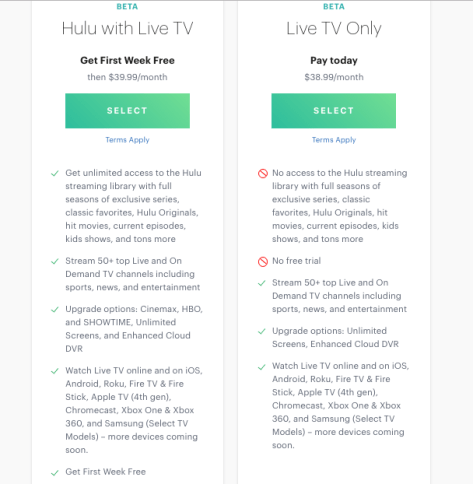
Hulu with Live TV has ONE channel lineup. Here is the current list of channels offered by Hulu with Live TV at this time. The cost for this plan is about $44. Please note that this plan includes BOTH Hulu Basic and Hulu with Live TV – therefore some people refer to this plan as “Hulu Plus.”

Hulu with Live TV Channel Lineup

To learn more, visit this page: https://www.hulu.com/live-tv

Does Hulu offer other plans?

As of now Hulu doesn’t really have customizable channel packages like those offered by its competitors at Sling, Direct TV Now, etc.  That said, Hulu does offer a couple other options:

You can choose regular Hulu without the ‘live’ tv option as noted here…

Hulu basic

Keep in mind that the ‘limited’ commercials option actually means LOTS of commercials and many who choose this option hate it because you can’t skip through the commercials and it’s very annoying.

Also you can choose to have just Hulu Live TV without the rest of Hulu Basic as noted here…

Hulu with Live TV Options

Learn more about the current prices and plans here: https://signup.hulu.com/plans

What does the “Beta” in Hulu Live TV Beta mean?

Hulu with Live TV is a relatively new service and the company recognizes that there may be ‘hiccups’ – thus they say it’s still in beta testing mode. That said, I did not notice any mishaps when I used it and I would not let that stop you from choosing Hulu.

Is there a Limit on the Number of Screens I Can Watch Hulu Live TV on simultaneously?

Yes – you can stream Hulu Plus on up to 3 devices at a time under the regular plan.

You can pay an additional $14.99/month and watch Hulu Plus on ‘unlimited’ screens while you are at home and up to 3 devices while you are away from home. Personally I think that’s a steep price to pay for an add-on you will probably not use very often. Learn more about it here: https://help.hulu.com/en-us/overview-unlimited-screens-add-on

Does Hulu with Live TV have a DVR?

Yes, Hulu Plus as a cloud DVR and it’s pretty good. You can record up to 50 hours on your DVR BUT you can’t fast forward through commercials.

You can pay an additional $14.99/month and add the ‘Enhanced Cloud DVR Option’ which gives you up to 200 hours of recorded content AND the ability to fast forward through commercials of your live tv recordings. Learn more here: https://help.hulu.com/en-us/upgrade-cloud-dvr-storage-space

Does Hulu have On-Demand TV Shows and Movies?

Yes. The on-demand library content is essentially the “Hulu Basic” service that is offered for $7.99/month on it’s own but is included in the Hulu Plus package noted above.

Can I watch Local Channels on Hulu Plus? What Regional Sports Networks are offered?

It depends on your area. In my area (Tampa) it’s very good. Basically we can get every local channel we want (except for our local NBC which no streaming service offers in our area).

To see what’s offered in YOUR area here’s what you do:

  1. Use this link: https://www.hulu.com/live-tv
  2. Look for the “VIEW ALL CHANNELS IN YOUR AREA” link below the Channel Icons as shown here…
  3. Hulu Plus Local Channels
  4. Enter your ZIP Code in the popup window
  5. See ALL the channels offered by Hulu with Live TV in your area – including the all important local channels and regional sports networks.

What Premium Channels does Hulu Plus Offer?

You can get HBO for 14.99/month, Cinemax for $9.99/month, or Showtime for $8.99/month.

What Promotions does Hulu Plus offer for New Subscribers?

Not a lot. You can basically get a 7-day free trial unless you have one of their not very often promo codes.

What is the User Interface like on Hulu? Does Hulu offer a Channel Guide?

This is the major problem with Hulu with Live TV at this time – their channel guide sucks because they don’t actually have a traditional tv guide. If you always know what you want to watch then this may not be a problem for you, but if you are used to watching cable tv and you like to use a traditional channel guide to browse what’s on, you can’t do that with Hulu. It’s so hard to actually find anything and it became such a problem for us that we canceled our Hulu with Live TV subscription.

Hulu Plus does have Amazon Alexa Voice Control but we found that it only worked successfully about 1/3 of the time so it didn’t help.

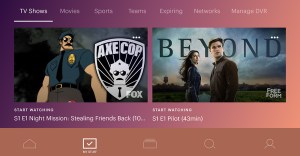
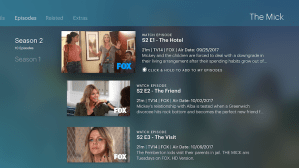
Here are some screenshots of the Hulu UI:


Hulu Live TV – What’s the Bottom Line?

Because of the lack of some of the channels we wanted (Nick Jr) and the lack of the channel guide we had to cancel with Hulu Plus. I did like the service overall but not as much as Direct TV Now (our current primary streaming service).

That said, we do still have the “No Commercials” version of Hulu Basic and still enjoy watching their on-demand content and original shows like “The Handmaid’s Tale.”

Handmaids Tale Show


What to read next?

Check out the other streaming tv service provides and learn the best ways to cut the cord by watching our new video about the best streaming tv services…


Want more tips like this?

If you like helpful tips like this and practical solutions to real life problems, be sure to subscribe to my blog. It’s free and super easy to sign up…

Never Miss a Tip!

How to Stream Local News Online with DirecTV Now, Hulu, Sling, PS Vue, and more

Cord Cutters – do you want to watch local news online? I’ll show you which online tv streaming service providers will give you the best local channels and local news coverage in your area. This is an important, but often overlooked, aspect of cord cutting – learn how to get your local channels so you can stream local news WITHOUT having to use an antennae. Pick the right online streaming tv service provider and you can watch your live local news online, pick the wrong one and you’ll be frustrated.

I’ll show you how to get the Fox News Live Stream, watch ABC News Live, get Breaking News, and more.


Check out our Complete Guide to Cord Cutting here:

1. Essential Guide to Cord Cutting VIDEO: https://www.youtube.com/watch?v=t9k6ZkbyabM&t=5s
2. Essential Guide to Cord Cutting ARTICLE: https://thathelpfuldad.com/cord-cutting-how-stream-live-tv/

Additional Resources:
Watch Live Local News Online: https://youtu.be/9natWVw6hPY
Direct TV Now Review: https://www.youtube.com/watch?v=K1LSntUSn-U&t=33s
Hulu Plus Live TV Review: https://www.youtube.com/watch?v=uxLyfV8Mhrg&t=11s
PlayStation Vue Review: https://www.youtube.com/watch?v=0wA56Q4Sib8&t=19s
Sling TV Review: https://www.youtube.com/watch?v=7hQsDvihkIs&t=13s
YouTube TV Review: https://www.youtube.com/watch?v=ks-qYM-DWTE&t=90s


Subscribe to Our Blog for some Helpful FREE GIFTS:

That Helpful Dad’s Blog: https://thathelpfuldad.com/


Follow us on Pinterest:


Choose Happiness Over Money – It’s the Path to True Wealth

Happiness or Money?

Whether you are just starting out in your career, you’re considering relocating for work, or perhaps even a complete career change at mid-life, you’re going to face the question “Should I choose Happiness or chase the Money?” In this article we’ll discuss why the choice does NOT have to be one or the other — let me show you how you can have BOTH Happiness AND Money.


Want to Watch This as a Video?


Life Lesson #3: Do what makes you happy and the rest will take care of itself.

Today’s life lesson was inspire by two of my favorite wisdom teachers – Confucius and King Solomon.

First let’s look at what Confucius has to say on this topic…

Do What You Love
Pin Me!
I think it’s easy to see which way the Chinese Master would answer our “Happiness or Money” question, don’t you?

Now what about King Solomon? He is held by many to be the wisest man who ever lived so we should probably ask him this important question too, right?

Proverbs 22:29
Pin Me Too

What wisdom can we glean from both of these teachers?

That if you choose a job you love doing, not only will you be happy, but you will be earning money doing what you love. The next question then is HOW do we do this?


Happiness or Money – Choose Now.

I’ve talked to countless friends, co-workers, and soon-to-be graduating students who all too often feel trapped in their lives because they are working at a job (or about to start one) that they only took because of the money, not because they are passionate about it. Does that sound like anyone YOU know?

Don’t get me wrong, most of us (myself included) are not so financially free that we can just do whatever we want and not worry about money. But just because we need money, doesn’t mean we have to be ruled by it.

Are You Just Starting Your Career?

If you are young and just starting out in life, and you’re in a position where you have no family/obligations to attend you then you’re in a prime position to choose to do what you love. Don’t waste this opportunity.

It’s possible you even have the luxury of being able to live at home to save on expenses while you pursue your dream job – if so, make the most of your home base and use this to your advantage.

Follow your passion right from the beginning and don’t give away any of your precious life towards something that takes away from your dreams!

Are You Already In a Career? Married With Kids?

If however you already have a family and/or lots of bills to pay such that you need to earn a certain income to make ends meet, then obviously it’s a bit more difficult to pursue your passion – but it’s not impossible.

The sooner you recognize that life could offer you something more, the sooner you can break free of the rat race and pursue what really makes you happy in life.

For those of us already at our mid-life point, it’s even more critical that we don’t give up on our dreams. Time is fast dripping away. There is no guarantee of tomorrow. If you don’t pursue your dreams now, you may never do so.

If you are not happy doing what you do, that’s a recipe for a bitterness, resentment, and an early grave, so instead find a way to make a change. Even a small change that allows you to spend time doing what you love is better than not doing it at all. You’ll be happier for it!

What’s the first step to making a change? Why not start first with a hobby and once you generate some income, pursue it as side hustle income as part of a transition to your dream job/lifestyle? This way you keep income coming from your current job, while you make the move to your new Legacy Life (and you prove to yourself and your family that it IS possible). Many people have followed this proven path and you can to – IF you just take action and get started.

A Great Resource for Any Age

Tim Ferris 4 Hour WorkWeek
Click Here to Learn How You can Break Free of The Rat Race.

If you’ve never read Tim Ferris’ Book The 4-Hour Workweek you are missing out. It’s a great resource to help you break free of the rat race of corporate life.

Meanwhile, let’s continue our lesson with some REAL WORLD examples of people who chose Happiness over Money and ended up find True Wealth. 


Happiness AND Money – Examples

Did you ever hear the story of the boy who dropped out of college and started playing with broken computer parts in his garage? People around town thought he was a loser and even his parents were afraid he wouldn’t amount too much.

His name was Bill Gates and he went on to invent some of the most important software for personal computers (ever hear of Windows?) and of course founded Microsoft – now he’s one of the richest men in the entire world.

Why does he matter to us?
Because Bill Gates didn’t follow the normal path in life. Instead he was a man who followed his dreams — even when the rest of the world didn’t think Bill knew anything at all. But Bill persevered in the pursuit of doing what he loved and in the end, he changed the world.

Or how about a guy who didn’t even finish high school and instead dropped out at age 15 to spend more time learning about what he loved – physics. I know, you and 99% of the rest of the world may not like the subject of physics, but this guy did.

His name was Albert Einstein and I’m guessing you’ve heard of him too. Like Bill Gates, Einstein also pursued his own path in life — one which the rest of the world didn’t think much of — and like Mr. Gates, Einstein also changed the world.

There’s no reason you can’t do it too!


Do What You Love – The Path

Don’t get me wrong, I’m not by any means telling you to not finish high school, or to drop out of college, or to quit your job (today).

For most people, earning a high school/college diploma and/or earning a solid income at work are part of the path to success in life – but not for everybody, and perhaps not for YOU specifically.

Regardless of how long you go through some form of school or put your time in on the job, the key thing I’m trying to teach my sons and what I hope YOU take away here is this – when you find something you are truly interested in (whether it be computers, music, or perhaps sharing wisdom with the world), if you can become a true expert in your field, then not only will you be happier in your life, but the money will eventually find you.

In fact, I would advise you that regardless of how much money you make in life…

If you do what you love, then you will find happiness — even if the rest of the world doesn’t understand you.

After all, let’s not forget, there was no market for computer software before Bill Gates came around.

There was no Theory of Relativity before Einstein.

And the same goes for a list of inventions longer than I can ever list.

What would have happened if Bill Gates didn’t pursue his passion for computers and instead became an accountant?

Or if Einstein had worked at the post office for the rest of his life and given up on his far-fetched dreams of being a physicist?

Would the world be a better place?

I think not.

So let these trailblazers be an inspiration to you.

Do what you love and happiness will follow.

So what will your contribution to the world be?

Who knows, you might just change the world!


Don’t Wait, Use This Wisdom Today

It’s starts with a simple question – what makes you happy?

Once you know the answer, find a way to pursue that passion a little bit today – and then tomorrow — and the next day too. Before you know it, you’ll be climbing the mountain of your dreams.


More Life Lessons

https://thathelpfuldad.com/life-lessons/


Did You Know?

Today’s lesson came from a book Jax and I wrote called Diary of a Minecraft Dad. Read it for free here…

Diary of a Minecraft Dad

Use This Ridiculously Simple Time Management Cheat Sheet and Get Your To-Do List Done!

Time Management – It’s a Bear

time management to do listIf time management was easy, we’d all be super productive and we wouldn’t need all those To Do Lists we love to make (but hate to actually do). Unfortunately the ability to use time wisely is a challenge for many people and most of the To Do lists we make just end up in the trash, half done at best.

But it doesn’t have to be that way, in this article I’ll share a simple cheat sheet you can use to better manage your time and get that To Do List done! BTW you can download the cheatsheet yourself using the link at the bottom of the page.

Editor’s Note: If you like practical solutions tips like this, be sure to subscribe to my blog and you can get access to all my other life hacks too.


Want to Watch This as a Video?


Time Management – Words of Wisdom

I would be remiss if I didn’t point out that the ideas you read here were inspired from two main sources – Ben Franklin and the book “The Time Trap.” More on the latter in a moment, but first a great quote from old Ben…

Lost time is never found again.

time management


What is Time Management to You?

When you get overwhelmed with a lot of things on your To Do List (be it for school, work, or anything else), do you know how to decide what to do FIRST?

Do you understand the importance of prioritizing your to-do list so that you can accomplish what’s most important in the long run?

Are you always getting your day interrupted by urgent ‘fires’ that require your immediate attention?

If any of these are a problem for you, the advice on this page can help you.


Time Management – An Example

Because this tool is so ridiculously simple I’m going to use the example of a high school student. I think we can agree, most teenagers are probably the last people on earth to care about time management right? Well, let’s put this tool to the test…

Say your a 15-year old boy, it’s Friday afternoon, and you have the following items on your weekend to-do list:

  1. Clean your room by Sunday night
  2. Study for History Exam on Monday
  3. Go to baseball practice today at 5pm
  4. Watch the latest episode of Tosh.o
  5. Walk the dog today

How do you decide what to do and when?

Do all of these tasks have to be done immediately?

Are all of these tasks equal in terms of importance?

to do list confusion

If you feel like the woman in this picture, then have no fear, because your solution is here…

A Ridiculously Simple Cheat Sheet to Help Your Prioritize Your To Do List

I like to use a technique from a book called “The Time Trap: The Classic Book on Time Management” which assigns a number value to each task in terms of it’s “Importance” (I) to  the LONG-TERM goals of your life — the most important is given a 1, the next most a 2, and so on.
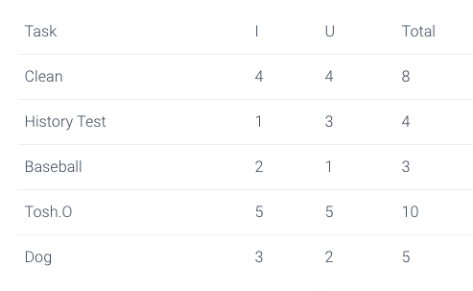

Next you consider the task’s “Urgency” (U) as relates to your SHORT-TERM duties where the most urgent is a 1, next most is a 2, and so on.

Then you simply add up the numbers and take a look at the results to determine how you should prioritize your To Do list.

Let’s try it in our example:

Time Management Chart

A couple notes on my scales.

  1. While the new episode of Tosh.0 might come out today, I assume you’ll have a DVR and thus can watch is anytime – therefore it’s not urgent, and compared with the other items on this list, not important either (although it IS funny!).
  2. Baseball practice today and walking the dog today must be done TODAY, therefore they are the most urgent tasks.
  3. The rest I assume you can figure out – nobody likes cleaning so it takes a back seat. 🙂

And so, using our totals, we can thus prioritize our To Do list as follows:

  1. Go to baseball practice first.
  2. Come home and study a bit for your history exam.
  3. Walk the dog.
  4. After that, as the weekend unfolds you can study more for your history exam, then clean your room.
  5. And finally reward yourself by watching Tosh.

Obviously this is only a guide. If you don’t agree with the totals, you can adjust the order of the tasks as you see fit. But the point is this by using this simple time management cheat sheet you’ll be giving yourself some help when it comes to figuring out how to spend your time wisely so you get the most out of it.

Never forget this important life lesson: Manage your time or it will manage you!

Still not convinced?

Let’s think about our example in  reverse – what if you didn’t use a tool like this to manage your time and instead just did the tasks as they were told to you?

First off, hopefully you’d remember go to baseball practice at 4pm. But what then? Most likely you’d come home and watch Tosh. It’s likely you’d forget to walk the dog until it’s too late. And naturally your mother would get on your case because you didn’t clean your room yet. And worst of all you’d likely end up cramming for your history exam at the last minute because you spent of the weekend playing Roblox or Fortnite.

The result is that you’d end up doing your most important task LAST and probably not doing very good on that test. Not good.

But it doesn’t have to be that way. Now you have an easy to use cheat sheet that can help you quickly identify how you should be prioritizing your day. Use it and start learning crushing your To Do list like a Pro.


Don’t Wait, Use this Wisdom Today…

Step 1: Click here to….

Download your free copy of this Time Management Cheat Sheet.

Step 2: Check out the book the  “The Time Trap” by Pat Nickerson. This is a book I read nearly 20 years ago and it changed the way I manage my time in a big way. By using the techniques in this book, I was able to better understand how to decide the best way to tackle my daily to-do’s AND to ensure that I was not letting all the ‘little fires” that always seem to crop up every day sidetrack me from my long-term goals. You can find it lots of places, but if you want to save time, here’s a link to the book on Amazon…


Did You Know?

Today’s lesson was adapted from a book Jax and I wrote called Diary of a Minecraft Dad


More Time Management from Ben Franklin

Here’s a page from Ben Franklin’s daily planner – check out how he planned his day!

Ben Franklin Time Management


Want more Wisdom Like This?

Click Here to Live Your Legacy Life

10 Tips for Contract Negotiations

Contract Negotiations Best Practices Video

In this video I’ll share 10 Tips that can help you close more deals in your contract negotiations. Our focus is on creating a ‘win-win-win’ mindset of collaboration so that we can negotiate a deal that works for all sides.


Why listen to me?

Because I can help you.

  • 20 years in contract negotiations – gamut of hospital sales, insurance & financial services, and real estate contracts.
  • 10 years specifically in medical device and pharma sales
  • Closed over $90+ million on hospital contracts for individual Hospitals, Systems, and GPOs
  • Business Acumen: Contracting Analysis, Drafting Agreements, Negotiations, Formulary/Protocol projects, Supply Chain, GPO, and System Agreements, Reimbursement, T&C’s

If you like my tips, connect with me so we can help each other…


Contract Negotiation Best Practices – Summary of Tips

  1. Right Attitude
  2. Know Your Customer
  3. How to use Evidence
  4. LISTEN
  5. Don’t be Hasty and Miss the Way
  6. The Influence of Others
  7. What am I Buying?
  8. Be Creative with T’s & C’s
  9. Connect the Dots
  10. Cross the Goal Line…and Beyond

Contract Negotiation Best Practices


Contract Negotiation Best Practices Explained…

Tip 1 – Right Attitude

  1. me vs them vs US.
  2. Focus on the WHY.
  3. Focus on Collaboration
  4. Don’t take it Personal – even if it gets nasty – everyone has a job to do, some people are trained to try to use manipulation/aggression to get what they want. Combat Aggression with Calmness

Tip 2 – Know Your Customer

  1. Sun Tzu (every battle is won or lost before it is fought).
  2. Quantitative and Qualitative Analysis
  3. Pre-meetings to gain intelligence.
  4. Talking to KOLS who won’t be at meeting.

Tip 3 – How to use Evidence

  1. Provide Data to backup your claims.
    • Examples: value sheets, usage history, comparison to similar customers.
  2. Testimonials.
  3. Review real situations of benefits at this institution

Tip 4 – LISTEN

  1. Let the customer talk. Listen. Take notes.
  2. Really HEAR what they are saying.
  3. The pearls they provide are the keys to really understand what they want/desire/NEED in order to get the deal done.
  4. Example: price vs reimbursement (solution opportunity = real value)

Tip 5 – Don’t Be Hasty and Miss the Way

  1. Use the Wisdom of Solomon
  2. If things are going south, take a breather, don’t agree to do things under pressure.
  3. If don’t know all answers, Get back to them, continue moving forward.
  4. Remind everyone of the goal.

Tip 6 – The Influence of Others

  1. Using your Pseudo Sales Force
  2. Priming the Pump
  3. During Negotiations, Before the Close

Tip 7 – What Am I Buying?

  1. Ensure contract signers know what they are buying.
  2. Often sigs are not users. Do they really understand the product?
  3. Example: Value Sheets.
  4. Focus on VALUE vs just bottom line pricing.
  5. Focus on what’s really important
  6. Example of Neonatal Product/Most Fragile Patients

Tip 8 – Be Creative with T’s and C’s

  1. Offer desired ‘premiums’ (free training, reimbursement advice, extra equipment/supplies, etc).
  2. Adjust contract time period.
  3. Customize T&C’s where possible.
  4. Offer system agreements.
  5. Use volume based pricing.
  6. Etc.

Tip 9 – Connect the Dots

  1. Trace the path from your product to their ‘sales’ to their customers’ happiness.
  2. Create a Win-Win-Win Mindset.

Tip 10 – Cross the Goal Line…and Beyond

  1. Keep the ball moving towards the end zone with all parties.
  2. That means follow-up on what you promised to deliver.
  3. Follow-up on customer questions/ideas.
  4. Keep pushing to the close.
  5. BUT is also means follow-up AFTER the deal is signed.
  6. Ensure the customer is happy and that they are using the product effectively.
  7. Offer them ongoing training and touch points.
  8. Stay involved.
  9. Keep them happy and develop them as a partner who will not only be happy with you but will tell others too.

Looking beyond…

These 10 tips have helped me achieve contract negotiation and sales success for 20+ years. I’m certain they can help you too.  And if YOU have a tip to share with me, please do so.


What to Read Next…

https://thathelpfuldad.com/ppaf-pre-call-planning/

https://thathelpfuldad.com/pharmaceutical-sales-call-best-practice/