So you know you want to buy an Amazon Fire TV Device but you’re not sure which one? I can help you. In this article, we’ll review the key differences between the Fire TV Stick, the Firestick 4k, the Fire TV Cube, and the Fire TV Recast so you can complete your decision and buy the right Fire TV device that’s best for your family.
This article assumes you’ve already made the decision that an Amazon Fire TV device is right for you and that you just need help on choosing which model is best.
Amazon Fire TV Table of Contents
Video Review
How to Decide which Fire TV Device to buy
Know the options available.
Know what YOU want the device to do.
Buy the Fire TV device(s) that’s best for you.
Fire TV Accessories
More Tips
Buy a Fire TV Device with Confidence
The Amazon Fire TV Devices (as a group) are our #1 recommended option for people who are trying to cut the cord and ditch their cable tv. If you want to EASILY stream tv online, the Amazon Fire TV devices are your best bet.
Compared to Roku, Apple TV, Smart TV, and other digital media players, the Amazon Fire TV Devices are the easiest to set up, the easiest to use, and the easiest to find content on.
This is especially true for older adults (over 40) who are new to the world of streaming tv online.
Fire TV Options – The VIDEO
How to Decide which Fire TV Device is Right for You?
It’s really a simple 3-step process.
Know what Fire TV Devices are available.
Decide what you want the Fire TV Device to do
Make the purchase
Step 1: Know the Fire TV Device Variations
To get started we first have to know the various Fire TV devices that are available. They are…
This is the key section of this article. I’m going to keep it short and sweet because again I’m assuming you already know the basics about the Fire TV and just want to make the final decision. Here’s how to pick:
You want the absolute easiest option in terms of setup and use.
You don’t care about 4k content.
You don’t care controlling other devices with your Firestick remote.
You are on a limited budget and/or you have multiple tv’s you want to put a fire stick on.
You are new to the world of cord cutting.
The basic Amazon Firestick is not only the lowest cost option but it’s also the best option for older adults new to online streaming tv. Buy one or more of these and you won’t be sorry. I personally own 5+ of these devices for all my non-4k tv’s and have them on most of our tv’s and travel with 1 of them pretty much all the time.
The Amazon Fire TV Stick forms the foundation of our cord cutting tv system for my family.
You want all the features of the Fire TV Stick 4k AND you also want to be able to control other Alexa-enabled devices with a single system. So, for example, with the Fire TV Cube you can…
Use either the Fire TV remote or just your voice to turn on the TV, dim the lights, and play what you want to watch.
You can control your soundbar, A/V system, cable box, DVR, etc.
You want the combination of a Fire TV Stick 4k and an Amazon Echo all in one device.
The Fire TV Cube is like a powerful universal remote in a single system.
You already have a Fire Stick, Firestick 4k, or Fire TV Cube AND an HD Antenna AND you want to be able to record shows and watch them on your fire-tv compatible devices.
Do not buy a Fire TV Recast as your first Fire TV device!
The Fire TV Recast is basically a DVR to record over the air content. It is not a streaming stand-alone device.
Keep in mind that you can’t record streaming app content on this device. That means you can NOT record Sling, Hulu, DirecTV Now, etc content with a Fire TV Recast – you’ll need to use the DVR that comes with those apps.
To be clear, in order to use the Fire TV Recast you need ALL of the following:
Fire Stick, Fire Stick 4k, or Fire TV Cube or Echo Show.
TV or mobile device that can access the Fire TV App.
If you have these things AND you want to be able to record over-the-air content onto a DVR (i.e. the Fire TV Recast) then this is a great option.
Step 3: Make the Purchase
Now that you know which Fire TV devices are best for your specific needs, go ahead and pull the trigger.
If you are going to cut the cord, ditch cable tv, and move to online streaming tv like I did, then the Amazon Fire TV Devices can help you make that happen.
Although it sounds like a lot of upfront costs if you buy a Firestick for every tv, if you do the match it’s really a no-brainer because the purchase of the Amazon Fire TV devices is a ONE-TIME COST while the cost of all those cable boxes (on average $8-20) is an ON-GOING MONTHLY COST. Do yourself a favor and get rid of all those costly cable boxes!
Here’s my setup:
For all my non-4k tv’s I have the basic Amazon Fire Sticks – that includes my kids’ rooms, guest rooms, and outdoor tvs. my 4 year old watches tv with his Fire Stick. My 75 year old mother-in-law also watches on her Fire Stick.
I do not currently have the Fire TV Cube (it wasn’t available when I made my original purchases) and I don’t need the Fire TV Recast (because I get my local channels from my streaming tv app and therefore don’t use an HD Antennae. Instead I use the DVR inside my streaming tv app from DirecTV Now). That said, if you would benefit from the Fire TV Cube or Fire TV Recast, by all means, go for it.
If you’re ready to buy, check the latest prices here. We are proud to be an official Amazon Affiliate. Good luck!
Are you considering making a switch to cut the cord and use Sling TV as your streaming service? If so, this article is for you. We’ll tell you the pro’s and con’s of using Sling TV from a point of view of an actual user.
[lwptoc]
Editor’s Note: This article is part of a series devoted to helping people learn how to stream tv online and get rid of their high cable bills. The Series is called “Essential Guide to Cord Cutting“. Our latest video review is here:
Sling TV is a genuinely viable alternative to cable tv. As one of the early to market players in this “cord cutting” category, Sling TV was really the first major online streaming tv service provider to hit the mainstream and (as of the time of this article) it is still the market leader in this space – followed by Hulu, YouTube TV, AT&T Now, Philo, Fubo TV, Pluto TV, and more.
If you want to ditch cable tv, you can choose Sling TV and get an experience that is similar to cable.
But is Sling TV the best cord cutting option? That’s what we’ll discuss in this article.
2. How do you watch Sling TV?
In order to watch Sling TV there are a few things you need:
Watching Sling TV is different than watching cable tv or tv from an antennae – and that’s a good thing!
With cable TV you get the content from the cable tv provider and it is delivered to your home via the cable line to the cable box and then to your TV. With over the air television, you get the content via an antennae hooked up to your TV.
With streaming tv providers like Sling TV, you do NOT need any cable boxes but you DO still need the internet. You will get the tv content from the Sling TV app that is downloaded onto the device you are watching – this could be a “smart” tv or your phone, tablet, or another mobile device that works with the app.
Basically you just download the Sling TV app (for example from the Apple App Store, Google Play, or the Channel Store on your Smart TV) onto the device you want to watch on, login to Sling TV, and then watch the content from inside the app environment. It’s easy and it works great – once you change your mindset from watching via a cable box and instead just watch from within the app.
Why watching Sling TV on a TV Streaming Device is the best way to watch Sling TV:
In many cases, the ideal setup for watching Sling TV on a television is to use a digital media player such as the Amazon Firestick, Roku, or Apple TV.
Some of the benefits of using a digital media player (DMP) like Roku or Amazon Firestick vs. a smart tv are that the DMP’s are usually the first to get updates from the streaming service providers like Sling TV so you always have the latest version of the Sling TV app with the most features AND the interface for DMPs are often friendlier and easier to use than the clunky interface on most smart tvs. Here are the DMP’s I recommend…
What Channel Packages are Available on Sling TV? Currently there are 3 plans available:
Sling Orange: $20 per month. About 30 channels, including ESPN and Disney (but not Fox or NBC channels). Limited to one simultaneous stream at a time.
Sling Blue: $25 per month. About 45 channels, including Fox and NBC channels (but not ESPN or Disney channels). Up to three simultaneous streams.
Sling Orange + Blue: $40 per month. Includes all channels from both. Up to four simultaneous streams, but only one at a time of Orange channels.
Here is a few screenshots:
Sling Orange
Sling Blue
Sling Orange + Blue
To learn more visit this page: Sling TV Channels or watch this in-depth video of the Sling TV Channel Packages and how to CUSTOMIZE them to meet YOUR needs…
Sling TV offers tons of great content and prides itself on giving you the channels you want while removing the ‘useless’ channels. The channels you access are based on the Sling TV plan you choose (as noted above). You can also customize your Sling TV channel package with premiums like HBO, extra sports channels, kids networks, foreing language, and more.
Does Sling TV Offer Local Channels and Regional Sports Networks?
Because I am honest and transparent I will advise you that potentially the biggest problem with Sling is local and/or regional sports channel availability in some areas.
If you only subscribe to Orange, you won’t get any local channels!
Blue subscribers in certain cities can watch Fox and NBC live, and outside those areas can watch Fox and NBC on-demand only.
In some areas your main option for getting local channels if you have Sling TV is to have an over the air antennae – which is a bit of a pain, however Sling TV has a promotion that combines Sling + over-the-air antennae viewing if this applies to you. More importantly, Sling TV continues to add more and more locals so it’s possible your area may have better local channels than mine. If so, that makes Sling TV a great option for cord cutters!
Yes – Sling TV offers LOTS of extra channel packages – perhaps the best of any streaming service provider.
To add these channels you’ll first have to be a Sling Orange or Blue subscriber and then pay an additional monthly fee – except for the premiums, most of following ‘packages’ are currently $5 mo each.
Sports Extra: NBA TV, NHL Network, more ESPN channels (Orange only), NFL RedZone and Golf Channel (Blue only), and more. Fans of international Soccer and Cricket will love Sling because of Sling TV’s many programs for fans of these sports. To see all the sports programming Sling TV offers visit this page: Sling TV Sports.
Comedy Extra: MTV, Paramount, Logo, TV Land, CMT, and more.
Kids Extra: Boomerang, Nick Jr (orange), Teen Nick, Disney Junior and Disney XD (Orange only), and more.
News Extra: BBC World News, HLN, The Blaze, MSNBC and CNBC (Blue only), and more
Lifestyle Extra: VH1, Cooking Channel, Hallmark, DIY, FYI, Lifetime Movies, and more.
Does Sling TV Offer Premium Channels like HBO and Showtime?
Yes, Sling TV offers HBO, Showtime, Cinemax, Starz, and more. You can add these channels for an additional $5 to $15 per month.
Sling also offers numerous foreign-language channel packages – including Latino, Polish, Chinese, French, Italian, German, Hindi, Punjabi, Arabic and other international language programs. You can generally add international programming to Sling TV for a small monthly fee. For example, here is an ad for Servicios en Espanol desde $10/mes…
Sling TV is available on pretty much every streaming device (Apple TV, Roku, Amazon Fire, etc), as well as on tablets/phones, computers and also via the XBox One.
Does Sling TV Limit the Number of Screens I Can Watch on?
Yes – you can watch Sling TV on 1-4 screens at a time depending on your plan.
Orange Plan: 1 stream
Blue Plan: 3 streams
Orange + Blue Plan: 4 streams
Does Sling TV Have a DVR?
Yes – for $5 more you can record up to 50 hours on your Sling Cloud DVR and watch it anywhere. It works similar to your cable DVR and you can skip commercials but only on certain channels.
Also the DVR doesn’t actually work on all channels – for example you can’t use the DVR currently on ABC owned networks (that means all ABC, Disney, and ESPN networks).
Does Sling TV Have On-Demand TV Show and Movies?
Yes, Sling has on-demand content that varies by channel but it’s limited to the past 3-7 days.
7. What Does the Sling TV Channel Guide Look Like?
What’s the Sling TV User Interface (TV Guide) like?
Sling has updated it’s User Interface (UI) to make it more user friendly. This includes the addition of a ‘traditional’ guide which is especially important if you are a current cable tv user who wants to cut the cord and you like using a traditional channel guide to see what’s on.
Here are some pics of the Sling TV UI:
8. Does Sling TV Offer a Free Trial?
What Promotions does Sling TV Offer New Subscribers?
On top of this, Sling TV often partners with Roku on various promotions as well: check out this Page: Sling TV + Roku for more info.
Transparency Notice: I am an average consumer just like you. This is an honest review. I am a real life cord cutter. That said, I am part of the Sling Affiliate Network and if you elect to sign up, I may be paid a small referral fee. I trust you agree this would be a win-win for both of us.
9. How does Sling TV Compare to other Streaming TV Providers?
If you are interested in learning more about Sling TV vs ATT Now vs vs Hulu Plus vs YouTube TV you may also like these articles…
Or watch my latest video about the best streaming tv providers…
Sling TV was the first major streaming service provider to make cord cutting a realistic option for the masses and it’s still one of the most popular ways for cord cutting.
If you can live with the limitations (the biggest being a lack of local channels on your stream) then you may be able to save a lot of money with Sling. It really is a great service.
Want more tips like this?
If you like helpful tips like this and practical solutions to real life problems, be sure to subscribe to my blog. It’s free and super easy to sign up…
#mc_embed_signup{background:#fff; clear:left; font:14px Helvetica,Arial,sans-serif; } /* Add your own MailChimp form style overrides in your site stylesheet or in this style block. We recommend moving this block and the preceding CSS link to the HEAD of your HTML file. */
Are you an Egghead? Whether you’re a long-time owner of a Big Green Egg or a newbie, this article can help you. We’ll discuss which accessories are the best to buy for your BGE and why. Here’s a list of over 200 Big Green Egg accessories that will take your cooks to the next level.
Table of Contents
Here’s how this page is organized:
Top 10 Must Have Accessories (Highest Priority Items to buy for your Big Green Egg, especially if you are just getting started)
Cookbooks and Kamado Manuals to help you learn how to use the Big Green Egg.
Cooking Surfaces for the Big Green Egg – including a discussion of the Eggspander and the KJ Divide & Conquer System, the best pizza accessories for the Big Green Egg, using the JoeTisserie in your BGE, and more.
Ash Baskets – what it is and why you need.
Temperature Controls, Thermometers, and Remote Temperature Probes.
Fire Supplies: Lump Charcoal, Smoking Wood Chips, Electric Lighters, Gloves, and more.
Tools: Knives, Cutting Boards, Tongs, Claws, Rib Racks, Grate Grippers, and other BBQ Tools.
Cleaning Products, Grill Mats, etc.
Custom tables, covers, and vent caps.
SWAG: Big Green Egg Aprons and t-shirts.
Big Green Egg Replacement Parts
New Eggheads Start Here
Before you even consider buying any accessories it’s important to understand…
There IS a learning curve when it comes to kamado grill cooking on your Big Green Egg. And it’s a continuous learning process.
Do yourself a favor and don’t try to figure it all out on your own – you’ll just end up burning a lot of food and getting frustrated.
But it doesn’t have to be that way. There are a number of good books out there that can help you master kamado cooking on your Big Green Egg and speed up your BGE Mastery learning curve.
Here are two of my favorites books – they provide some awesome kamado grill recipes as well as MANY helpful tips.
After you get these two books, THEN you will be better prepared to actually use your new cooking accessories correctly…
Best Cooking Surfaces for the Big Green Egg
1-Flexible Cooking System (#1 MUST HAVE ITEM ON THIS PAGE)
This accessory will change the way you use your BGE and for that reason it is my #1 MUST HAVE Accessory for the Big Green Egg (or any kamado).
Let’s face it the Big Green Egg is the #1 most popular kamado on the market for a reason – the quality is awesome, the reputation is well-earned, and the Egghead community is the strongest of any kamado cooking group. BUT, if we’re honest with ourselves, BGE users shouldn’t be afraid to admit that even though Kamado Joe is a competitor KJ has made some great accessories over the years – perhaps the best of all time is their Flexible Cooking System called “The Divide and Conquer” system. Check out the theory behind the Divide and Conquer Flexible Cooking System…
After you make a decision on which flexible cooking system to buy, next get some Half Moon Heat Deflectors so you can to cook both Direct and Indirect at the same time or just because they are easier to use than the traditional bulky BGE place setter (aka “The convEGGtor”)
Then get these additions to conveniently hold your drip pans and/or allow you to cook higher up in the dome – which is really useful for pizza cooking too so you can avoid burning the crust.
Finally, for even more cooking space and another higher level add these…
2-Cast Iron Griddle
Now that you have a Flexible Cooking System in your Big Green Egg tou’re going to quickly learn that the standard stainless steel cooking grates just don’t cut it for certain foods.
You want to get a good sear on steaks? Cook scallops? Griddle up some bacon and eggs? Then you’ll want a cast-iron griddle. Sure you could use a cast-iron pan but these griddles fit into your BGE and give you some great flexibility too.
Now if you can afford to get both the cast iron grates and the cast iron griddle for your BGE, you’ll be really happy, but if you have to prioritize then get the cast iron griddle first because it adds so many more options to your cooks.
I’ve got a few options for you to pick from. Personally I prefer using the half-moon Cast Iron Griddle made by Kamado Joe – it’s 1/3 of the price of the BGE version!
Although the cast-iron griddle is basically a ‘must-have’ for your Big Green Egg, the grates are more of a nice-to-have item in my opinion. Don’t get me wrong. I have the grates and I use them all the time for burgers, the indirect portion of steak grills, and more. Remember, if you have to prioritize, get the griddle first, then the grates.
When you’re ready for cast iron grates, consider the Kamado Joe Cast Iron Grates (used in combo with the KJ Flexible Cooking System – the beauty of it is you can use use the griddle for direct searing and then have the grates over a half-moon heat deflector for the indirect cook portion. Bonus!)
4. Even More Cooking Surfaces
A Quality Grilling Basket
Do you need it?
I think so. Particularly when you get a basket with a removable handle it allows you to turn fish, veggies, and delicate items easily – saving time, hassle, AND protecting your food.
A Good Dutch Oven
Even if you have the cast-iron griddle and grates you’ll benefit from a quality dutch oven. You can never have too much cast-iron right?
But seriously, the reason you’ll want a dutch oven is because by putting a dutch oven in your Big Green Egg (and learning how to use is safely) you can BAKE and FRY inside your BGE!
There’s really one one brand here to consider – The Lodge.
PIZZA in the BIG GREEN EGG
One of my family and friends’ favorite things in a kamado is wood-fired pizzas. They’re fun to make, taste great, and easy to do.
For this reason I consider a Pizza Stone to be a must-have accessory for your BGE.
Here are a few options. The BGE stone is ridiculously expensive so do a bit of research about your options and you may be able to save some money – just make sure it’s a quality stone that won’t crack on you!
After you get the stone, then get one or more of these helpful pizza accessories. Don’t overlook the Elements of Pizza cookbook here too.
Soapstone Surface
What the heck is soapstone and why do I need it?
Soapstone is great for cooking more delicate items like fish and veggies that you don’t want to put in a basket or cedar plank but do want to have directly on a cooking surface. Soapstone is bacteria and stain-resistant and may give you fewer flareups even though the meat cooks in its own juices. People also like using this surface for ‘smash burgers’ too.
We’ve gotta give credit to KJ again here because they make the best version of this item – another half-moon surface that fits the Flexible Cooking System.
CEDAR PLANK COOKING
You can’t go wrong with cooking fish on cedar plank – but cedar can be used for veggies and meats too.
BEST ROTISSERIE for the Big Green Egg
This is a Top 10 MUST HAVE Accessory for your Big Green Egg.
While a few companies are making a rotisserie for the BGE, there’s really only one to consider here – the “JoeTisserie.” It’s proven to work in the BGE and work well.
Get the JoeTisserie and turn your kamado into a rotisserie-style cooker and take your cooks to the next level. The JoeTisserie is not just for cooking chicken, you can also use it for some great Brazilian-style steak, pork, and more.
BONUS – add a grilling basket to the JoeTisserie and cook wings, veggies, and expand your game even further.
Other Useful Cooking Pans and Drip Pans for the Big Green Egg
An assortment of useful cooking pans that sit on the grates and/or don’t necessarily attach to the racks. Item #1 (The Plancha) is super popular and highly useful. BTW all of these are “BGE” official brand.
All About ASH BASKETS
What is an Ash Basket and why might you want one for your Big Green Egg?
An Ash Basket lets you simply lift out used charcoal and ash before every cook and it is reported to increase air flow around your lump charcoal in your Egg.
When you use an ash basket you can dispose of ashes and be ready for your next cook in seconds—no muss, no fuss. Just lift the ash basket out and give it a few shakes in your grill or over a trash can (make sure the fire is completely out!), then set the ash basket back in place, add some fresh charcoal, and you’re ready to go in seconds.
Spaces between the ash basket’s rings allow the small particles to fall through when you shake the ashes out. You can start each cook with an ideal fuel load, whether you’re searing steaks or going low and slow. You get easier starts and more even burning for ultimate temperature control.
The most popular choice, by far, in ash baskets for the BGE is the Kick Ash Basket.
Don’t overthink this one and get a lesser brand that’s gonna be lesser quality. You’ll use this in every cook and you’ll want it to hold up over time. Get the Kick Ash and be done with it.
Don’t Forget the ASH TOOLS too.
Temperature Controls, Thermometers, & Remote Temp Probes for the Big Green Egg
EGG Genius (Remote Temp Controls)
Most Eggheads will agree that kamado cooking is an art, not a science, however if you want to get pinpoint accuracy with your cooks the EGG Genius may be for you.
BGE says “The EGG Genius effortlessly controls the temperature of your EGG through your smartphone, tablet or computer. Remotely manage and monitor cooking temperatures for worry-free cooking, monitor the temperature of your food, view graphs of your cooks … and even receive alerts when your cook is finished or when the EGG temperature is too high or low.” Can you say, Wow?
Remote Probe Thermometer
As I mentioned in the Top 10 List, a good remote thermometer with remote probes that won’t break the bank is a must have item. If you can afford an Egg Genius then you won’t need these, but if the Genius is out of your budget or you want to have more manual control of the ‘art’ of kamado cooking (but with just a little help) then get one of these options.
Other Thermometers
You’ll need a quality instant thermometer as well as a “Candy” thermometer if you want to monitor frying oils, etc. And don’t overlook the Temperature “Gun” for checking surface temps accurately on your grill cooking surfaces and so much more (I use it all the time).
Best Lump Charcoal, Fire Starters, and Smoking Wood for your Big Green Egg
Quality Lump Charcoal
You wouldn’t drive a BMW on junk tires would you? Then why are you using crappy lump in your Big Green Egg?
Now I know there are a lot of charcoal options out there when it comes to kamado grilling and there’s even a list of quality options on the Naked Whiz Database, but for my money, I believe in the Kamado Joe Lump Charcoal brand – specifically the Big Block XL version. Why? Because not only is the bag filled with really big lumps of charcoal, but even more importantly, the type of wood used is a combination of various hardwoods so you get a great flavor but not an overpowering flavor. (If you’ve ever used lump charcoal that is primarily made with hickory then you know what I mean). The KJ-Char is great for kamado grill cooking in your Big Green Egg because you can use it for all types of food – from pizza, to chicken, to beefs, to pork, and fish. It works for all of it and it compliments it all well. Using KJ-Char as your base also gives you the flexibility to then add your own wood chips to add additional specific flavors (cherry, pecan, apple, etc) depending on what you’re cooking.
Helpful Dad’s Tip:
Walmart also has some good buys on charcoal – this includes 20-lb Royal Oak for around $15-20/bag and a new line called Western which is only $10 for a 30-lb bag! Both are pretty good options in my book.
Smoking Wood Chips
I’m sure you already know that your Big Green Egg is a powerhouse of a smoker – capable of both hot and cold smoking. While a quality lump will give you great flavor to begin with, if you want to impart true ‘smoke’ flavor into your meats you’re gonna need quality smoking wood too. Consider these options…
As an alternative to using chips or chucks, many BGE owners like the simplicity and control of ‘maze’ style smokers that use concentrated wood chips. A-Maze-N is the brand you want for this option. You can get the full maze or just a single tube. Then you’ll need the pellets too (see below).
Fire Starter Alternatives.
If you don’t want to use the Electric Fire Starter I recommended above, then consider these other options to light your Big Green Egg…
Knives, Cutting Boards, Tools, Tongs, Claws, and More
All of these are nice to have accessories for your Big Green Egg.
Lets Start with KNIVES
If you can’t afford to get a set or don’t want one, then focus on getting a quality chef’s knife, a Filet/Boning Knife, A Brisket Slicing Style knife, along with some nice steak knives for your guests to use. Brands I mentioned before were Wustof, Henkels, Shun, Global, Cutco, and Rapala.
Here are the knives I recommended above along with a few more worthy ones. Also, note the knife accessories at the end, including no-cut gloves and some sharpeners.
Carving, Cutting, and Serving Boards
Tongs, BBQ Sets, Meat Hooks & Claws, Rib Racks, Grate Grippers & Cleaners, and More
TONGS
I prefer relatively cheap, metal-tips tongs with flanges that grasp food easier. Steer clear of anything is rubber, plastic, or silicone on the tip to avoid sticking to the grill. I also like a variety of shorter (8-9 inch) and longer (up to 16 inch) for different uses. You can never have too many tongs!
I like these spatulas because most of them are either long-handled or else have a wide flipper which makes them easier to use on the Big Green Egg.
Claws and Meat Hooks for Big Green Egg
Again I keep it pretty simple for this category – I want inexpensive but that does the trick.
RIB Racks and Smoking Meat Hooks
A few quality options to consider for rib racks and smoking meat hanging hooks for your kamado. The first two are the BGE Official ones, followed by numerous quality alternatives.
Wing Racks, Beer Can Chicken, and Turkey Roasters
Burger Presses and Grill Presses
Grate Grippers & Cleaners
If you need a replacement on your grill grate grippers for your Big Green Egg, here are a few options. The BGE official are listed first, followed by after-market brands.
Grill Mats
Whether you are looking for a grill mat to sit under your Big Green Egg and protect the ground or sit inside on the grates, we have a few to recommend…
Mops, Basting Brushes, and Meat Injectors
Custom Tables for your Big Green Egg
If you’re ready to fly beyond the next, here are a few ideas to get your started on deciding which type of custom table you want for your Big Green Egg. These are all from Amazon, but Etsy is another good spot to check too. Prices vary widely depending on the type of material (wood, plastic, stainless steel), whether you want drawers, how wide/long, granite inserts, etc, etc.
Heavy Duty Covers for Big Green Egg
Personally I like keeping my Egg under a cover – especially since I moved from the nest to a custom wood table. Here’s a few to consider – just be sure to measure the dimensions of your table and give a little room to play. I’ve purchased both of these Classic Accessories covers and they’ve held up well. If you have a large island like me, the final option is a winner…
Big Green Egg Aprons and other Swag
Did We Miss Anything?
If there is an accessory for the Big Green Egg that we’ve overlooked, be sure to let us know. Or if YOU have a favorite accessory you want to recommend, tell us about it in the comments below.
Are you an Egghead? Whether you’re a long-time owner of a Big Green Egg or a newbie, this article can help you. We’ll discuss which accessories are the best to buy for your BGE and why. Here’s a list of over 200 Big Green Egg accessories that will take your cooks to the next level.
Top 10 Accessories for your Big Green Egg
There are 200+ recommended accessories for your Big Green Egg on this page, but here’s a quick ‘Top 10’ List to get your started.
Get these items first and you’ll be well on your way to success with your Big Green Egg.
As fun as it is to cook on the Big Green Egg nobody wants to sit by the fire all day. You want be with friends, drink a few brews, and relax without always wondering about the temps of your meats. Having a good remote thermometer allows you to do that. There are really only 2 brands to consider: ThermoPro or Maverick.
Having a good remote thermometer allows you to do that. The top two brands (in my opinion) ThermoPro or Maverick.
Increase your airflow and get more from your lump.
Only 1 brand to seriously consider here: Kick Ash and the classic option is the Kick Ash Basket
I added a demo video so you can see how it works…
7-Pizza Stone
Because you know you want to make pizzas in your Egg, right? Try one of these. The BGE version is hard to find now and there are so many options is crazy. For the value I’d go with the Kamado Joe versions…
Here’s a few to add to your shopping list:
Kamado Joe DoJoe (we talked about this one in the Top 10 List above – it will turn your KJ into a real wood-fired pizza making machine!)
No matter what accessories you buy for your Big Green Egg or how well you manage your fire, if you don’t have quality lump charcoal to cook with, you’re setting yourself up for disappointment. There’s nothing like doing everything right and then having the food taste bad because the lump charcoal you used was made with poor quality wood or too much of a particularly strong wood (like hickory). I’d recommend you buy good quality lump charcoal that has a mix of hardwoods that work with all types of foods for your basic cooks and then buy smoking wood chips for particular flavor profiles you want to add in later (such as hickory for chicken, fruit woods for fish, etc).
There’s really only one to consider – The KJ-made “Jotisserie” which works great on a BGE Large or XL kamado.
Here’s a demo vid so you can see the JoeTisserie ‘in action’ the Big Green Egg – MMM.
Obviously you’re gonna need some quality meat and plenty of friends and family to enjoy your BGE cooks with, but for now these 10 “Must Have” accessories are the basics that will get you fast-tracked for success with your Big Green Egg. Once you have these in your arsenal, then move on to the full list below.
200+ Accessories for The Big Green Egg
Best COOKBOOKS for the Big Green Egg
What, you’re starting your list of Best Accessories for the Big Green Egg with cookbooks?
What gives? Is a ‘cookbook’ even an accessory? In my book YES. Here’s why…
There IS a learning curve when it comes to kamado grill cooking on your Big Green Egg. And it’s a continuous learning process.
Do yourself a favor and don’t try to figure it all out on your own – you’ll just end up burning a lot of food and getting frustrated.
But it doesn’t have to be that way. There are a number of good books out there that can help you master kamado cooking on your Big Green Egg and speed up your BGE Mastery learning curve.
Here are two of my favorites books – they provide some awesome kamado grill recipes as well as MANY helpful tips.
After you get Hot Coals and/or Smoke It Like a Pro, other great highly-rated cookbooks for your Big Green Egg. The sauce recipes alone in Big Bob Gibson’s book make it an incredible value!
If you must have only a “BGE” specific book, check these options out…
Best Cooking Surfaces for the Big Green Egg
1-Flexible Cooking System (#1 MUST HAVE ITEM ON THIS PAGE)
This accessory will change the way you use your BGE and for that reason it is my #1 MUST HAVE Accessory for the Big Green Egg (or any kamado).
Let’s face it the Big Green Egg is the #1 most popular kamado on the market for a reason – the quality is awesome, the reputation is well-earned, and the Egghead community is the strongest of any kamado cooking group. BUT, if we’re honest with ourselves, BGE users shouldn’t be afraid to admit that even though Kamado Joe is a competitor KJ has made some great accessories over the years – perhaps the best of all time is their Flexible Cooking System called “The Divide and Conquer” system. Check out the theory behind the Divide and Conquer Flexible Cooking System…
A picture tells a 1,000 words in this case right?
You can use a Flexible Cooking System in your BGE and you’ll be able to…
Cook High
Cook Low
Cook both Direct AND Indirect at the same time
And gain a world of flexibility.
KJ’s Divide and Conquer system has been so successful that BGE made their own “Flexible Cooking System” and called it the EGGspander.
The Big Green Egg EGGSpander Flexible Cooking System
The KJ Alternative? If you can afford the Eggspander, go for it. You’ll be happy. However if you are looking for a quality alternative, the Kamado Joe Flexible Cooking System is a worthy option – not only is it less expensive to begin with but the cost of the various cooking surface inserts are less expensive as well. This can help your money go farther.
Remember when you are converting KJ to BGE…
The KJ Classic = BGE Large
The KJ Big Joe = BGE XL.
After you make a decision on which flexible cooking system to buy, next get some Half Moon Heat Deflectors so you can to cook both Direct and Indirect at the same time or just because they are easier to use than the traditional bulky BGE place setter (aka “The convEGGtor”)
Then get these additions to conveniently hold your drip pans and/or allow you to cook higher up in the dome – which is really useful for pizza cooking too so you can avoid burning the crust.
Finally, for even more cooking space and another higher level add these…
2-Cast Iron Griddle
Now that you have a Flexible Cooking System in your Big Green Egg tou’re going to quickly learn that the standard stainless steel cooking grates just don’t cut it for certain foods.
You want to get a good sear on steaks? Cook scallops? Griddle up some bacon and eggs? Then you’ll want a cast-iron griddle. Sure you could use a cast-iron pan but these griddles fit into your BGE and give you some great flexibility too.
Now if you can afford to get both the cast iron grates and the cast iron griddle for your BGE, you’ll be really happy, but if you have to prioritize then get the cast iron griddle first because it adds so many more options to your cooks.
I’ve got a few options for you to pick from. Personally I prefer using the half-moon Cast Iron Griddle made by Kamado Joe – it’s 1/3 of the price of the BGE version!
If for some reason you want a stainless steel griddle, you do have an option – Little Griddle makes a nice half-moon griddle specifically for the Kamado. It’s super easy to clean and has a convenient grease trough.
3-Cast Iron Grates
Although the cast-iron griddle is basically a ‘must-have’ for your Big Green Egg, the grates are more of a nice-to-have item in my opinion. Don’t get me wrong. I have the grates and I use them all the time for burgers, the indirect portion of steak grills, and more. Remember, if you have to prioritize, get the griddle first, then the grates.
When you’re ready for cast iron grates, consider these: (Again option #3 requires the KJ Flexible Cooking System but the beauty of it is you can use use the griddle for direct searing and then have the grates over a half-moon heat deflector for the indirect cook portion. Bonus!)
4. Even More Cooking Surfaces
A Quality Grilling Basket
Do you need it?
I think so. Particularly when you get a basket with a removable handle it allows you to turn fish, veggies, and delicate items easily – saving time, hassle, AND protecting your food.
A Good Dutch Oven
Even if you have the cast-iron griddle and grates you’ll benefit from a quality dutch oven. You can never have too much cast-iron right?
But seriously, the reason you’ll want a dutch oven is because by putting a dutch oven in your Big Green Egg (and learning how to use is safely) you can BAKE and FRY inside your BGE!
There’s really one one brand here to consider – The Lodge.
PIZZA in the BIG GREEN EGG
One of my family and friends’ favorite things in a kamado is wood-fired pizzas. They’re fun to make, taste great, and easy to do.
For this reason I consider a Pizza Stone to be a must-have accessory for your BGE.
Here are a few options. The BGE stone is ridiculously expensive so do a bit of research about your options and you may be able to save some money – just make sure it’s a quality stone that won’t crack on you!
After you get the stone, then get one or more of these helpful pizza accessories. Don’t overlook the Elements of Pizza cookbook here too.
Soapstone Surface
What the heck is soapstone and why do I need it?
Soapstone is great for cooking more delicate items like fish and veggies that you don’t want to put in a basket or cedar plank but do want to have directly on a cooking surface. Soapstone is bacteria and stain-resistant and may give you fewer flareups even though the meat cooks in its own juices. People also like using this surface for ‘smash burgers’ too.
We’ve gotta give credit to KJ again here because they make the best version of this item – another half-moon surface that fits the Flexible Cooking System.
CEDAR PLANK COOKING
You can’t go wrong with cooking fish on cedar plank – but cedar can be used for veggies and meats too.
BEST ROTISSERIE for the Big Green Egg
This is a Top 10 MUST HAVE Accessory for your Big Green Egg.
While a few companies are making a rotisserie for the BGE, there’s really only one to consider here – the “JoeTisserie.” It’s proven to work in the BGE and work well.
Get the JoeTisserie and turn your kamado into a rotisserie-style cooker and take your cooks to the next level. The JoeTisserie is not just for cooking chicken, you can also use it for some great Brazilian-style steak, pork, and more.
BONUS – add a grilling basket to the JoeTisserie and cook wings, veggies, and expand your game even further.
Other Useful Cooking Pans and Drip Pans for the Big Green Egg
An assortment of useful cooking pans that sit on the grates and/or don’t necessarily attach to the racks. Item #1 (The Plancha) is super popular and highly useful. BTW all of these are “BGE” official brand.
All About ASH BASKETS
What is an Ash Basket and why might you want one for your Big Green Egg?
An Ash Basket lets you simply lift out used charcoal and ash before every cook and it is reported to increase air flow around your lump charcoal in your Egg.
When you use an ash basket you can dispose of ashes and be ready for your next cook in seconds—no muss, no fuss. Just lift the ash basket out and give it a few shakes in your grill or over a trash can (make sure the fire is completely out!), then set the ash basket back in place, add some fresh charcoal, and you’re ready to go in seconds.
Spaces between the ash basket’s rings allow the small particles to fall through when you shake the ashes out. You can start each cook with an ideal fuel load, whether you’re searing steaks or going low and slow. You get easier starts and more even burning for ultimate temperature control.
The most popular choice, by far, in ash baskets for the BGE is the Kick Ash Basket.
Don’t overthink this one and get a lesser brand that’s gonna be lesser quality. You’ll use this in every cook and you’ll want it to hold up over time. Get the Kick Ash and be done with it.
Don’t Forget the ASH TOOLS too.
Temperature Controls, Thermometers, & Remote Temp Probes for the Big Green Egg
EGG Genius (Remote Temp Controls)
Most Eggheads will agree that kamado cooking is an art, not a science, however if you want to get pinpoint accuracy with your cooks the EGG Genius may be for you.
BGE says “The EGG Genius effortlessly controls the temperature of your EGG through your smartphone, tablet or computer. Remotely manage and monitor cooking temperatures for worry-free cooking, monitor the temperature of your food, view graphs of your cooks … and even receive alerts when your cook is finished or when the EGG temperature is too high or low.” Can you say, Wow?
Remote Probe Thermometer
As I mentioned in the Top 10 List, a good remote thermometer with remote probes that won’t break the bank is a must have item. If you can afford an Egg Genius then you won’t need these, but if the Genius is out of your budget or you want to have more manual control of the ‘art’ of kamado cooking (but with just a little help) then get one of these options.
Other Thermometers
You’ll need a quality instant thermometer as well as a “Candy” thermometer if you want to monitor frying oils, etc. And don’t overlook the Temperature “Gun” for checking surface temps accurately on your grill cooking surfaces and so much more (I use it all the time).
Best Lump Charcoal, Fire Starters, and Smoking Wood for your Big Green Egg
Quality Lump Charcoal
You wouldn’t drive a BMW on junk tires would you? Then why are you using crappy lump in your Big Green Egg?
Now I know there are a lot of charcoal options out there when it comes to kamado grilling and there’s even a list of quality options on the Naked Whiz Database, but for my money, I believe in the Kamado Joe Lump Charcoal brand – specifically the Big Block XL version. Why? Because not only is the bag filled with really big lumps of charcoal, but even more importantly, the type of wood used is a combination of various hardwoods so you get a great flavor but not an overpowering flavor. (If you’ve ever used lump charcoal that is primarily made with hickory then you know what I mean). The KJ-Char is great for kamado grill cooking in your Big Green Egg because you can use it for all types of food – from pizza, to chicken, to beefs, to pork, and fish. It works for all of it and it compliments it all well. Using KJ-Char as your base also gives you the flexibility to then add your own wood chips to add additional specific flavors (cherry, pecan, apple, etc) depending on what you’re cooking.
Here are some options to consider…
Helpful Dad’s Tip:
Walmart also has some good buys on charcoal – this includes 20-lb Royal Oak for around $15-20/bag and a new line called Western which is only $10 for a 30-lb bag! Both are pretty good options in my book.
Smoking Wood Chips
I’m sure you already know that your Big Green Egg is a powerhouse of a smoker – capable of both hot and cold smoking. While a quality lump will give you great flavor to begin with, if you want to impart true ‘smoke’ flavor into your meats you’re gonna need quality smoking wood too. Consider these options…
As an alternative to using chips or chucks, many BGE owners like the simplicity and control of ‘maze’ style smokers that use concentrated wood chips. A-Maze-N is the brand you want for this option. You can get the full maze or just a single tube. Then you’ll need the pellets too (see below).
Here are just a few examples of the smoking pellets you can use in the A-Maze-N for your Big Green Egg. There are tons to choose from.
Fire Starter Alternatives.
If you don’t want to use the Electric Fire Starter I recommended above, then consider these other options to light your Big Green Egg…
Knives, Cutting Boards, Tools, Tongs, Claws, and More
All of these are nice to have accessories for your Big Green Egg.
Lets Start with KNIVES
If you can’t afford to get a set or don’t want one, then focus on getting a quality chef’s knife, a Filet/Boning Knife, A Brisket Slicing Style knife, along with some nice steak knives for your guests to use. Brands I mentioned before were Wustof, Henkels, Shun, Global, Cutco, and Rapala.
Here are the knives I recommended above along with a few more worthy ones. Also, note the knife accessories at the end, including no-cut gloves and some sharpeners.
Carving, Cutting, and Serving Boards
Tongs, BBQ Sets, Meat Hooks & Claws, Rib Racks, Grate Grippers & Cleaners, and More
TONGS
I prefer relatively cheap, metal-tips tongs with flanges that grasp food easier. Steer clear of anything is rubber, plastic, or silicone on the tip to avoid sticking to the grill. I also like a variety of shorter (8-9 inch) and longer (up to 16 inch) for different uses. You can never have too many tongs!
BBQ SETS
These BBQ Sets make great gifts and (with the exception of the BGE official set) all of them are 4+ star rated on Amazon with 100+ reviews.
Spatulas & Fish Flippers
I like these spatulas because most of them are either long-handled or else have a wide flipper which makes them easier to use on the Big Green Egg.
Claws and Meat Hooks for Big Green Egg
Again I keep it pretty simple for this category – I want inexpensive but that does the trick.
RIB Racks and Smoking Meat Hooks
A few quality options to consider for rib racks and smoking meat hanging hooks for your kamado. The first two are the BGE Official ones, followed by numerous quality alternatives.
Wing Racks, Beer Can Chicken, and Turkey Roasters
Burger Presses and Grill Presses
Grate Grippers & Cleaners
If you need a replacement on your grill grate grippers for your Big Green Egg, here are a few options. The BGE official are listed first, followed by after-market brands.
Grill Mats
Whether you are looking for a grill mat to sit under your Big Green Egg and protect the ground or sit inside on the grates, we have a few to recommend…
Mops, Basting Brushes, and Meat Injectors
Custom Tables for your Big Green Egg
If you’re ready to fly beyond the next, here are a few ideas to get your started on deciding which type of custom table you want for your Big Green Egg. These are all from Amazon, but Etsy is another good spot to check too. Prices vary widely depending on the type of material (wood, plastic, stainless steel), whether you want drawers, how wide/long, granite inserts, etc, etc.
Heavy Duty Covers for Big Green Egg
Personally I like keeping my Egg under a cover – especially since I moved from the nest to a custom wood table. Here’s a few to consider – just be sure to measure the dimensions of your table and give a little room to play. I’ve purchased both of these Classic Accessories covers and they’ve held up well. If you have a large island like me, the final option is a winner…
Big Green Egg Aprons and other Swag
Did We Miss Anything?
If there is an accessory for the Big Green Egg that we’ve overlooked, be sure to let us know. Or if YOU have a favorite accessory you want to recommend, tell us about it in the comments below.
So you’re going on a Disney Cruise? That’s awesome. You’re going to have a great time. Everything you’ve heard from all your friends about how much fun it is on a Disney Cruise is all true – and it’s likely the trip will exceed your expectations.
Disney Cruises are indeed fun – but they are also expensive. Besides the initial cost of the cruise itself, there is the travel insurance, airfare, transportation, port parking, cost of excursions, gratuities, souvenirs, all the up-selling, and the many other ‘extras.’ It’s enough to drain a wallet… fast.!
In in this article, we’ll look at 10 Tips to create “Now Moments” on a Disney Cruise that will cost you… zero… zilch… nada.
Now that makes Mom and Dad happy, right?
What is a “Now Moment?”
A Now Moment is an instant in life when you pause and are consciously aware of what’s happening to you ‘in this moment’.
You can also think of this as taking time to ‘stop and smell the roses’ or “enjoying the journey,” or any number of other cliches that help you appreciate the present moment. After all, when we recognize that all we have in life is ‘this moment’ its important to enjoy the special moments of life while you are living them.
On a Disney Cruise, you’ll have lots of opportunity to enjoy special moments…
But only IF you actually pause and enjoy them.
There is a LOT to do on a Disney Cruise, but that can be a blessing and a curse – you can’t do it all in one cruise and if you try to pack in too much, you’ll be rushing around from one spot to the next and always thinking about making your next appointment without ever enjoying the activity you’re doing now. That’s a recipe for stress, not vacation. And because there is so much to do and so little time to do it, your Disney Cruis is sure to fly by – whether you like it or not, your Disney Cruise will be over before you know it.
If you don’t pay attention, all those special moments may pass you by before you really had a chance to enjoy them.
But this doesn’t have to happen to you. WIth a little knowledge and a bit of planning, you’ll be able to create lots of Now Moments on your Disney Cruise and you’ll be in the mindset to enjoy them – not worrying about what you might be missing out on, not worrying about getting to the next activity, just enjoying THIS activity, THIS Moment, YOUR life.
10 Tips to Create Now Moments on a Disney Cruise
1-Enter in Style
When you first walk on to the Disney Cruise the staff will announce your family’s name (or whatever you want them to announce) and then you’ll walk through a line of Disney Staff who will be clapping for you. It’s fun, exciting, and a great way to kick off your cruise.
But rather than just do the standard “Announcing The Smiths” – why not consider something filled with a bit more Disney Magic? How about going a bit crazy with your entrance? You could…
Do a coordinated family dance (or even a quick flash mob).
Wear funny/special costumes to commemorate the occasion.
Sing a song and invite the crew to join you.
The possibilities are endless. What can YOU think of?
Whatever it is, just be sure you have someone to capture the Now Moment on camera because this event is ‘one and done.’
2-Play the Midship Detective Agency Game
The Midship Detective Agency is an interactive gaming experience on a Disney Cruise where you are asked to solve 3 different mysteries aboard the ship by visiting various locations throughout the vessel to uncover clues about the cases.
A great way to get you comfortable with the ship’s layout
DCL Insider Tip: Play the Midship Detective Agency game the first day you get onboard because you’ll not only learn the ship’s layout, but you’ll be able to enjoy the game without many other players vying for spots at thew various interactive portals – if you wait till the final day at sea (when most people try to play) you’ll have to battle the crowds.
3 – Take the Pelican Plunge!
The Pelican Plunge is a family-friendly water slide at Disney’s private island “Castaway Cay.” The Pelican Plunge is itself a mini-island since you have to swim out to it to reach out. There are TWO water slides to choose from – an open air one and a tunnel version.
DCL Insider Tips:
The Tunnel version is much faster compared to the open air version.
Ride this first thing in the morning or later in the afternoon to avoid the crowds.
You end up in water over your head so you have to know how to swim and you can only ride single rider at a time so keep that in mind for kids. That said, my 4 year old was fine.
Because you end up in overhead water, you’ll literally ‘plunge’ into the water – you might want to plug your nose to avoid getting a massive surge of sea water up it!
4-Don’t Miss the Interactive Magic at Animator’s Palate
If you’re on a 7-day cruise the Animator’s Palate restaurant will treat you to a special show. Check out this video to see this Now Moment…
DCL Insiders Tips:
Sadly this show is not offered on shorter cruises.
The show is only done on the FIRST night of your scheduled dine around on the ship so either be sure you attend dinner at The Animator’s Palate as per your schedule or arrange to dine with another group where the show is planned.
5-Snap a Pic of the UNDERWATER MICKEY on Castaway Cay
Snorkeling on Castaway Cay is a must-do – not only is it not that crowded but the area to snorkel is a lot bigger than you think, there are plenty of lifeguards watching over you, and there are numerous Disney-esque Now Moments to create under the water – perhaps the highlight of these is the ultimate Hidden Mickey – the Underwater Mickey!
DCL Insider Tips:
1. Mickey isn’t the only hidden treasure you’ll see – another crowd favorite is also waiting for you too.
2. Rather than rent DCL snorkeling gear, bring your own – this particular set is not only reasonably priced, it’s the absolute best, easiest to use mask for kids and adults to use who are novice snorkelers. You can breath through your mouth or nose with this mask. Check it out:
6-Engage with your Wait Staff and Host
Like some other cruises, your wait staff at the formal restaurants will follow you around each night and you’ll have the same Host for your stateroom. Be sure to take some time to engage with them on your Disney Cruise because, as with all things Disney, the crew goes overboard trying to make you happy and that includes this team too.
Numerous Now Moments await you when you make friends with your servers — we got treated to nightly magic tricks from Mr. Leo, table games from Santiago, and more. It was a blast – and they even cut our kids food for us (Bonus!). And of course the always fun ‘towel sculptures’ from our Stateroom Host (and his super helpful advice) were another treat.
7- Character Pics with your own camera
No Disney adventure on land or sea would be complete without a few pics with your favorite characters. Yet rather than pay $20 a pic or buy a three-figure photo package, just use your own camera.
DCL Insider Tips:
Not only will Disney allow you to use your own camera, their staff members will also take the picture for you using your camera as well – so long as you let them snap a few pics with their official camera first (but you are not obligated to buy their pics)
Dress for the occasion and take it up a notch – clearly we didn’t do that in this pic, but a world of possibilities await you when you gear up too – and you’ll delight the characters you’re interacting with as well.
8-Watch the Pool Deck shows from one level UP!
Regardless of your cruise, you’re sure to have at least one show on the pool deck. For the Halloween on the High Seas there are multiple shows – including the “Pirates’ Life for Me” you see here.
DCL Insider’s Tips:
Rather than have to arrive an hour early and fight the crowds for a decent seat on the main level, just stroll up a level higher about 5-10 minutes before the show and you’ll get a front row seat right next to the stage!
Bonus – numerous characters who are part of the show will enter on the steps right in front of you – you’ll be the first to see them and literally be within arms reach of them – can you say PHOTO OP?
9- Starboard Side Rules
If you’re blessed to be able to secure a room with a balcony, try to get it on the starboard side and you’ll treat yourself to numerous Now Moments.
DCL Insider Tips:
You’ll be the first to see the islands.
Castaway Cay will greet you as you enter and leave.
The fireworks go on on the starboard side and you can watch them from your balcony!
10 – For Adults Only.
Disney knows where their bread is buttered and adults are more than catered to on a Disney Cruise. Besides being able to enjoy the benefit of dropping your kids at the incredible kids clubs (It’s a Small World Nursery, Oceaneers Lab, Oceaneers Club, The Edge, and Vibe) and enjoy some time without kids, adults will be pleasantly surprised at all the MANY things available to do that are specifically ‘adults-only.”
2. Relax on the many chairs or giant waterfall hot tub at Satellite Falls
3. Watch the sunset from Meridian Lounge. Other Adult Only clubs and bars on a Disney Cruise include La Piazza, Ooh La La, O’Gills, Pink, Pub 687, Signals, Skyline, and The Tube.
4. Use the Steam Room at Senses Spa – although it doesn’t compare to The Rainforest Experience on Disney Dream, the steam room in the locker rooms for the gym and spa are FREE to use so enjoy.
Bonus Tip #11 is another must-do: Ride the famous Aqua Duck waterslide!
DCL Insider Tip:
Besides the cliche tip of trying to ride this as the fist thing you do on Day 1 after boarding to beat the crowds, instead ride this puppy at night. Not only will you avoid the crowds but you’ll get a whole new experience at night as you take the tubes with the stars overhead and ride it as many times as you like.
For example the average wait time during the day is around 45 minutes – my son and I rode the Aqua Duck 5 times in under 25 minutes riding at 8pm at night!
Disney Cruise Special Moments
Those are my top 10 tips to create Now Moments on a Disney Cruise. Others include participating in the many family ‘test your knowledge’ games, meeting new friends, playing cards on deck, and (fighting crowds to) swim in the pools, playing games on Goofy’s Sports Deck , along with so much more.
What are YOUR ideas for creating the next Now Moment on a Disney Cruise?
I’ve been using Google’s Project Fi (AKA just Google Fi) now for over 2 years. My average monthly bill is around $30 (incl taxes). In this article I’m going to give you 10 reasons why YOU should consider switching to Google’s Project Fi as your cell phone carrier. Trust me, once you give Fi a try, I doubt you will go back.
Editor’s Note: I am a real consumer of Project Fi not a paid supporter. I honestly do believe in the service. That said, when I share a link to Project Fi’s homepage it is a Referral Link which I hope you will find to be a win-win, because if you sign up for the service, after 30 days of being active we BOTH get a $20 credit. Pretty cool, huh?
Since most people nowadays rarely bother to read an entire blog post, I’m starting with the most important reason first.
Switch to Google Project Fi and I’d wager you’ll save a nice little chunk of change.
The average bill for my phone with Verizon Wireless was over $60 a month – that was on a family plan that was supposed to be saving me money and even included a 22% employer discount. It was a fairly basic plan with unlimited talk/text and I averaged 1GB data or less per month. Can you say “screw-job?” Yeah, that’s what I thought too, so I decided to try Google Fi.
So what’s my average bill with Google Project Fi for similar coverage (unlimited talk/text and 1GB data)?
$29 – inclusive of all fees.
I don’t think it takes a math whiz to realize which one is the better deal.
2. GET REFUNDS ON UNUSED DATA
What’s better than rollover data?
How about getting an actual refund on the data you don’t use?
It’s pretty much a flat fee of $10 per GB, but the catch is that with Google Fi you only pay for the data you actually use and get a refund on what you didn’t use.
How’s that for consumer friendly?
3. BETTER COVERAGE INSIDE BUILDINGS
My job takes me inside a lot of big buildings (hospitals, hotels, etc) for extended periods of time. With Verizon I was always frustrated to be without service on many an occasion. My colleagues with AT&T, T-Mobile, etc also seemed to have similar issues.Since I switched to Google Project Fi this hasn’t been an issue.
Why? Because as long as you can connect to wifi inside, you’ll have coverage. And with so many places having wifi now, this make connecting easy.
4. A COMBO OF WIFI AND CELL TOWERS
What makes Google’s Project Fi unique is that the coverage for your service is provided by a combo of WiFi and cell towers owned by a variety of carriers.
The benefit of this is that your Google Fi phone will automatically switch back and forth between WiFi or cell towers to provide you the best network coverage – it’s silent, seamless, and happens without you even knowing.
This means less dropped calls and better coverage overall.
Google’s massive scale also means you don’t have to worry about having every WiFi password stored in your phone to connect – Google has an ever-growing list of (public) WiFi networks coded into your phone’s service so you’ll phone connects to many of them automatically.
5. INCREDIBLE INTERNATIONAL DATA “FOR FREE!”
That same $10 per GB you paid for in the US also applies in 120 other countries for no additional fee.
This is simply amazing if you travel internationally even a couple times a year.
With Verizon I used to have to pay $2 per MB or else call them and add a crappy little temporary international plan for either $10/day or an extra $40 a month (for a generous 100MB of data and 100 mins of talk and 100 texts) – gee thanks, Verizon.
With Google Fi there is no need to call or notify them to get access to their international plan because all their plans include international coverage. That means you don’t have to fear international roaming charges so long as you are in one of the 120 counties on the list.
Just use your phone like you do in the US – what could be simpler?
6. GOOGLE USERS UNITE
Assuming you have a google account already (perhaps for your gmail or YouTube usage), then you basically already have a Google Project Fi account since Google Fi is simply an extension of your already existing google account.
This allows you to manage everything with one google account.
Again simple.
If you are one of the few people in the world who somehow doesn’t have a google account, signing up is easy, quick and simple – just click on that login button in the top right hand corner of your Google search page and join the rest of us.
7. SAVE EVEN MORE IF YOU DON’T WANT DATA.
If for some reason you don’t want data, that’s A-OK with Google Project Fi.
Believe it or not, you’re actually allowed to have a plan with Google Fi ex-data if you so desire.
That puts your bill down in the $20/month range and could be perfect for your elderly friends and family who just want talk/text.
Try doing that with Verizon or another carrier!
8. LOW RATES FOR INTERNATIONAL CALLING
When you call another country from the US, (depending on the country you call), average rates are in the 1-4 cents per minute range. Awesome!
How about when you call the US from another country? Once again you’ll enjoy low rates with Google Project Fi. If you’re calling over wifi, those rates are often in the 4cents/minute range (as it was for us while travelling in South Korea recently).
Wifi not available? Need to call over your cell network while in another country? You’ll be looking at approx 20cents/minute – that may not sound as awesome, but keep in mind there are no roaming charges either. Ahhhh…
9. NO CONTRACTS
You heard me right.
With Google Project Fi, you do not have to sign any contract.
Not happy? Leave.
No early termination fees.
No hidden fees.
Nothing to come back and bite you later.
Once again, consumer friendly.
10. USE YOUR OWN PHONE
Admittedly, this is the only one that could be a bit of a problem for some people.
While it’s true that you can indeed use your own phone with Google Project, that phone must be compatible with the Google Fi system.
As of this writing that list is very short and includes only the Pixel and Nexus lines and a few Motorola and LG models.
You can view the current list of all Project Fi eligible phones here:
Is this requirement a big deal? Obviously it could be – especially if you are an Apple fan. Personally I’m an Android guy and have been for some time.
I used to be a Samsung guy before I switched to Google Fi, but a couple years back I gave the Nexus 6P a try and it ended up being the best phone I ever owned. Currently I have a Pixel XL.
Before switching to a ‘stock android’ phone, I never realized all the bloatware on other phones. Now I could never go back.
The Google Project Fi phones are android-stock phones without bloatware. In addition, not only will you enjoy automatic system updates for your phone, but you’ll quickly discover that there are less bugs to worry about.
With my old Samsung phones I used to dread installing a new system update because it invariably meant problems while Samsung and Google worked out the inevitable bugs.
With Google Project Fi, I haven’t noticed a problem with any update so far because these updates are pretty much built with the Google Fi phones in mind.
And best of all, using a Google Project Fi phone means you also get first access to new Google updatesand exclusive features (for example, UNLIMITED STORAGE on Google Photos) – pretty cool, huh?
Are you a fan of Anthony Bourdain? Like me, I’m sure you’re sad that Tony is no longer with us, but rather than dwell on the negative, let’s not forget that he left a lasting legacy for us – part of that legacy are the many books Tony wrote. And what a life lesson those books taught us! Recall that Anthony was just a little known chef in his early 40’s who was often on the skids until he a tongue-in-cheek article he wrote for The New Yorker found unexpected success and quickly morphed into his first book “Kitchen Confidential” – the title that skyrocketed him to fame. In this article, we’ll talk about that book and others he wrote so you can build your library with some must-have Anthony Bourdain books.
Pin-Friendly Image | Share This Article
Bourdain’s Best-Selling Books
Let’s start with the four books by Anthony Bourdain that are basically must-own titles for any of his fans of the show. If you love Tony for his tell it like it is, no apology style, and you want to enjoy some of his most classic stories, the start with these books…
Check out Anthony Bourdain in the early days
Any list of Anthony Bourdain’s best books has to start with this book – it’s the title that effectively propelled Tony to stardom and it’s an all-time classic in the ‘chef reveals his secrets’ category.
This is the book that warned us ‘don’t eat fish on Monday,’ that taught us the inside scoop on sneaky tricks by penny pinching restaurateurs, and gave us our first glimpse into Tony’s (sometimes scary, often hilarious) life story and outlook on life.
If you’re building a library of Anthony Bourdain books, then Kitchen Confidential is your #1 first buy – don’t wait, get it now!
Go behind the scenes of Anthony Bourdain’s first book – listen to what Tony had to say about the New Yorker article that first made him famous….
A Cook’s Tour is perhaps Tony’s 2nd most popular book.
It was written around the time he starred in a TV show of the same name in the early 2000’s on The Food Network. It’s basically an account of his world travels to Portugal, France, Vietnam, Russia, Morocco, Japan, Cambodia, Mexico, Spain, and the famous restaurant French Laundry in Napa Valley.
This is classic Tony – in addition to introducing you to the local food and culture, you get his humorous take on each of the locations as he tries to answer the question “What would make the perfect meal?”
Tony in his first TV series.Tony in his first TV series.
The most recent of Tony’s books, Medium Raw is actually a long-overdue ‘sequel’ to his original book Kitchen Confidential. It became an instant NY Times Best Seller.
Fans of Tony who want to see him at his most personal, will love this book because it’s basically a memoir of his recent years, his rise to fame, his thoughts on other TV show ‘chefs’ (and he uses that word loosely when describing some of his rivals), and more.
It’s a no-holds barred, adults-only, put the kids to bed and enjoy kind of book.
Personally The Nasty Bits is one of my favorite Anthony Bourdain books. I’m not sure why it’s often overlooked because this title features so much of that hilarious ‘Hardcore Tony’ that so many fans love. If you like that style of Anthony Bourdain, then you’ll enjoy this book.
What’s here is a collection of 30+ essays in classic Bourdain-style on topics from from behind-the-scenes in restaurants, to “Tony Rants” about places and people he doesn’t like, to some inside scoop on his passions, and more.
The Nasty Bits is fast-paced, funny, and really hard to put down!
There was more to Tony than just his funny quips about traveling around the world. Did you know he also enjoyed making graphic novels? Or that he wrote a couple culinary mysteries? Or that he even penned a what-if historical book?
See – there’s more to Tony than you knew!
Intrigued?
Then check out these Anthony Bourdain books too…
Graphic Novel
Available October, 2018
Best-selling Graphic Novel
CIA Murder Mystery
Food, Crime, & Mayhem
Mob Crime Mystery
The real cause of Typhoid?
Anthony Bourdain – Advice for writers
Are you an aspiring writer? Check out some of Tony’s advice for wanna be authors and producers…
Ichi-go Ichi-e, Tony
Pin-Friendly Image | Share This
What Now?
If you’re striving to live a legacy life like Tony did, follow our blog and let’s stay in touch. If you’re on Facebook, accept my personal invitation to join The Legacy Life Facebook Group too. Be sure to share some of the funny stories and memorable quotes you picked up by reading all of Anthony Bourdain’s books!
Are you considering making a switch to cut the cord and use PlayStation Vue as your live tv streaming service? If so, this article is for you. We’ll tell you the pro’s and con’s of using PlayStation Vue from a point of view of an actual user.
UPDATE: In November, 2019 Sony announced it’s plans to SHUT DOWN PlayStation Vue in Jan 2020 – effectively killing what was perhaps the best streaming tv app of the bunch. What a shame!
Watch the VIDEO Review of PlayStation Vue
Prefer to see our review of PlayStation via video? Check out this YouTube vid…
Editor’s Note: This article is part of a series devoted to helping people cut the cord called “2018 Essential Guide to Cord Cutting” – be sure to read that article for more tips about Direct TV Now as well as other streaming options. That article also has an in-depth video discussion as well. You can watch the video on Youtube here: https://youtu.be/t9k6ZkbyabM
Credibility Notice: I am an average consumer just like you. This is an honest review. I am a real life cord cutter not a paid endorser.
This is such a big misconception that it’s actually hurt PlayStation Vue’s chances of survival! Various reports have surfaced that Sony may discontinue PlayStation Vue because of it’s poor sales – that’s a shame because PlayStation Vue really is a good service. Personally I think it’s the best overall service of ANY current live tv streaming service because of all the great features it offers and how easy it is to use. It would be a shame to see PlayStation Vue go away.
What Channel Packages are offered on PlayStation Vue?
PlayStation Vue offers LOTS of variety and there is something for everybody. There are FOUR main plans available:
Access: $40/month for 45-50 local broadcast channels and favorite cable networks like AMC, ESPN, HGTV and more, depending on your area.
Core: $45/month gets you all the Access channels PLUS NFL Network, NBA TV, MLB Network and more regional sports networks.
Elite: $50/month gets you the Core channels PLUS select ‘movie’ speciality channels like MGM, FXX, Sony Movie Channel, Universal Kids, etc.
Ultra: $75/month gets you the Elite package PLUS premium networks HBO® and SHOWTIME® included. There are over 90+ networks to enjoy on this plan!
To see what’s available in YOUR area you need to look for the box in the upper right hand corner and enter you zip code. See this pic…
Is there a Limit on the Number of Screens I can Watch PlayStation Vue on at one time?
What’s great about PlayStation Vue is that you can watch up to FIVE (5) live tv streams at one time on with any of their plans. That’s the most of any tv streaming service.
You can also watch away from home on up to 3 devices.
BONUS COOL FEATURE: If you do happen to own a PS4™console, you can choose up to three live programs to watch on the SAME screen — you can put any live game, news, TV show, or movie in a split-screen setup to watch two or three live programs at once.
Does PlayStation Vue have a DVR?
Another great feature of the PlayStation Vue Service is there DVR. All plans include a DVR with UNLIMITED Storage of shows for up to 28 days. In most cases you can also fast forward through your DVR recordings – which is NOT always the case with other streaming service providers.
Does PlayStation Vue have On-Demand TV Shows and Movies?
Yes but the content library doesn’t seem to be as robust as other tv streaming services and you can’t fast forward through commercials on most of the on-demand content.
What Local Channels does PlayStation Vue Offer? Can I get Regional Sports Networks too?
It depends on your area. In my area (Tampa, FL) PlayStation Vue is one of the best streaming services available for local channels and regional sports networks. Basically we can get every local channel we want (except for our local NBC which no streaming service offers in our area).
To see the local channels available in YOUR area use the instructions I provided above in the “Channel Packages” section.
Does PlayStation Vue offer Premium Channels like HBO and Showtime?
Yes, PlayStation offers a number of premium channels and combo packages. Check it out…
Does PlayStation Vue offer other channel add-ons?
Yes, PlayStation Vue has some great customizable channel add-on packages. This includes the NFL RED ZONE Channel – a network that PlayStation Vue is one of the only streaming service provides to offer. Check it out…
What is the User Interface and Channel Guide like on PlayStation Vue?
While perhaps not as user friendly as a traditional channel guide offered by cable tv providers, the channel guide on PlayStation Vue is at least as good as that offered by other good streaming services such as Direct TV Now, it’s superior to Sling TV, and worlds better than Hulu Plus (which doesn’t even have a channel guide!). Here is a screenshot…
Does PlayStation Vue offer Promotions for New Subscribers?
Yes, the normal offer is a 5-7 day free trial on their website.
I love PlayStation Vue – it had everything I wanted in a streaming tv service. It’s a shame that Sony killed PlayStation Vue.
What other Streaming TV Services are available instead?
Want more tips like this?
If you like helpful tips like this and practical solutions to real life problems, be sure to subscribe to my blog. It’s free and super easy to sign up…
You want to watch tv on Hulu but you’re not sure what’s the difference between regular Hulu, Hulu Plus, or Hulu Live TV? Or perhaps you want to know what channels Hulu offers? Or more about Hulu Original Programming? Or what Hulu’s prices are like? We’ve got you covered on all these questions and more.
In this article and video we’ll discuss Hulu Live TV channel packages, Hulu pricing, Hulu premiums, what local channels you can get on Hulu, how to customize Hulu, HBO on Hulu, the Hulu DVR, how Hulu Live TV compares to other streaming tv providers like Netflix, Sling, Amazon, ATT Now, and so much more. Ready? Let’s go.
Watch our VIDEO Review of Hulu Live TV
Want this content via video? Here’s our YouTube video review of Hulu Live TV…
Editor’s Note: This article is part of a series devoted to helping people learn how to stream tv online and get rid of cable. You can get all tips on this page: Best Streaming TV Providers.
Credibility Notice: I am an average consumer just like you. This is an honest review. I am a real life cord cutter not a paid endorser.
You can watch Hulu Live TV on pretty much every streaming device (Apple TV, Roku, Amazon Fire, Chromecast, etc), as well as on tablets/phones and computers.
BONUS – You can watch Hulu Live TV outside the home to when you travel on your laptop or mobile device.
What Channels does Hulu Live TV Offer? Are Channel Packages Available on Hulu Plus?
Hulu with Live TV has ONE channel lineup. Here is the current list of channels offered by Hulu with Live TV at this time. The cost for this plan is about $44. Please note that this plan includes BOTH Hulu Basic and Hulu with Live TV – therefore some people refer to this plan as “Hulu Plus.”
As of now Hulu doesn’t really have customizable channel packages like those offered by its competitors at Sling, Direct TV Now, etc. That said, Hulu does offer a couple other options:
You can choose regular Hulu without the ‘live’ tv option as noted here…
Keep in mind that the ‘limited’ commercials option actually means LOTS of commercials and many who choose this option hate it because you can’t skip through the commercials and it’s very annoying.
Also you can choose to have just Hulu Live TV without the rest of Hulu Basic as noted here…
Hulu with Live TV is a relatively new service and the company recognizes that there may be ‘hiccups’ – thus they say it’s still in beta testing mode. That said, I did not notice any mishaps when I used it and I would not let that stop you from choosing Hulu.
Is there a Limit on the Number of Screens I Can Watch Hulu Live TV on simultaneously?
Yes – you can stream Hulu Plus on up to 3 devices at a time under the regular plan.
You can pay an additional $14.99/month and watch Hulu Plus on ‘unlimited’ screens while you are at home and up to 3 devices while you are away from home. Personally I think that’s a steep price to pay for an add-on you will probably not use very often. Learn more about it here: https://help.hulu.com/en-us/overview-unlimited-screens-add-on
Does Hulu with Live TV have a DVR?
Yes, Hulu Plus as a cloud DVR and it’s pretty good. You can record up to 50 hours on your DVR BUT you can’t fast forward through commercials.
You can pay an additional $14.99/month and add the ‘Enhanced Cloud DVR Option’ which gives you up to 200 hours of recorded content AND the ability to fast forward through commercials of your live tv recordings. Learn more here: https://help.hulu.com/en-us/upgrade-cloud-dvr-storage-space
Does Hulu have On-Demand TV Shows and Movies?
Yes. The on-demand library content is essentially the “Hulu Basic” service that is offered for $7.99/month on it’s own but is included in the Hulu Plus package noted above.
Can I watch Local Channels on Hulu Plus? What Regional Sports Networks are offered?
It depends on your area. In my area (Tampa) it’s very good. Basically we can get every local channel we want (except for our local NBC which no streaming service offers in our area).
To see what’s offered in YOUR area here’s what you do:
Use this link: https://www.hulu.com/live-tv
Look for the “VIEW ALL CHANNELS IN YOUR AREA” link below the Channel Icons as shown here…
Enter your ZIP Code in the popup window
See ALL the channels offered by Hulu with Live TV in your area – including the all important local channels and regional sports networks.
What Premium Channels does Hulu Plus Offer?
You can get HBO for 14.99/month, Cinemax for $9.99/month, or Showtime for $8.99/month.
What Promotions does Hulu Plus offer for New Subscribers?
Not a lot. You can basically get a 7-day free trial unless you have one of their not very often promo codes.
What is the User Interface like on Hulu? Does Hulu offer a Channel Guide?
This is the major problem with Hulu with Live TV at this time – their channel guide sucks because they don’t actually have a traditional tv guide. If you always know what you want to watch then this may not be a problem for you, but if you are used to watching cable tv and you like to use a traditional channel guide to browse what’s on, you can’t do that with Hulu. It’s so hard to actually find anything and it became such a problem for us that we canceled our Hulu with Live TV subscription.
Hulu Plus does have Amazon Alexa Voice Control but we found that it only worked successfully about 1/3 of the time so it didn’t help.
Here are some screenshots of the Hulu UI:
Hulu Live TV – What’s the Bottom Line?
Because of the lack of some of the channels we wanted (Nick Jr) and the lack of the channel guide we had to cancel with Hulu Plus. I did like the service overall but not as much as Direct TV Now (our current primary streaming service).
That said, we do still have the “No Commercials” version of Hulu Basic and still enjoy watching their on-demand content and original shows like “The Handmaid’s Tale.”
What to read next?
Check out the other streaming tv service provides and learn the best ways to cut the cord by watching our new video about the best streaming tv services…
Want more tips like this?
If you like helpful tips like this and practical solutions to real life problems, be sure to subscribe to my blog. It’s free and super easy to sign up…
Are you in the market for the Bowflex SelectTech Bench? If so this video may help you.
Hi, I’m Mike, That Helpful Dad and in this video I’ll show you all the ins and outs of the Bowflex SelectTech 3.1 Adjustable Bench. I’ll demonstrate how the bench adjusts, how easy it is to use, show you the bench ‘in action’, and also show you how you can take off the leg attachment.
Share This Review by Sharing This Image – It’s a Facebook Friendly and Ideal Pinterest Image. Thanks!
Notes:
This is an honest product review of the Bowflex SelectTech 3.1 Adjustable Bench by an actual user. I paid for this product myself and I am not being compensated by Bowflex for this review.
In this video is the Bowflex SelectTech 3.1 Adjustable Bench.
There is also other options. Here are all the versions on Amazon:
What’s The Bottom Line?
The Bowflex SelectTech 3.1 Adjustable Bench is a quality piece of fitness equipment for a good price. Even though there are newer options, personally I still think the 3.1 version is the best combination of price to value. BTW I also own the Bowflex 552 Dumbbells too and those are even more awesome!
Want more Honest Reviews?
Want to see other products are on our “Most Recommended” List?
Practical Wisdom YOU can use today to make a difference in YOUR Life



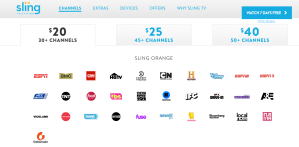
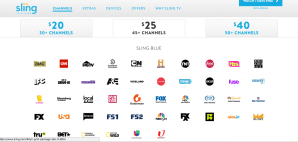
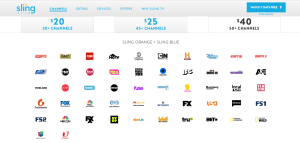

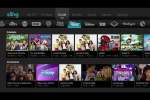


































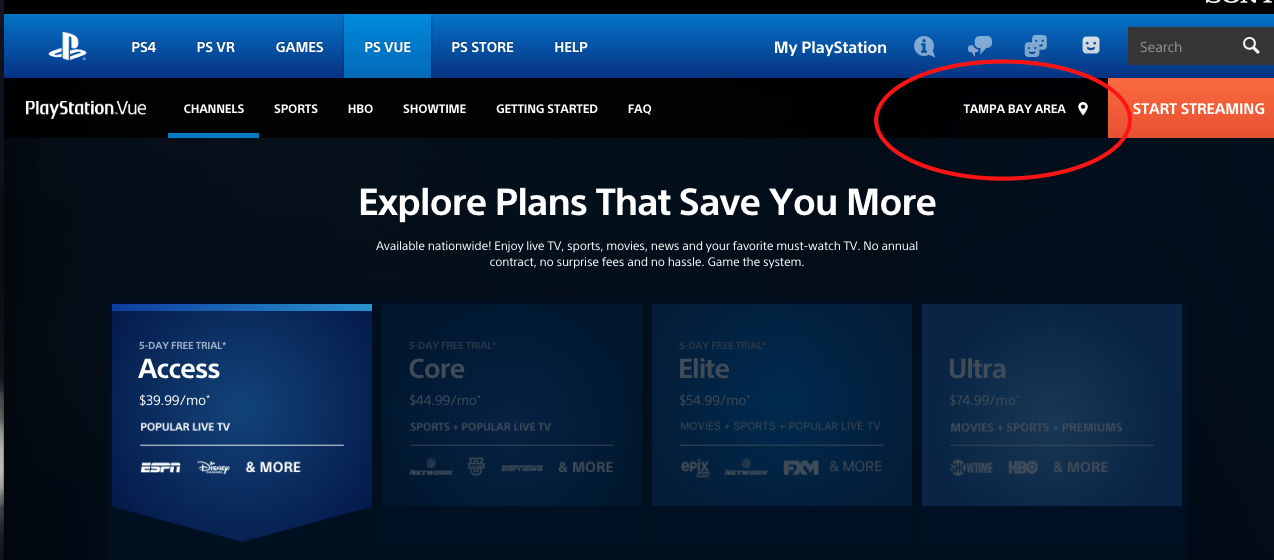
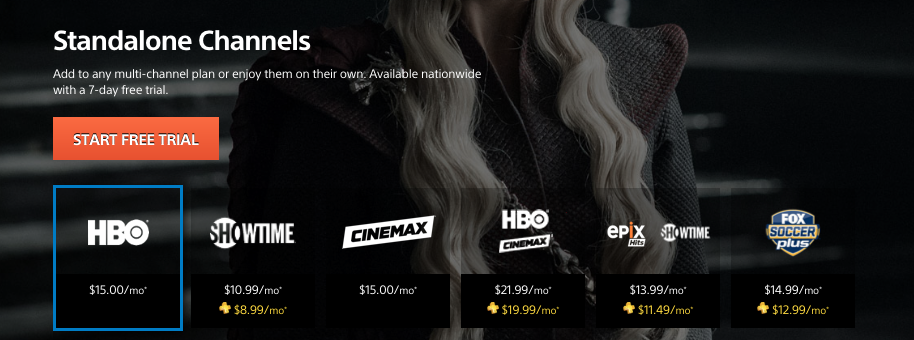
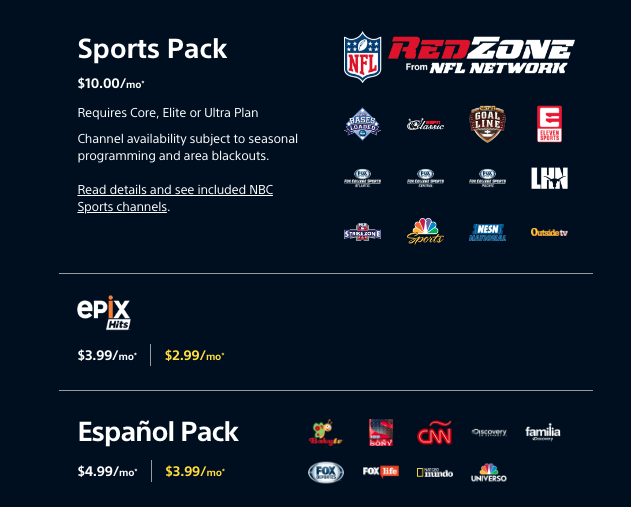
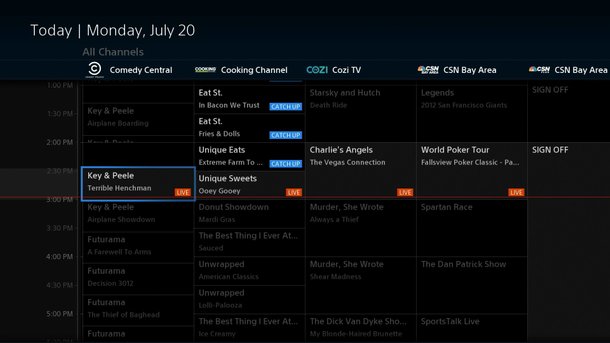

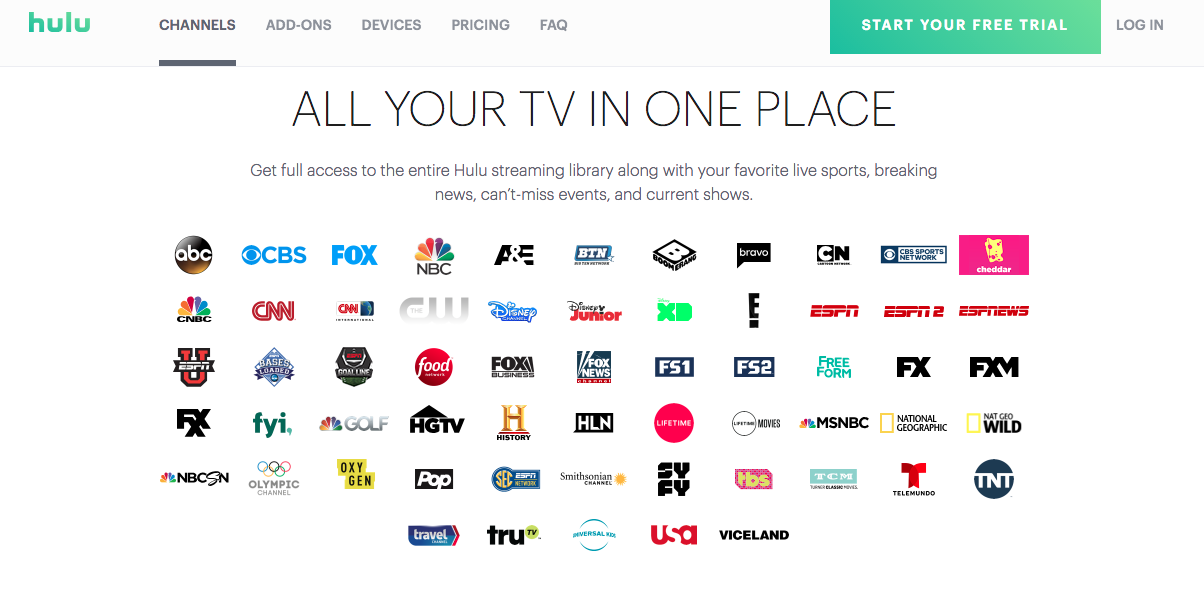
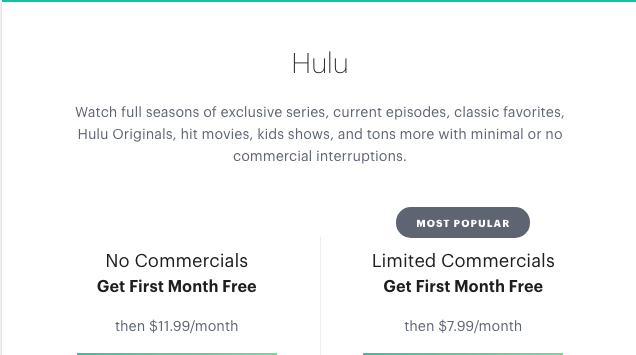
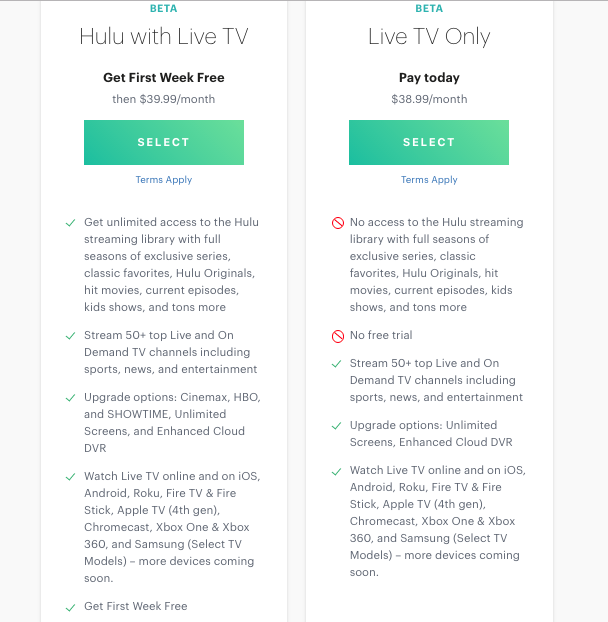
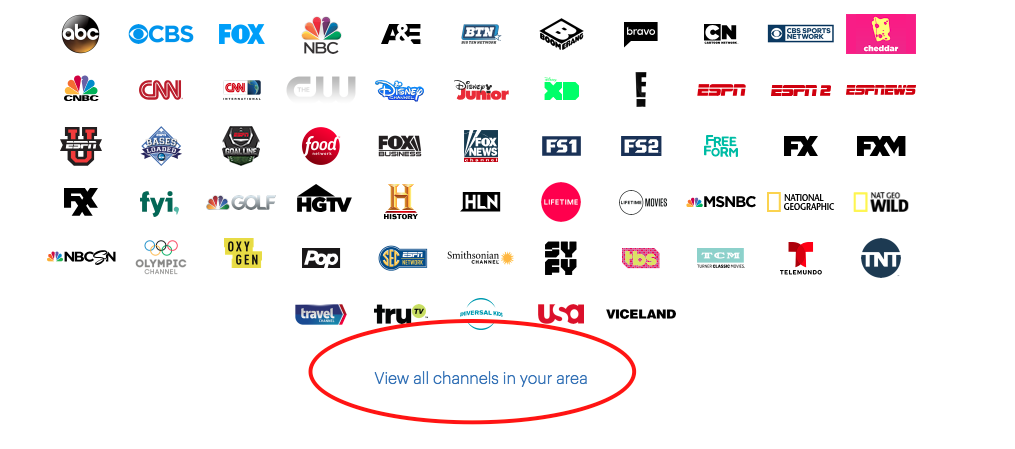





 That Helpful Dad