Tag Archives: cord cutting

ATT TV Now Review – a Streaming TV Service MORE expensive than cable?!?

Are you considering signing up for ATT Now as your Streaming TV Provider? If so, this article is for you. We’ll tell you the pro’s and con’s of using AT&T Now from a point of view of an actual consumer.

[lwptoc]

Editor’s Note: This article is part of a series devoted to helping people learn how to stream tv online.  If you want to see a review of all the major streaming tv providers and know which services I recommend (hint: it’s NOT ATT Now), then be sure to watch this vid… 

What is AT&T Now?

AT&T Now is a Streaming TV App that will allow you to enjoy a tv viewing experience similar to having cable tv. 

Is AT&T Now the same as DirecTV Now?

I get it, not everyone has heard of “AT&T Now” and a lot of people are confused. This streaming service used to be called “DirecTV Now”.  In 2019, AT&T changed the name of “DirecTV Now” to “AT&T Now”. 

AT&T Now FAQ’s

What is AT&T Now’s Website?
https://www.atttvnow.com/

How do I watch AT&T Now?

You can watch AT&T Now on pretty much every streaming device (Apple TV, Roku, Amazon Fire, Chromecast, etc), as well as on tablets/phones and computers.

Bonus – You can watch it anywhere, not just in your house.

Does AT&T Now Have Different Channel Packages?

Yes, and this is the #1 best thing about AT&T Now.

If you want a service that offers the most customization options, AT&T Now and Sling TV are your best choices. 

The problem is that in 2019 AT&T made some major changes to the DirecTV Now channel packages when they rebranded the service as AT&T Now. Prior to 2019, DirecTV Now used to have 4 plans to choose from that ranged from $35-70/month. It used to look like this…

Direct TV Now Channel Packages

Sadly that is not the case any longer.

In 2019 AT&T changed the name and jacked up the prices AND drastically reduced the channels available in the lower priced tiers. 

Now there are two options they promote:

By the time you read this article, the prices will probably have been increased again. At the time of this writing, the lowest priced option was $50 and it only included 40 channels – but they give you HBO. Just to be clear, for that same $50 you used to get 80+ channels with DirecTV Now.

As you can see, AT&T Now costs more money for LESS content. 

To be fair, there are still other options, if you don’t mind paying more, you can choose from their other options:

See that Choice Plan for $110? That’s the one that most compares to the old “Just Right” Plan that used to be $50. Ouch – talk about price gouging!

Again, AT&T has repeatedly increased the price so what you see on this page is probably already out of date again. To see a full list of all the current channels for each plan and their current prices visit this page.

Fair Balance: if price is not an issue and you want to be able to customize your package, I will say again that AT&T Now is still one of the best options for streaming tv online. 


Does AT&T Now Limit the Number of Screens I Can Watch on?

Yes, you can only watch AT&T Now on 2 screens (AKA streams) at the same time.

If you are willing to pay an additional $5/month and then you can watch it on 3.

On the surface this screen limit seems kind of sucky, and it isn’t good compared to other services like YouTube TV or PlayStation Vue, but remember this only applies to your ATT Now viewing so if you have Amazon Prime TV and/or Netflix and/or Amazon Channels and/or you wanna watch YouTube, none of those count as ‘streams’ against your ATT Now screen limit so in reality it may not be that bad unless you have a big family. 


Does ATT Now have a DVR?

Finally the answer is YES. It’s been a loooong wait for DirecTV Now to get a DVR but at last they have one and AT&T Now has continued to offer a DVR.

As for the DVR itself, the free version gives you 20 hours of recordings and you can save them for 30 days. You can pay an extra $10/month and get up to 100 hours with 90 days storage.

To be honest with you the ATT Now DVR sucks – compared to other online streaming tv providers the ATT Now DVR is far behind. YouTube TV, Sling TV, and PlayStation Vue all have better DVR options.  

I used to be willing to live with the ATT Now DVR but after the price increases, etc I can no longer overlook the fact that it sucks.

DVR Warning – you may or may not be able to skip through commercials – according to the Direct TV Rep I talked to it depends on the network and the show.

Does ATT Now have On-Demand TV Shows and Movies?

Yes, besides their ’72-hour’ rewind feature on most networks, ATT Now’s on-demand service offers mostly tv shows from the current seasons and some movie content.

Warning – depending on the network and show, you may or may not be able to skip through commercials and you may not even be able to rewind or fast-forward. Lest you think this isn’t important see my “important consideration #4” in my “Essential Guide to Cord Cutting” article for my story about watching Anthony Bourdain with no less than 7 required commercial breaks of 7 commercials each!

Does ATT Now offer Local Channels and Regional Sports Networks?

It depends on where you live. In my area they offer a lot and this is another feature in the cap of ATT Now.

One of the main reasons we previously chose ATT Now as our (former) cord cutting streaming provider was because it offered the best selection of local channels and regional sports networks.

Basically we used to be able to  get every local channel we want with DirecTV Now, however AT&T Now no longers offers all the locals in my area and there are other better options for us (namely YouTube TV). 

To see the local channels available from ATT Now in YOUR area use this link:

https://www.att.com/tv/locals/

Does DirecTV Now offer Premium Channels like HBO and Showtime?

Yes they do – in fact for the 2 mains packages they promote (Plus and Max plans), HBO is included. If you don’t choose the Plus or Max plan, you can add HBO separately and/or you could add another premium network like Showtime, Cinemax, etc. 

What Promotions does ATT Now offer to New Subscribers?

There is usually always a promotion offered from ATT Now for new subscribers. Besides a 7-day free trial, ATT Now usually has some pretty sweet promotions, sometimes giving away an Apple TV, Roku devices, etc.

Visit their site to see their current offers or better yet (TIP) use their chat feature and see what kind of deals a ATT Rep will make you. I was offered multiple months at 50% off and additional credits when I spoke with them. Good luck getting thru to the right dept with ATT’s Help Desk though. 

What is the ATT Now User Interface (UI) and TV Guide like?

The user interface and channel guides are really important in my opinion and can make or break the experience for people who are switching from cable tv to streaming services. For example, Hulu with Live TV has a great product, but their UI is so bad (they basically don’t even have a channel guide!) that the service doesn’t work for us because we can’t find a way to easily navigate to find out what’s on.

Thankfully ATT Now recently updated their UI and it’s pretty good. Here are some screenshots:

AT&T Now – My Video Review

As I mentioned above, my family used to use DirecTV Now as our streaming tv provider, however we ditched the service in 2019 for the reasons I explain in this vid…

ATT Now vs Other Streaming TV Providers

If you’re looking for a comparison of ATT Now vs Sling TV vs Hulu Plus Live TV vs YouTube TV and other streaming tv providers then you’ll find all that and more on our main page: Best Streaming TV Providers

We also have in-depth video discussions of all the major online streaming tv providers in our Cord Cutting Playlist on YouTube.

Here is our latest video on this topic:

ATT Now – What’s the Bottom Line?

As I said, I used to recommend AT&T Now as my #1 streaming tv provider and I was a long-time customer HOWEVER AT&T has basically ruined the service – higher prices, less channels for lower-priced tiers, a DVR that sucks compared to other providers, and only 2 streams make ATT Now a poor choice for most people looking to stream tv online AND save money. 

That said, if money is not an issue and you want a service that provides the most customization options AND gives you access to most/all local channels then ATT Now may still be a viable option for you. 

It’s just a shame that what could have been an awesome service for most Americans to use to get rid of cable tv has basically been turned into an online version of cable – complete with the high prices and poor service. 

Which Streaming TV Providers do I recommend now?

If you don’t need local tv (either because you have an HD Antennae or you don’t care about locals), then I recommend SLING TV or Philo TV. And of course Pluto TV is a MUST have because it’s a FREE streaming tv app. 

If you DO want local tv (for news, weather, and local sports teams) then I recommend…


More Tips for Cord Cutters


Best Streaming TV Providers


Other Helpful Articles


10 Things to Consider BEFORE You Cut the Cord – Cord Cutting Tips

Are you considering cutting the cord and looking for tips on how to stream live tv online with a streaming service like Sling, DirecTV Now, Hulu Plus, etc.? If so, this article can help you because we’ll discuss 10 important considerations you need to think about BEFORE you cut the cord, such as…

  • How to watch LOCAL news and sports?
  • Is having a channel guide important?
  • Do you want a DVR?
  • And much more.

Pin Me to Save for Later

Editor’s Note: This article is one of a series of articles in our Guide to Cord Cutting Series – if you’re serious about cutting the cord, be sure to subscribe to our blog and pick up your free copy of our Step-by-Step Guide to Cord Cutting – visit the home page to learn more.


Cord Cutting Tips – 10 Important Considerations

If you want a tv streaming experience that is as close as possible to watching cable tv then you’ll want to be able to watch LIVE LOCAL tv, right?

If that’s important to you then you should know…

Not every online tv service provider offers live LOCAL tv and even if they do, they may not offer live local tv in YOUR area or they may not offer ALL your local channels.

You need to know this going in.

What local channels (NBC, CBS, ABC, Fox, etc) are most important to you?

Which ones are offered on the various streaming services?

I suggest you make a chart as you go through your options.

Remember, if you care about your LOCAL NEWS and LOCAL SPORTS teams, you’ll need to be able to watch your local channels. And unless you plan to try to do this over the air with a separate antennae (easier said than done and quite frankly a bit of a pain), then you’ll need to know what the cord cutting companies offer.

This is one is the most important questions in my opinion yet it’s also the one most often overlooked AND some streaming companies make it hard to figure out.

Be sure to get a copy of my Step-by-Step Guide to Cord Cutting so you can learn even more about which Streaming TV Providers offer the best local channels in your area.  In this regard, there is a BIG difference in what’s available from each company.

You may also want to check out the following VIDEO TIPS on the topics of How to Stream Live LOCAL Sports and How to Watch Live LOCAL News.

I think this is a bit obvious, but just in case let’s talk about the fact that each of the different streaming tv service provides (Sling, DirecTV Now, etc) all have different channels available in their various channel packages.

Some, like Hulu, Philo, and YouTube TV offer just 1 option and that includes basically all the channels they offer. Others like Sling, DirecTV Now, PlayStation Vue, and FuboTV have multiple channel package options with varying degrees of customization.

It’s also important to note that not channels are in every package.

Let me give you some examples.

  1. If ESPN or NFL network is a big deal, you’ll have to ensure the package offers it – but not every provider offers these networks.
  2. Same goes for kids’ networks – my son ‘has to’ have Nick Jr. Unfortunately Nick Jr is not on most of the packages so that really limits me.

One of the benefits of reading my Step-by-Step Guide to Cord Cutting is I save you time by giving you the links you need to see what each online tv streaming service offers.

Here are a couple video tips to help you: How to stream the NFL Network and NFL Redzone and How to watch Kid’s Networks online like Boomerang, Cartoon Network, Disney Channel shows, and the Nickelodeon networks.

Is having the ability to record content on a DVR important to you? If so, then you should check to see what streaming services offer this AND if there is an extra fee to have it.

Additionally you’ll want to know…

  1. If you can fast forward/rewind while watching your recorded shows (not all of them let you do this, particularly when it comes to commercials on certain shows).
  2. How many hours of storage you have. Some only give you 20 hours, some give you UNLIMITED storage.
  3. How long you can keep a show for ? Some streaming tv service provides limit your DVR saved content to < 30 days, others give you unlimited storage time.

BTW, I review all these in my Step-by-Step Guide too.

What’s the library of on-demand tv shows and movie content like? Do they even HAVE an on-demand library?

Can you fast forward or rewind on-demand content?

Are you locked into watching commercials? (That sucks!)

Just how many commercials does the average on-demand show have?

Think having to watch commercials during an on-demand show isn’t a big deal?

Think again — when my wife and I watched an Anthony Bourdain show on Direct TV Now’s On-Demand service from CNN…

There were 7 required-to-watch, non skippable, commercial breaks with 6-8 15-30-second each commercials for all 7 breaks for a show that was less than 1 hour.

Worse yet it was the same commercials every single time!

It was so ridiculous we couldn’t watch another on-demand episode.

I’d call that a problem, wouldn’t you?

How many simultaneous streams (i.e. how many tvs?) can you watch the streaming tv programs on at the same time?

Some allow you just 1 stream, some up to 5. Sometimes you can get more streams if you pay an ‘add-on’ fee. Sometimes is also depends on which plan you have for a specific streaming tv service provider.

For example Sling Orange (most basic plan) gives you just 1 stream, but Sling Orange + Blue (highest plan) gives you 4 steams. DirecTV gives you 2 streams to start but you can pay $5/month and get a 3rd stream. PlayStation Vue gives you 5 Streams.

If you don’t want to do the research on your own, I review them all in my Step-by-Step Guide to Cord Cutting to make it easy for you. You can download this guide from my home page or you can watch it in VIDEO form here…

6. How will you access the streaming tv app? Do you have sufficient internet coverage for streaming?

With cable tv you use cable boxes, but with streaming tv service providers you’ll use their app. In order to access the streaming tv app, you’ll need to download it either to your Smart TV’s Smart Hub or more likely to a Digital Media Player (DMP).

● Popular DMPs include Amazon Fire Stick, Apple TV, Roku, etc.
● I’d be cautious on relying on just your Smart TV interface as not every streaming tv service provider’s app is compatible with all smart TVs.
● You’d be much better off just getting a DMP for each tv if you can since the streaming tv apps are usually created/updated specifically for DMPs.

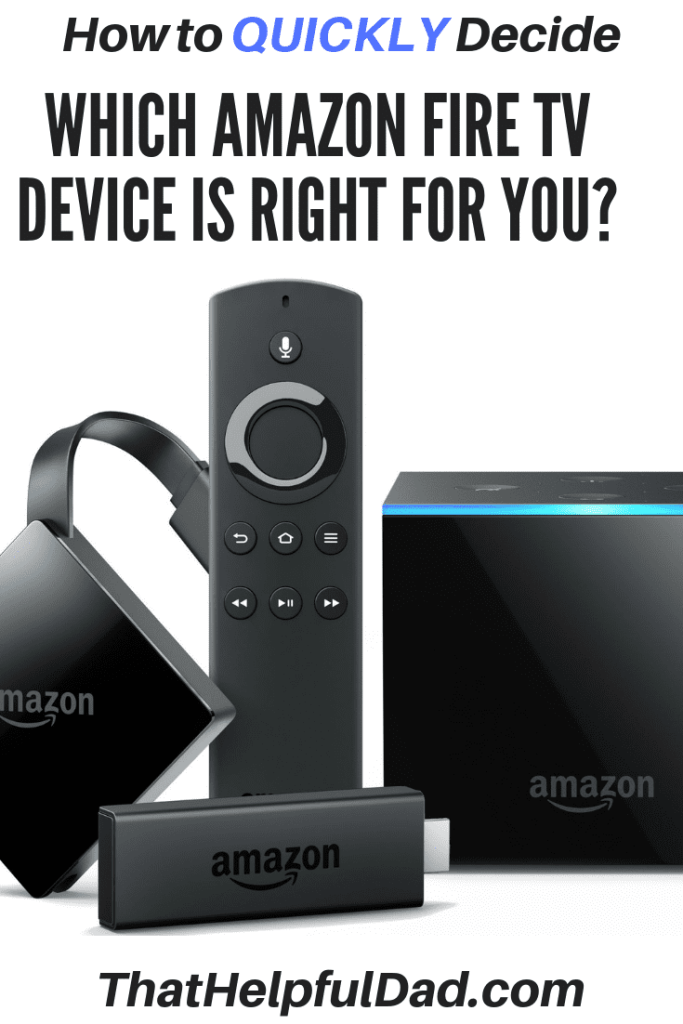
Here are a few of the more popular Digital Media Players – my favorite is BY FAR the Amazon Fire devices (I have multiple Fire Sticks and the Fire TV), but the Roku and Apple TV options are also very popular.

The Amazon Fire TV Stick is a low-cost, awesome way to cut the cord and access the tv streaming service provider apps. It is my go-to choice.

The Amazon Fire TV with 4k Ultra HD is the same as the Fire Stick but with the addition of 4k viewing (for shows/networks that offer 4k).

The Amazon Fire TV Cube give you the ability to combine the Fire TV with an Amazon Echo and an IR blaster for your remote so you may be able to control your TV, receiver, etc from one device.


Apple TV 4K – 64GB

Don’t forget about ensuring you have adequate Internet Speeds AND Coverage Throughout
Your House.

Remember you still need the internet in order to stream tv online. You’ll also need an adequate internet speed.
● Your speeds could be as low as 50/50 Mbps if you only have a couple tvs, but if you have a large family, have lots of tv/tablets, etc, then you’ll probably want 100-200 Mbps to be safe.
● CHECK YOUR CURRENT SPEED: http://www.speedtest.net/

Will you also need a Wifi Mesh to help maximize your internet coverage?

Let me make this very simple for you – if your house is > 1500 sf and/or you have lots of tvs/tablets you want to stream on then do yourself a favor and get a wifi mesh.

Personally I use the Google Wifi Mesh – it’s awesome, setup was super easy, and since we installed it we’ve haven’t had a single ‘buffering’ problem even while streaming on 5 devices at once in a 3k sf home.

Here’s a review I wrote about Google Wifi if you want to learn more…

https://thathelpfuldad.com/product/google-wifi/

7. Can you add Premium Channels like HBO, Showtime, etc? What if a specific channel is missing from the streaming tv provider?

Additional original programming is also on other premium channels like HBO (Game of Thrones, Westworld, Curb Your Enthusiasm, Ballers, Veep, and more), Showtime (Homeland, Shameless, Billions, Ray Donovan, and more), and other premiums, but unlike Netflix, Hulu, and Amazon Prime, you should be able to add these premium channels directly WITHIN your streaming tv provider app (or if you have Amazon Prime you can add it as a ‘channel’ there too).

As a result, premiums are considered simply additional channels within your streaming service app overall.

BUT, not every streaming provider offers all the same premiums. Also, the cost for these premiums varies by providers too so it pays to shop around.

In addition to premiums, you also need to consider what  happens if a particular channel is not available in any of the packages you’re looking at?

Don’t let this stop you from cutting the cord, if a specific channel is missing, you can look into the potential to add a specific channel (for a small fee) to your online streaming tv interface (for example you may be able to add add CBS, Boomerang, Akorn TV, etc as single add-on channels to your Roku, Amazon Fire, or Apple TV accounts).

One benefit of using the Amazon Fire devices is that you can add premium channels like HBO and Showtime as ‘standalone’ channels within your Amazon TV interface so you can access them individually whether you have a major streaming tv service provide or not. It’s super easy to add (or delete) a channel from your Amazon Video account.

That Helpful Dad’s Tip: why pay for HBO all year if you just want to binge-watch Game of Thrones? Instead add the HBO channel on Amazon Channels, binge-watch the series for a month or so until you finish, and then cancel the channel until the series comes on again: Cha-ching – money saved!

Here are 4 examples of how Amazon Channels can help you find specific cord cutting options..

Pretty much every cord cutting company offers a free trial, but some offer longer periods, unadvertised promotions (for a month or more) that you either have to ask for or that you can get as part of promotions when you buy something (for example YouTube TV offered a 2-month free trial when you bough a Pixel 2 XL on Verizon). Best Buy and Groupon often have promo code incentives like this.

There are also other sign-up bonuses like free Apple TVs, Roku’s, Amazon Fire Sticks, etc.

These deals frequently change so pay attention to what’s available. You can find all the basic promos directly on the streaming tv service providers websites with the links provided in my Step-By-Step Guide to Cord Cutting.

If you’ve watched cable tv all your life then this is an important one. Questions to ask are…

  • Is there an easy to use channel guide?
  • How easy is it to find your favorite channels?
  • How do you navigate through the user interface to find content?

This may or may not be a big deal to you. If you tend to know exactly what you want to watch before you watch, then most of the cord cutting user interfaces will work for you, HOWEVER if you like to channel surf or look at a traditional ‘cable-tv’ style guide, then this could be a huge problem.

Case in point, I love the streaming content that Hulu with Live TV provides but the lack of a traditional guide made it so hard to browse content that we had to cut the cord on Hulu because it was just too difficult to use.

10. Know how much you can save with cord cutting before you take the plunge to ensure it’s worth it for you.

Before you go through the process of cord cutting, I recommend you first determine how much you might potentially save and see if that amount is worth your while to pursue.

In my Step-by-Step Guide to Cord Cutting I’ll walk you through this in detail and provide examples, but if you want to do a quick test just…

Look at your current cable bill and find out how much you are paying for internet only. If your under a bundled plan multiply the price by 1.25 (because you’ll lose the bundled discount.

Determine the cost of your new streaming tv service package.

Add parts 1&2 together.

Subtract the answer to #3 from your TOTAL current cable bill.

The difference is your potential savings.

After cutting the cord, I’m personally saving around $80/month, but I have LOTS of friends saving $100-125/month as well.

The big question for YOU is ‘how much is enough of a savings for you to cut the cord and ditch cable?’ $80? 50? 25?

Once you know your break point, you’ll be more inclined to take action and cut the cord.

Good luck!

~Michael

Helpful Links

What to Read Next?


Pin Me * Share Me * Save Me


https://thathelpfuldad.com/cord-cutting-how-stream-live-tv/

How to Watch Nick Jr Live Online – A Cord Cutters Guide

Cord Cutters with Kids – do you want to watch Nick Jr online? I’ll show you which online streaming tv service providers will let you watch Nick Jr shows so you can watch Nick Jr Live with your kids. We’ll talk about DirecTV Now, PlayStation Vue, Sling TV, YouTube TV, Hulu, Philo and more. NOT EVERY SERVICE gives you the ability to stream NICK JR live — I’ll show you which ones do so you can watch your favorite Nick Jr shows online.


Check out our Complete Guide to Cord Cutting here:
1. Essential Guide to Cord Cutting VIDEO: https://www.youtube.com/watch?v=t9k6ZkbyabM&t=5s
2. Essential Guide to Cord Cutting ARTICLE: https://thathelpfuldad.com/cord-cutting-how-stream-live-tv/

Additional Resources:
How to Watch NFL Network and NFL Redzone: https://youtu.be/UY-k_LTifQ0
How to Watch Live Local News: https://youtu.be/9natWVw6hPY
Direct TV Now Review: https://www.youtube.com/watch?v=K1LSntUSn-U&t=33s
Hulu Plus Live TV Review: https://www.youtube.com/watch?v=uxLyfV8Mhrg&t=11s
PlayStation Vue Review: https://www.youtube.com/watch?v=0wA56Q4Sib8&t=19s
Sling TV Review: https://www.youtube.com/watch?v=7hQsDvihkIs&t=13s
YouTube TV Review: https://www.youtube.com/watch?v=ks-qYM-DWTE&t=90s


Subscribe to Our Blog for some Helpful FREE GIFTS – including a free STEP-BY-STEP Guide to Cutting the Cord!

That Helpful Dad’s Blog: https://thathelpfuldad.com/


Follow us on Pinterest: