
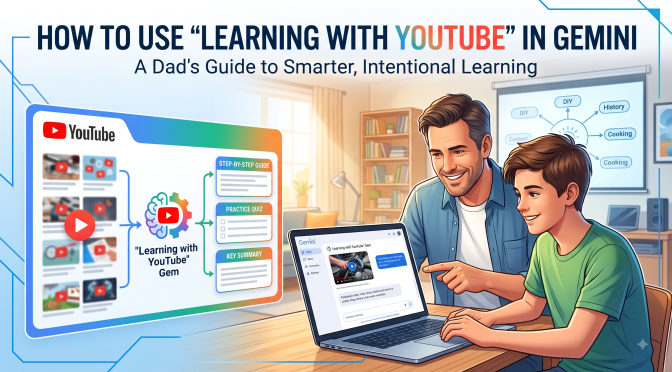
Recently, Google introduced a feature within its Gemini AI ecosystem called the “Learning with YouTube” Gem. In this article I’ll tell you what it is, how to use it, and give you specific examples you can try.
Let’s first review of a “Gemini Gem” is. In simple terms, a “Gem” is a custom, specialized version of Google’s Gemini AI designed to handle a specific task. Other AI’s might call these “agents” or “projects.”
The Learning with YouTube Gem is pre-programmed with a specific mission: to analyze YouTube videos, extract the core educational content, and help you digest, understand, and test yourself on the material.
Instead of simply watching a 30-minute video passive-style, this Gem turns the video into an interactive workspace. It can summarize lengthy tutorials, break down step-by-step instructions, generate practice quizzes, explain complex concepts in simpler terms, and answer specific questions about precise moments in a transcript.
How to Access and Set Up the Gem
You don’t need a degree in computer science to get this up and running. Here is the simple, step-by-step setup:
- Open Gemini: Head over to the Gemini interface on your computer or mobile device and sign into your Google account.
- Navigate to Gems: In the left-hand sidebar, click on the Gems manager or Gem Manager option.
- Select “Learning with YouTube”: Google provides several pre-made premade Gems in its library. Look for the one titled Learning with YouTube and click to open it.
- Pin It for Easy Access: Click the pin icon next to the Gem so it stays anchored to your sidebar for quick access whenever inspiration hits.
4 Practical Ways to Use “Learning with YouTube” for Real-Life Growth
1. Master Practical DIY Fixes Without the Fluff
We’ve all been there: your household appliance makes a strange grinding noise, or you need to tackle a home repair project. You search for a tutorial, find a 15-minute video, and then spend the first seven minutes watching the creator ask you to “smash that subscribe button” and talk about their sponsor.
How to use the Gem:
- Copy the URL of the repair tutorial video.
- Paste it into the “Learning with YouTube” Gem prompt bar.
- Type: “Extract the exact tool list needed for this job, and give me a numbered, step-by-step text guide of the physical repair process.”
The Gem reads the underlying transcript in seconds and hands you a clean, printable checklist. You get straight to work, execute the repair, and get back to enjoying your weekend with your family.
2. Turn Educational Cooking Videos into Precise Recipes
Outdoor cooking and custom spice rubs are great hobbies, but watching someone cook for 20 minutes doesn’t always translate cleanly to standing in the kitchen with all your ingredients ready to go…

How to use the Gem:
- Paste a link to a barbecue masterclass or culinary technique video.
- Type: “Create an ingredient list with exact proportions mentioned in this video, along with the targeted internal temperatures and cooking time benchmarks.”
Instead of scrubbing back and forth through a video with messy hands while standing over a hot fire, you have a clean, formatted recipe card right on your phone screen.
3. Help Your Kids Study Complex Academic Topics
If you have kids in high school or middle school, you know that modern coursework—whether it’s advanced algebra, biology, or world history—can sometimes leave a dad scratching his head. You want to support them, but you might not remember the exact formulas you learned thirty years ago.
How to use the Gem:
- Find a highly rated educational video covering the exact subject your child is studying.
- Paste the link into the Gem and type: “Create a 5-question multiple-choice practice quiz based on the key concepts in this video, along with an answer key that explains WHY each answer is correct.”
Now, instead of just sitting your kid down in front of a screen to passively watch a video, you have turned that content into an active, engaging study session. You get to play the role of an encouraging coach, testing their knowledge and working through the solutions together.
4. Deepen Your Personal Growth and Perspective
Whether you are studying history, trying to understand personal finance, exploring music theory, or reading through classic literature, learning should never stop just because you finished school. Perspective is hard-won, and keeping your mind sharp requires deliberate effort.
How to use the Gem:
- Paste a link to a long-form lecture, a documentary, or a deep-dive educational presentation.
- Type: “Provide a 3-paragraph summary of the core thesis of this video. Highlight the key historical life lessons or overarching principles, and suggest 3 thoughtful follow-up questions I should consider about this topic.”
This allows you to engage with deep, meaningful content on a higher level, extracting the timeless wisdom without getting bogged down in filler.
Tips for Getting the Most Out of the Gem
To ensure you are getting the highest quality output, keep these simple guidelines in mind:
- Use Videos with Clear Transcripts: The Gem relies on YouTube’s auto-generated or creator-uploaded transcripts. Spoken-word heavy videos—like lectures, tutorials, reviews, and essays—work exponentially better than purely visual, music-driven content.
- Ask Specific Questions: Don’t just ask for a summary. Ask the Gem to “Explain timestamp 04:12 to 06:30 in simple, layperson terms” or “What were the three main reasons the presenter gave for doing step two first?”
- Verify Practical Safety: While AI is an incredible tool for organization and distillation, always use good old-fashioned common sense when dealing with structural home repairs, high-voltage electrical work, or heavy machinery.
The Legacy CTA: What Will You Do With the Time You Save?
In the long run, technology is only as valuable as the purpose it serves. Tools like the “Learning with YouTube” Gem aren’t meant to help you hoard digital information or squeeze more tasks into a hyper-stressed day.
Their true value lies in efficiency. By cutting through the digital noise and helping you master new skills faster, these tools hand you back your most valuable currency: time.
So here is my challenge to you today: Don’t just use this tool to consume more content. Use the time you save to invest in what matters most.
Put the phone down after you’ve learned your lesson. Go out into the garage and build that project with your son. Sit down at the table and help your daughter with her homework. Cook a great meal for your spouse, or call an old friend you haven’t spoken to in months.
Knowledge is great, but the time you spend nurturing relationships and building a meaningful life—that is what builds a real legacy. Now go out there, learn something new, and make it count.

