There’s nothing quite like the sizzle of a hamburger hitting the grill on a warm summer day. While a great patty is essential, the right seasoning can take your burger from ordinary to extraordinary. If you’re looking to elevate your burger game, look no further. We’ve scoured the web and grilled up the top 5 rubs guaranteed to make your hamburgers a hit at your next cookout.
Classic Burger Rub:
Product: Weber Gourmet Burger Seasoning: A classic blend from a trusted brand, this seasoning offers a perfect combination of kosher salt, garlic, and black pepper to enhance the flavor of your burger patties.
Product: McCormick Grill Mates Garlic, Herb & Wine Marinade: While technically a marinade, this versatile product can also be used as a dry rub. With flavors of garlic, rosemary, and thyme, it’s perfect for adding a touch of herbaceousness to your burgers.
Maple Bacon Rub:
Product: Pork Barrel BBQ All American Seasoning & Rub: While not explicitly labeled for burgers, this rub’s combination of brown sugar, smoked paprika, and bacon flavor adds a unique twist to your burger patties, reminiscent of the classic maple bacon combination.
Mediterranean Lemon Pepper Rub:
Product: Kosmos Q Dry Rub Texas Beef BBQ Dry Rub: This tangy rub offers a unique blend of spices is combined with true Texas BBQ ideals, delivering a mouthwatering explosion of savory flavors.
At the end of the day these rubs and seasoning blends are not only popular among grillmasters but also highly rated and frequently purchased by consumers so whether you’re a seasoned grilling aficionado or just starting out, these top 5 rubs are sure to impress your guests and elevate your burger game to new heights.
No matter which rub you choose, be sure to generously coat your burgers on both sides before grilling for maximum flavor. Whether you’re hosting a backyard barbecue or simply craving a delicious homemade burger, these top 5 rubs are sure to impress. So fire up the grill, grab your favorite toppings, and get ready to enjoy the ultimate burger experience!
Are you a parent confused about whether a mobile monitoring app can help your keep your child safe? You must have read about how mobile phone use has increased among children and teenagers. You probably feel worried about dangers like cyberbullying, access to inappropriate content, or online scams that children are exposed to. Are you considering using a mobile monitoring app? Don’t worry; you have come to the right place! In this article, we will review one of the best child monitoring apps for 2020 called XNSPY. We’ll answer all your questions and also identify the most important features of the app.
About the Author
Alex Miller
ThatHelpfulDad.com is pleased to feature the work of Alex Miller in this guest post. Here’s a bit more about Alex…
“I am a tech enthusiast, programmer and a sci-fi fan. I enjoy reviewing and researching new, innovative software that adds value to human life. I love writing about latest technology and trends, and have made this a full-time job.”
What is XNSPY?
XNSPY mobile monitoring app is used by parents all over the world to keep track of their child’s digital activities. It offers important features that can prevent incidents of cyberbullying, scams, or other similar dangers.
Let’s review some of the reasons why we think XNSPY is the best child monitoring app…
Features that make XNSPY the Best Child Monitoring App
Telecommunications Tracking: XNSPY can monitor all calls made to and from the device. This information is detailed in a call log that lists all incoming, outgoing, and missed calls, along with their date, time, and duration. You can also record calls and listen at your convenience. However, there is no live-call intercept feature available with the app. Similarly, XNSPY can monitor all exchanged texts too.
GPS Tracking: You can use the GPS tracking feature to monitor your child’s location in real-time. The app also offers a geofencing feature. Just mark a specific location on the map to geofence it. XNSPY will alert you if the fence is violated. This is a useful feature if you want to prevent your child from accessing inappropriate locations such as bars or clubs. It can also give you peace of mind to know that your child is at a safe place such as at school.
IM, Text, and Social Media Monitoring: Most children and teenagers rely heavily on instant messaging, text, and social media apps for communication and socializing. Incidents of cyberbullying also occur on these platforms. You can use the IM, text, & social media monitoring feature to track apps such as Facebook Messenger, WhatsApp, Viber, Skype, Tinder, and others.
Online Activity Monitoring: XNSPY mobile monitoring app tracks all web-based activities such as bookmarked pages, complete web browsing history, and all exchanged emails. However, you would have to purchase a separate content filtering app as XNSPY does not offer such a system.
Control Your Child’s Phone Apps
Phone Remote Control: You can use the app to remotely control your child’s phone. Some features in this department are a bit on the intrusive side, such as microphone recording and screenshots. However, other features are quite useful. For example, you can remotely view all installed apps and block those you feel are unsuitable or inappropriately used. Similarly, you can view all saved contacts, lock the device, restart it, and delete all saved data in case of theft. The app management and screen-time management features are particularly handy if you are looking to prevent addictive behaviors.
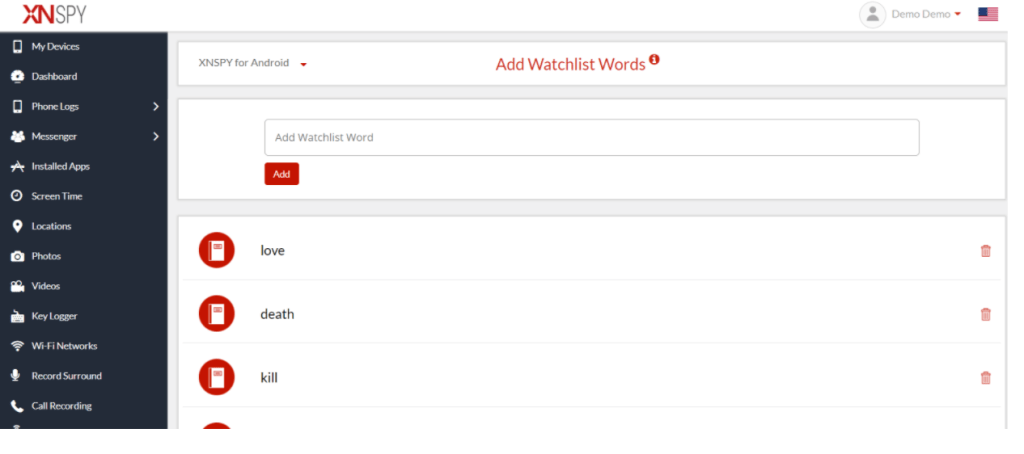
Watch List Word Alerts: The watch list alert feature is among the most valuable features provided by the XNSPY mobile monitoring app. You can add any word, contact number, or a location to the app’s watch list and XNSPY will immediately notify of any relevant activities. For example, you can add words related to pornography to the list. The app will watch out for those terms and if they are mentioned in any text message or typed into a search engine, XNSPY will quickly send you an alert. Unlike with other monitoring apps, you do not need to track phone data at all times. XNSPY will provide the right information at the right time. This way, you can intervene in a timely fashion.
Use Watchlist Words for Monitoring
XNSPY Additional Functions: Other features available with the app include a keylogger that creates a record of all keystrokes, calendar access, and an analytics report that lists important information. This includes details such as top callers, most-visited websites, and other data.
Sounds good! How much does XNSPY cost?
There are two versions of the XNSPY app available for subscription. The basic version costs USD 4.99 per month but doesn’t offer all features. On the other hand, the premium version costs USD 7.49 a month but offers all available features. We suggest you opt for the premium version as the price difference between the two is marginal.
XNSPY Plan Options
Is it compatible with my phone?
XNSPY mobile monitoring app is compatible with all Android versions above 4.0 and supports all iOS versions above 6.0. Most mobile phones currently in use are running on one of the aforementioned versions, so compatibility should not be a problem.
While the installation process is different for both Android and iOS. Let’s go through this step by step on how to install XNSPY on both operating systems.
XNSPY For Android
Step 1: Head over to the XNSPY website and select a suitable subscription package. Make the payment and then check your email inbox.
Step 2: The email will contain a download URL, your XNSPY login credentials, and instructions on how to install the app.
Step 3: You only need physical access to the phone once, so you can install the app. You’ll download Xnspy using a download URL emailed to you. It should not take more than a couple of minutes. XNSPY is completely hidden after that point.
Step 4: Wait for 24–48 hours so the app can begin transferring data from the phone.
Step 5: Log in to your XNSPY account on the app’s website and select the relevant Android phone in the “My Devices” tab on the top left corner.
Step 6: You can access all the data and device control options via the menu bar on the left. All monitoring is remote. You can log in to your account from any web browser, anywhere in the world.
XNSPY For iPhone
Step 1: Visit the XNSPY website and make the payment on your chosen subscription package.
Step 2: Wait for an email that contains instructions on how to install the app, along with your unique log in details.
Step 3: You do not need to physically access the iPhone to install XNSPY. However, you need to have the Apple ID details of the phone you wish to monitor.
Step 4: Make sure that the iCloud backup feature is set to “on” for the device. You can do so in phone settings.
Step 5: Log in to your XNSPY account and select the relevant iPhone from the “My Devices” tab.
Step 6: Enter the Apple ID details and wait for verification.
Step 7: You can now access all data and use device control options through the tab on the left.
XNSPY Additional Considerations
Okay, I get it; but are there any pros & cons I need to consider?
Yes. Like all other services, XNSPY mobile monitoring app also has some advantages and disadvantages. Let’s take a quick look at some pros and cons.
Pros
XNSPY is among the most affordable monitoring apps currently available on the market.
The watch list alert feature is particularly unique and available with other services.
The app enjoys a solid reputation owing to its quality customer support.
Cons
Features such as microphone recording or screenshots are quite intrusive.
There is no content filtering service.
You may have to root or jailbreak the device if you want to use some specific features.
What’s the Verdict
XNSPY is a sophisticated monitoring app that offers a good combination of functions. The app has its drawbacks, such as a lack of content filtering systems. Considering that many such apps are free of cost, this limitation should not be a problem. At any rate, the app more than makes up for it with unique features such as watch list alerts, along with a very affordable price tag.







 That Helpful Dad